Mumble Integration
🟡 Updated this year⚠️ Install Order · 2 steps
Install in this order, then this mod last — most mods fail to load without their framework and dependencies in place.
🖼️ Gallery (2 images)
🔍 Analysis
- 👍 0.2% endorsement rate
- 🏆 #155 of 339 forge mods in this game by downloads
📋 About This Mod
## Version 3.X.X For older versions of the mod, check the (https://github.com/GeheimagentNr1/MumbleIntegration/wiki). This mod links Minecraft with Mumble. This mod uses the Mumble Link Plugin v1.2.0. It sends in game position and direction information to mumble for positional audio. For more information about Mumble, you find on (https://www.mumble.info/). This mod works only on the client side and doesn't work on the server side. --- You need a server to play with friends? You don't know how to set up one? Just rent an already configured server! !(https://raw.githubusercontent.com/GeheimagentNr1/Online_Mod_Data/master/images/bisect_hosting_banner.png) Click on the picture above, select a plan (with recommended at least 6 GB), use my code **(https://bisecthosting.com/agent)** to get **25%** off your first month and enjoy playing with your friends! --- ## Support !(https://raw.githubusercontent.com/GeheimagentNr1/Online_Mod_Data/master/Supported_Versions.png) Minecraft versions, for which the mod is not released, are not supported. You can find a text version (https://github.com/GeheimagentNr1/Online_Mod_Data/wiki/Supported-Versions). ## Client Config The config file can be found in the config folder and is named "mumbleintegration-client.toml". * **mumble_active / Mumble Active** Should the Mumble integration be active? true: Minecraft is linked to Mumble false: Minecraft is not linked to Mumble * **auto_connect / Auto Connect** Should Mumble be connecting automated? true: Mumble starts automated on entering a Minecraft world or connection to a server, if "use_dimension_channels" is active, it connects you to a dimension specific channel automated. false: Mumble don't start automated and does not connect you to dimension specific channels. * **address / Address** Address of the Mumble server. Only needed if "auto_connect" is true. * **port / Port** Port of the Mumble server. Only needed if "auto_connect" is true. * **path / Path** Path of the Mumble channel. Only needed if "auto_connect" is true. * **use_dimension_channels / Use Dimension Channels** Use subchannels for each dimension? true: Connects you to a dimension specific channel automated, if "auto_connect" is active. false: Don't connect you to a dimension specific channel automated. ### Dimension Channels Dimension Channel names must be the path of the registry name of a dimension and in this path underscore must be replaced with spaces and the name must be capitalized. For example, for the nether dimension: Registry Name: "minecraft:the_nether" Mumble Channel Name: "The Nether" The Dimension Channels must be child channels of the channel set in the path. !(https://cdn.modrinth.com/data/d77bzdmt/images/8a32215533dc467bdd144c2602cdcacf97667615.png) The Config can be changed in game (Main menu > Mods > Mumble Integration (Button Config)). !(https://cdn.modrinth.com/data/d77bzdmt/images/2ef063c9a50b33f89715f4ac63452dd4b4909bc2.png) --- Thanks for the logo to Muse31. You can use this mod in non-commercial modpacks without asking. You can find more mods from me on (https://www.curseforge.com/members/geheimagentnr1/projects) and (https://modrinth.com/user/GeheimagentNr1). !(https://raw.githubusercontent.com/GeheimagentNr1/Online_Mod_Data/master/images/mod_loader_banner.png)
## Version 3. X. X For older versions of the mod, check the (https://github.com/GeheimagentNr1/MumbleIntegration/wiki).
This mod links Minecraft with Mumble. This mod uses the Mumble Link Plugin v1. 2. 0. It sends in game position and direction information to mumble for positional audio. For more information about Mumble, you find on (https://www.mumble.info/). This mod works only on the client side and doesn't work on the server side.
You need a server to play with friends? You don't know how to set up one? Just rent an already configured server!
!(https://raw.githubusercontent.com/GeheimagentNr1/Online_Mod_Data/master/images/bisect_hosting_banner.png)
Click on the picture above, select a plan (with recommended at least 6 GB), use my code (https://bisecthosting.com/agent)** to get 25%* off your first month and enjoy playing with your friends!
## Support !(https://raw.githubusercontent.com/GeheimagentNr1/Online_Mod_Data/master/Supported_Versions.png) Minecraft versions, for which the mod is not released, are not supported. You can find a text version (https://github.com/GeheimagentNr1/Online_Mod_Data/wiki/Supported-Versions).
## Client Config The config file can be found in the config folder and is named "mumbleintegration-client.toml".
mumble_active / Mumble Active Should the Mumble integration be active? true: Minecraft is linked to Mumble false: Minecraft is not linked to Mumble auto_connect / Auto Connect Should Mumble be connecting automated? true: Mumble starts automated on entering a Minecraft world or connection to a server, if "use_dimension_channels" is active, it connects you to a dimension specific channel automated. false: Mumble don't start automated and does not connect you to dimension specific channels. address / Address Address of the Mumble server. Only needed if "auto_connect" is true. port / Port Port of the Mumble server. Only needed if "auto_connect" is true. path / Path Path of the Mumble channel. Only needed if "auto_connect" is true. * use_dimension_channels / Use Dimension Channels Use subchannels for each dimension? true: Connects you to a dimension specific channel automated, if "auto_connect" is active. false: Don't connect you to a dimension specific channel automated.
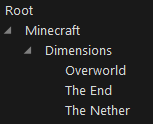
### Dimension Channels Dimension Channel names must be the path of the registry name of a dimension and in this path underscore must be replaced with spaces and the name must be capitalized. For example, for the nether dimension: Registry Name: "minecraft:the_nether" Mumble Channel Name: "The Nether" The Dimension Channels must be child channels of the channel set in the path. !(https://cdn.modrinth.com/data/d77bzdmt/images/8a32215533dc467bdd144c2602cdcacf97667615.png)
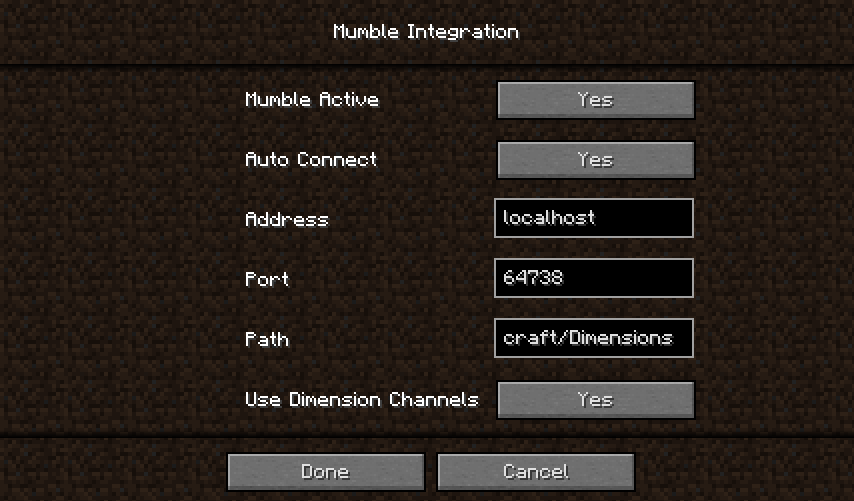
The Config can be changed in game (Main menu > Mods > Mumble Integration (Button Config)). !(https://cdn.modrinth.com/data/d77bzdmt/images/2ef063c9a50b33f89715f4ac63452dd4b4909bc2.png)
Thanks for the logo to Muse31. You can use this mod in non-commercial modpacks without asking. You can find more mods from me on (https://www.curseforge.com/members/geheimagentnr1/projects) and (https://modrinth.com/user/GeheimagentNr1).
!(https://raw.githubusercontent.com/GeheimagentNr1/Online_Mod_Data/master/images/mod_loader_banner.png)
📊 Mod Details
- Game
- Minecraft Mods
- Author
- GeheimagentNr1
- Version
- 1.21.1-3.0.1
- Downloads
- 2,512
- Endorsements
- 5
- Category
- forge
- Created
- 4/16/2023
- Updated
- 5/2/2026
- Game Versions
- 1.21.1, 1.21.2, 1.21.3, 1.21.4, 1.21.5
- Tags
- social
🔧 How to Install Minecraft Mods Mods
Download from Modrinth. Use Prism Launcher or drop into your mods folder.
📖 Full step-by-step install guide for Minecraft Mods →
Visit the official mod page for specific installation instructions for this mod.
🎮 Need cheat codes or console commands? Check ur gaming wiki for Minecraft Mods commands, item IDs, and more.
❓ Frequently Asked Questions
Which Minecraft Mods versions does Mumble Integration support?
The author lists 1.21.1, 1.21.2, 1.21.3, 1.21.4, 1.21.5, 1.21.6. Other versions may work but are untested by the author.
What is the latest version of Mumble Integration?
Version 1.21.1-3.0.1, published 2026-05-02 with 2,512 downloads recorded at the source.
Keep browsing — more Minecraft Mods mods await