MojangFix StationAPI Edition
🟡 Updated this year⚠️ Install Order · 2 steps
Install in this order, then this mod last — most mods fail to load without their framework and dependencies in place.
🖼️ Gallery (3 images)
🔍 Analysis
- 👍 0.1% endorsement rate
- 🏆 #6 of 8 babric mods in this game by downloads
📋 About This Mod
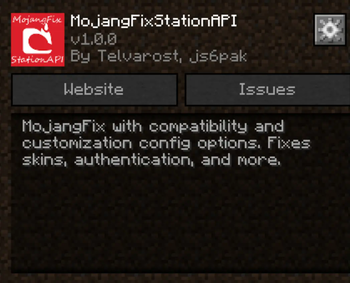
MojangFix with compatibility and customization config options. Fixes skins, authentication, and more.
# MojangFixStationAPI A more compatible version of (https://modrinth.com/mod/mojangfix) for Minecraft b1. 7. 3 with (https://modrinth.com/mod/glass-config-api) configs to increase the mod's compatibility. Fixes skins, authentication, and more. For more InventoryTweaks (ex: `left-click + drag`) consider : https://modrinth.com/mod/inventorytweaks For better auth/skin fixes use RetroAuth: https://modrinth.com/mod/retroauth
## Features
Skin and cape fix (including 1. 8+ outer layers)
!(https://user-images.githubusercontent.com/35262707/158473931-1ae3ea4f-4673-4baa-aa3d-044275d462ea.png) - Added ability to raise slim skin shoulders with GlassConfigAPI - Added ability to toggle rendering the player cape with GlassConfigAPI
Authentication fix
!(https://user-images.githubusercontent.com/35262707/159056534-568087f9-00e2-4830-b66a-5046773cb3b1.png) Allows the server to verify that the connecting player is logged in
Multiplayer server list
!(https://user-images.githubusercontent.com/35262707/159057966-8c3a6bc2-da0f-4132-a8f3-fb0d0839763a.png)
(server status not implemented yet)
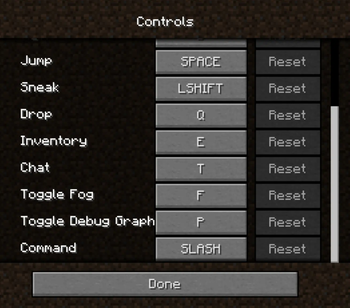
Scrollable keybinds gui
!(https://user-images.githubusercontent.com/35262707/159058180-789b936e-0cb8-4ece-8fa2-d225b4812b24.png)
Better text edition
!(https://user-images.githubusercontent.com/35262707/159060408-8e35a074-0ee1-426a-bc51-1152d6adca34.gif)
Basic inventory tweaks
Previously unlisted changes
- (New) Disable stats checksum verification
- - Allows mods to rearrange stats (for instance when converting a vanilla instance to a StationAPI one)
- Enable Bit Depth Fix
- Enable Command Keybinding
- - Used to more quickly open up the chat window and type in a command
- Enable Death Screen Score Fix
- Enable Debug Graph Hidden By Default
- - Use the new keybind (default: LCtrl) + F3 to open up debug screen with graph
- - Optionally using GCAPI config switch keybind to toggle debug graph whenever pressed
- Enable Displaying World Seed In Debug Menu
- Enable MojangFix Version Text On Title Screen
- Enable Quit Button
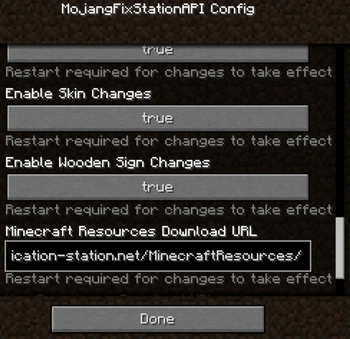
- Change Resources Download URL
- - This edition of MojangFix lets you change it yourself as well in the config settings
## Installation using Prism Launcher
1. Download an instance of Babric for Prism Launcher: https://github.com/Glass-Series/babric-prism-instance 2. Install Java 17 and set the instance to use it: https://adoptium.net/temurin/releases/ 3. Add GlassConfigAPI 3. 0. 2+ to the mod folder for the instance: https://modrinth.com/mod/glass-config-api 4. Add Glass Networking to the mod folder for the instance: https://modrinth.com/mod/glass-networking 5. (Optional) Add StationAPI to the mod folder for the instance: https://modrinth.com/mod/stationapi 6. (Optional) Add Mod Menu to the mod folder for the instance: https://modrinth.com/mod/modmenu-beta 7. Add this mod to the mod folder for the instance: https://github.com/telvarost/BetaTweaks-StationAPI/releases 8. Run and enjoy! 👍
Q. Why is minecraft so small and part of my screen white? A. You probably have screen scaling on or are using a high DPI screen. There are 5 possible ways to fix this: The best option is to install Gambac: (https://modrinth.com/mod/gambac) You could also pass the following string in as a java argument in the settings tab `-Dsun.java2d.uiScale=1. 0` You could also install ClientsideEssentials mod or UniTweaks and use their screen scaling fix from GCAPI config options (fix may produce small artifacts with this option) You could also change the DPI settings for Prism Launcher to system Or, you could change your screen scaling to 100%
📊 Mod Details
- Game
- Minecraft Mods
- Author
- Telvarost
- Version
- b1.7.3
- Downloads
- 18,900
- Endorsements
- 18
- Category
- babric
- Created
- 3/3/2024
- Updated
- 9/1/2026
- Game Versions
- b1.7.3
- Tags
- utility
🔧 How to Install Minecraft Mods Mods
Download from Modrinth. Use Prism Launcher or drop into your mods folder.
📖 Full step-by-step install guide for Minecraft Mods →
Visit the official mod page for specific installation instructions for this mod.
🎮 Need cheat codes or console commands? Check ur gaming wiki for Minecraft Mods commands, item IDs, and more.
❓ Frequently Asked Questions
Which Minecraft Mods versions does MojangFix StationAPI Edition support?
The author lists b1.7.3. Other versions may work but are untested by the author.
What is the latest version of MojangFix StationAPI Edition?
Version b1.7.3, published 2026-09-01 with 18,900 downloads recorded at the source.
Keep browsing — more Minecraft Mods mods await