Mod Menu Filter
🟡 Updated this year⚠️ Install Order · 2 steps
Install in this order, then this mod last — most mods fail to load without their framework and dependencies in place.
🖼️ Gallery (3 images)
🔍 Analysis
- 👍 0.5% endorsement rate
- 🏆 #332 of 945 fabric mods in this game by downloads
📋 About This Mod
# Mod Menu Filter (https://ko-fi.com/img/githubbutton_sm.svg)](https://ko-fi.com/H2H51ZR38L) <img src="https://cdn.modrinth.com/data/R8qexFs7/be8b917e1b1898345e71ce0fdd97183ff2c0a693_96.webp" alt="logo" width="128" height="128"/> !(https://img.shields.io/badge/license-MIT-green?style=flat-square) !(https://img.shields.io/badge/Platform-Fabric-blue?style=flat-square) !(https://img.shields.io/badge/Side-Client%20Only-orange?style=flat-square) **Mod Menu Filter** is a client Fabric utility mod that enhances (https://modrinth.com/mod/modmenu) with tag-based filtering, coloured badge overlays, favorites, and per-profile configurations --- ## Features - **Tag Badges** - Coloured inline badges drawn next to every mod name. - **Tag Filtering** - A toggle-button filter bar above the mod list. Click to show matching mods, with optional all-selected-tags matching for narrow searches. - **Favourites** - Favorite your mods! Easily filter between favorites and non-favorites. - **Profiles** - Supports multiple configurations that you can switch between. --- ## Requirements | Dependency | Notes | |---|---| | (https://fabricmc.net/use/) | Per-version minimum | | (https://modrinth.com/mod/modmenu) | Per-version compatible range | | (https://modrinth.com/mod/cloth-config) | Per-version compatible range | --- ## Installation 1. Install (https://fabricmc.net/use/) for your Minecraft version. 2. Drop **Mod Menu Filter**, **Fabric API**, **Mod Menu**, and **Cloth Config** into your `mods/` folder. 3. Launch the game - a default configuration is generated automatically on first run. --- ## Configuration Open **Mod Menu → Mod Menu Filter → (gear icon)** to access the full settings screen. ### Tag database (`config/mod_menu_filter.json`) Tags and the mods they apply to are stored in `config/mod_menu_filter.json`. A bundled `default_tags.json` is written on first launch as the base. > Most of these settings can be configured through the built-in configuration screen ```jsonc { "tagOverrides": { // add a mod to an existing built-in tag "sodium": , // assign multiple tags to one mod "iris": }, "customTags": { // define a completely new tag "rendering": { "displayName": "Rendering", "color": 9699609, "mods": } }, "hiddenTags": , "favoriteMods": , "matchAllTagFilters": false, "activeProfile": "default" } ``` ## License Feel free to include in any modpack!
# Mod Menu Filter [!(https://ko-fi.com/img/githubbutton_sm.svg)](https://ko-fi.com/H2H51ZR38L)

!(https://img.shields.io/badge/license-MIT-green?style=flat-square) !(https://img.shields.io/badge/Platform-Fabric-blue?style=flat-square) !(https://img.shields.io/badge/Side-Client%20Only-orange?style=flat-square)
Mod Menu Filter is a client Fabric utility mod that enhances (https://modrinth.com/mod/modmenu) with tag-based filtering, coloured badge overlays, favorites, and per-profile configurations
## Features
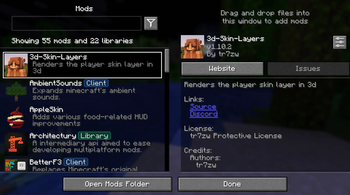
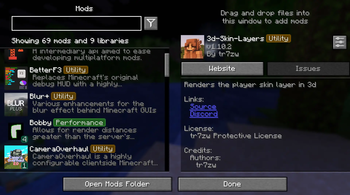
- Tag Badges - Coloured inline badges drawn next to every mod name.
- Tag Filtering - A toggle-button filter bar above the mod list. Click to show matching mods, with optional all-selected-tags matching for narrow searches.
- Favourites - Favorite your mods! Easily filter between favorites and non-favorites.
- Profiles - Supports multiple configurations that you can switch between.
## Requirements
| Dependency | Notes | |---|---| | (https://fabricmc.net/use/) | Per-version minimum | | (https://modrinth.com/mod/modmenu) | Per-version compatible range | | (https://modrinth.com/mod/cloth-config) | Per-version compatible range |
- --
- ## Installation
1. Install (https://fabricmc.net/use/) for your Minecraft version. 2. Drop Mod Menu Filter, Fabric API, Mod Menu, and Cloth Config into your `mods/` folder. 3. Launch the game - a default configuration is generated automatically on first run.
## Configuration
Open Mod Menu → Mod Menu Filter → (gear icon) to access the full settings screen.
### Tag database (`config/mod_menu_filter.json`)
Tags and the mods they apply to are stored in `config/mod_menu_filter.json`. A bundled `default_tags.json` is written on first launch as the base.
> Most of these settings can be configured through the built-in configuration screen
```jsonc { "tagOverrides": { // add a mod to an existing built-in tag "sodium": ["performance"], // assign multiple tags to one mod "iris": ["performance", "rendering"] }, "customTags": { // define a completely new tag "rendering": { "displayName": "Rendering", "color": 9699609, "mods": ["iris"] } }, "hiddenTags": ["library"], "favoriteMods": ["sodium"], "matchAllTagFilters": false, "activeProfile": "default" } ```
Feel free to include in any modpack!
📊 Mod Details
- Game
- Minecraft Mods
- Author
- mtxCore
- Version
- 2.2.0
- Downloads
- 2,599
- Endorsements
- 12
- Category
- fabric
- Created
- 2/9/2026
- Updated
- 8/22/2026
- Game Versions
- 26.2
- Tags
- management, utility
🔧 How to Install Minecraft Mods Mods
Download from Modrinth. Use Prism Launcher or drop into your mods folder.
📖 Full step-by-step install guide for Minecraft Mods →
Visit the official mod page for specific installation instructions for this mod.
🎮 Need cheat codes or console commands? Check ur gaming wiki for Minecraft Mods commands, item IDs, and more.
❓ Frequently Asked Questions
Which Minecraft Mods versions does Mod Menu Filter support?
The author lists 26.2. Other versions may work but are untested by the author.
What is the latest version of Mod Menu Filter?
Version 2.2.0, published 2026-08-22 with 2,599 downloads recorded at the source.
Keep browsing — more Minecraft Mods mods await