Mishang Urban Construction
🟡 Updated this year⚠️ Install Order · 2 steps
Install in this order, then this mod last — most mods fail to load without their framework and dependencies in place.
🖼️ Gallery (9 images)
🔍 Analysis
- 👍 0.0% endorsement rate
- 🏆 #131 of 335 decoration mods in this game by downloads
📋 About This Mod
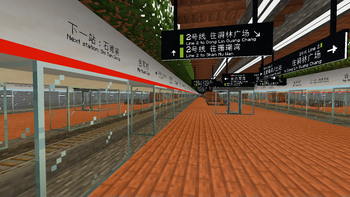
# Mishang Urban Construction Mishang Urban Construction is a building and decoration mod that provides a variety of useful blocks, including: - Road blocks: lines can be painted on them to make them look realistic. The road lines have various combinations and can be generated automatically in some situations. - Road marks: simple road markings, such as guide arrows; can be placed on roads and road slabs. - Lights: available in various shapes and colors, including white, yellow, orange, cyan, green, and pink. There are full light blocks as well as decorations that can be placed on walls, floors, or ceilings. - Sign blocks: available in different styles. Compared with vanilla signs, signs in this mod allow parameters such as color, size, and position to be adjusted flexibly. Sign presets can be managed via the `/mishanguc:signpreset` command. - Handrail blocks: available with various textures, appearances, and connection methods, and can be placed on stairs. - Custom-colored blocks: allow any color to be specified instead of being limited to the 16 colors available for concrete and wool. Moreover, the mod contains a series of useful tools, such as: - Fast Building Tool: quickly places multiple blocks on a plane. - Column Building Tool: quickly places multiple blocks in a column. - Force Placing Tool: places blocks while ignoring placement restrictions and block updates. - Teleportation Tool: teleports you to any location. - ID Checking Tool, Block State Tool, and Data Tag Tool: query the properties or NBT of a block or entity, or query the current biome. - Explosion Tool: creates an explosion when clicked. - Rotating or Mirroring Tool: rotates or flips a block when clicked. - Color Tool: obtains and modifies block colors; only some blocks support custom coloring. - Text Copy Tool: copies and pastes text on signs, including vanilla signs. - Growth Tool: makes creatures and crops grow or regress. When holding a golden dandelion in the offhand, it can also freeze or unfreeze a creature's age (version 26.1 and above). - Carrying Tool: picks up a block or entity and carries it to another location. - Road Tool: quickly adds or removes road markings. - …… For detailed information about this mod, see (https://github.com/SolidBlock-cn/mishanguc/wiki) or (https://www.mcmod.cn/class/5743.html). This mod **depends on Fabric API** and, since version 1.4.0, **no longer** depends on the (https://github.com/SolidBlock-cn/BRRP) (Better Runtime Resource Pack) mod. Only a Fabric version is available; there is no Forge or NeoForge version of this mod. Please also refer to (UpdateLog-en.md). This mod is published under the LGPLv3 license, which you must follow when propagating this mod. You are welcome to join the Tencent QQ group **587928350** for discussion. You can also report issues on GitHub.
# Mishang Urban Construction
Mishang Urban Construction is a building and decoration mod that provides a variety of useful blocks, including:
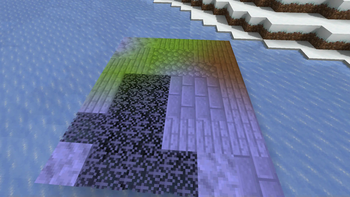
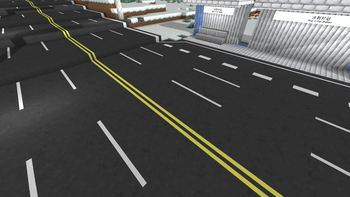
- Road blocks: lines can be painted on them to make them look realistic. The road lines have various combinations and can be generated automatically in some situations.
- Road marks: simple road markings, such as guide arrows; can be placed on roads and road slabs.
- Lights: available in various shapes and colors, including white, yellow, orange, cyan, green, and pink. There are full light blocks as well as decorations that can be placed on walls, floors, or ceilings.
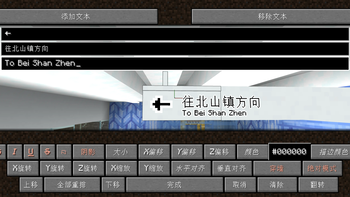
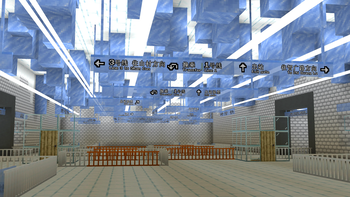
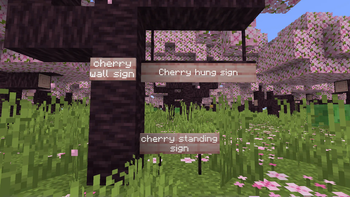
- Sign blocks: available in different styles. Compared with vanilla signs, signs in this mod allow parameters such as color, size, and position to be adjusted flexibly. Sign presets can be managed via the `/mishanguc:signpreset` command.
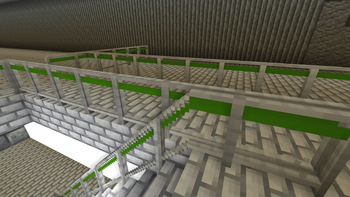
- Handrail blocks: available with various textures, appearances, and connection methods, and can be placed on stairs.
- Custom-colored blocks: allow any color to be specified instead of being limited to the 16 colors available for concrete and wool.
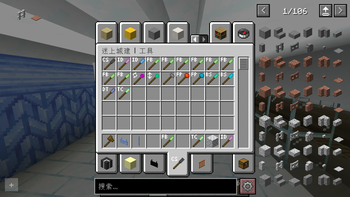
Moreover, the mod contains a series of useful tools, such as:
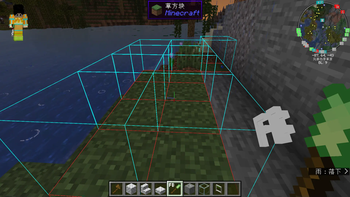
- Fast Building Tool: quickly places multiple blocks on a plane.
- Column Building Tool: quickly places multiple blocks in a column.
- Force Placing Tool: places blocks while ignoring placement restrictions and block updates.
- Teleportation Tool: teleports you to any location.
- ID Checking Tool, Block State Tool, and Data Tag Tool: query the properties or NBT of a block or entity, or query the current biome.
- Explosion Tool: creates an explosion when clicked.
- Rotating or Mirroring Tool: rotates or flips a block when clicked.
- Color Tool: obtains and modifies block colors; only some blocks support custom coloring.
- Text Copy Tool: copies and pastes text on signs, including vanilla signs.
- Growth Tool: makes creatures and crops grow or regress. When holding a golden dandelion in the offhand, it can also freeze or unfreeze a creature's age (version 26. 1 and above).
- Carrying Tool: picks up a block or entity and carries it to another location.
- Road Tool: quickly adds or removes road markings.
- ……
For detailed information about this mod, see (https://github.com/SolidBlock-cn/mishanguc/wiki) or (https://www.mcmod.cn/class/5743.html).
This mod depends on Fabric API and, since version 1. 4. 0, no longer depends on the (https://github.com/SolidBlock-cn/BRRP) (Better Runtime Resource Pack) mod.
Only a Fabric version is available; there is no Forge or NeoForge version of this mod.
Please also refer to (UpdateLog-en.md).
This mod is published under the LGPLv3 license, which you must follow when propagating this mod.
You are welcome to join the Tencent QQ group 587928350 for discussion. You can also report issues on GitHub.
📊 Mod Details
- Game
- Minecraft Mods
- Author
- SolidBlock
- Version
- 1.6.5-alpha.2-1.21.1
- Downloads
- 197,234
- Endorsements
- 55
- Category
- decoration
- Created
- 2/25/2022
- Updated
- 8/27/2026
- Game Versions
- 1.21.1
- Tags
- decoration
🔧 How to Install Minecraft Mods Mods
Download from Modrinth. Use Prism Launcher or drop into your mods folder.
📖 Full step-by-step install guide for Minecraft Mods →
Visit the official mod page for specific installation instructions for this mod.
🎮 Need cheat codes or console commands? Check ur gaming wiki for Minecraft Mods commands, item IDs, and more.
❓ Frequently Asked Questions
Which Minecraft Mods versions does Mishang Urban Construction support?
The author lists 1.21.1. Other versions may work but are untested by the author.
What is the latest version of Mishang Urban Construction?
Version 1.6.5-alpha.2-1.21.1, published 2026-08-27 with 197,234 downloads recorded at the source.
Keep browsing — more Minecraft Mods mods await