mcsudo
🟠 Updated over a year ago⚠️ Install Order · 2 steps
Install in this order, then this mod last — most mods fail to load without their framework and dependencies in place.
🖼️ Gallery (2 images)

🔍 Analysis
- 👍 0.4% endorsement rate
- 🏆 #450 of 945 fabric mods in this game by downloads
📋 About This Mod
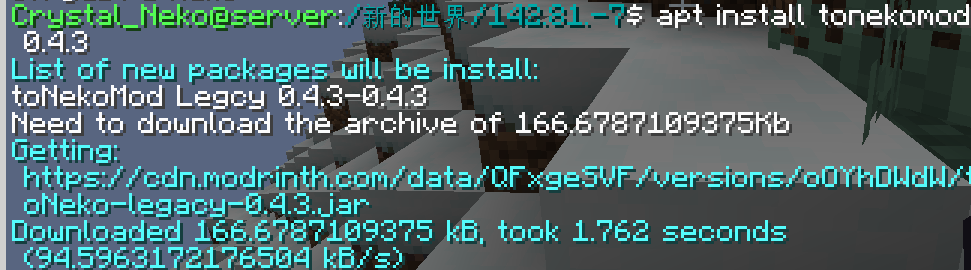
## Sudo This module adds some commonly used Linux commands to the game, including `sudo`, `echo`, `cat`, and `export`. Some Linux mechanisms have also been added, such as the `home` folder and the `.bashrc` file. ## Instructions ### Parameters Some commands support parameters, you can use `_` plus parameters. ### Variables Some commands also support the use of variables. You can use variables in the form of `${variable name}`. For how to set variables, please see (#export). #### Dynamic variables Dynamic variables are recalculated on every execution, here are all dynamic variables: - `home`: the current user’s home folder - `uuid`: uuid of the current user - `player`: the username of the current user - `exp`: the current user’s experience value - `level`: the level of the current user - `health`: current user’s health - `max_health`: the current user’s maximum health - `world`: current world name - `location`: current location (format is x.y.z) - `server`: current server name - `motd`: motd of the current server - `time`: current time (Unix timestamp) ### Order #### echo usage: ``` /echo <content> # Output content ``` #### cat usage: ``` /cat <file path> # Output file content ``` #### write usage: ``` /write <file path> <content> #Write file content, which will overwrite the original content. ``` #### export usage: ``` /export <variable name> <variable value> #Set variables /export public_<variable name> <variable value> # Set public variables, sudo permissions are required ``` #### apt Install mods from Modrinth. usage: ``` /apt install <slug> <version> # Install module /apt search <slug> # Search module ``` image of apt command: !(https://cdn.modrinth.com/data/Rxx9HSbF/images/208a3fcad2e9904d5b619a4e4a911eb7a00821e5.png) #### bash Call the system to execute bash commands (only supports Linux). usage: ``` /bash <command> ``` **WARNNING:THIS COMMAND IS DANGEROUS. IT MAYBE DAMAGE YOUR SYSTEM.** #### neofetch You know the command. ### Special files #### .bashrc This file executes the commands inside when the player logs in. The commands are separated by `;` and there is no `/` before the command. The file is located in `home/<player name>/.bashrc`. Players can modify this file without sudo permissions.
## Sudo This module adds some commonly used Linux commands to the game, including `sudo`, `echo`, `cat`, and `export`.
Some Linux mechanisms have also been added, such as the `home` folder and the `.bashrc` file.
## Instructions ### Parameters Some commands support parameters, you can use `_` plus parameters. ### Variables Some commands also support the use of variables. You can use variables in the form of `${variable name}`. For how to set variables, please see (#export).
#### Dynamic variables
Dynamic variables are recalculated on every execution, here are all dynamic variables:
- `home`: the current user’s home folder
- `uuid`: uuid of the current user
- `player`: the username of the current user
- `exp`: the current user’s experience value
- `level`: the level of the current user
- `health`: current user’s health
- `max_health`: the current user’s maximum health
- `world`: current world name
- `location`: current location (format is x.y.z)
- `server`: current server name
- `motd`: motd of the current server
- `time`: current time (Unix timestamp)
### Order
#### echo
usage:
```
/echo
usage:
```
/apt install
image of apt command: !(https://cdn.modrinth.com/data/Rxx9HSbF/images/208a3fcad2e9904d5b619a4e4a911eb7a00821e5.png) #### bash Call the system to execute bash commands (only supports Linux).
usage:
```
/bash
### Special files #### .bashrc This file executes the commands inside when the player logs in. The commands are separated by `;` and there is no `/` before the command.
The file is located in `home/
📊 Mod Details
- Game
- Minecraft Mods
- Author
- CrystalNeko
- Version
- 0.0.4
- Downloads
- 2,483
- Endorsements
- 10
- Category
- fabric
- Created
- 4/21/2024
- Updated
- 11/6/2024
- Game Versions
- 1.21.2, 1.21.3
- Tags
- utility
🔧 How to Install Minecraft Mods Mods
Download from Modrinth. Use Prism Launcher or drop into your mods folder.
📖 Full step-by-step install guide for Minecraft Mods →
Visit the official mod page for specific installation instructions for this mod.
🎮 Need cheat codes or console commands? Check ur gaming wiki for Minecraft Mods commands, item IDs, and more.
❓ Frequently Asked Questions
Which Minecraft Mods versions does mcsudo support?
The author lists 1.21.2, 1.21.3. Other versions may work but are untested by the author.
What is the latest version of mcsudo?
Version 0.0.4, published 2024-11-06 with 2,483 downloads recorded at the source.
Keep browsing — more Minecraft Mods mods await