MacroCraft
⚪ Last updated 2024⚠️ Install Order · 2 steps
Install in this order, then this mod last — most mods fail to load without their framework and dependencies in place.
🖼️ Gallery (10 images)
🔍 Analysis
- 👍 0.5% endorsement rate
- 🏆 #472 of 920 fabric mods in this game by downloads
📋 About This Mod
# MacroCraft ### Unleash the Power of Automation in Minecraft !(https://boxadactle.dev/img/macrocraft/icon.png) MacroCraft is a groundbreaking Minecraft mod designed to enhance your gameplay by enabling the automation of repetitive tasks through the use of recorded macros. This powerful tool allows you to capture keyboard and mouse actions and replay them with precision, freeing up your time for more creative and enjoyable pursuits in the world of Minecraft. ## Dependencies Versions 4.0.0+ of this mod require (https://modrinth.com/mod/boxlib), a Client-side library mod developed by me. ## Key Features !(https://boxadactle.dev/img/macrocraft/huge_2024-04-21_12.17.44.png) **Easy-to-Use Interface**: MacroCraft comes with a user-friendly GUI that lets you effortlessly manage all aspects of macro creation and execution, including: - **Record**: Capture your precise keyboard and mouse actions with a simple click. - **Play**: Replay your recorded macros to automate tasks in-game. - **Edit**: Fine-tune your macros by adjusting the sequences or adding new actions. - **Save/Load**: Save your macros for future use and load them as needed. - **Delete**: Remove macros that you no longer need. **Customizable Access**: Access the MacroCraft GUI through multiple methods tailored to your preferences—be it a custom keybind, a command, or even a conveniently placed button on the pause screen. !(https://boxadactle.dev/img/macrocraft/huge_2024-04-21_12.33.02.png) **Advanced Configuration Options**: Set up detailed configurations for each macro, including playback speed, number of repetitions, and conditional triggers based on in-game events. !(https://boxadactle.dev/img/macrocraft/huge_2024-04-21_12.19.19.png) **Compatibility and Performance**: Designed to be compatible with a wide range of other Minecraft mods and optimized to ensure minimal impact on game performance. ## How It Works ### 1. Setting Up Start by downloading and installing MacroCraft using Minecraft Forge or Fabric. Once installed, customize your access key or item and familiarize yourself with the GUI. !(https://boxadactle.dev/img/macrocraft/huge_2024-04-21_12.17.59.png) ### 2. Recording a Macro Activate the recording feature using your preferred method (keybind, pause menu, command). Perform the desired actions, such as building, mining, or farming. Once done, stop the recording. !(https://boxadactle.dev/img/macrocraft/huge_2024-04-21_12.15.24.png) ### 3. Saving Navigate to the MacroCraft GUI to save your recorded macro. Be sure to give it a name! !(https://boxadactle.dev/img/macrocraft/huge_2024-04-21_12.18.04.png) ### 4. Playing Back Whenever you need to perform the recorded task, simply select your macro and play it. You can adjust settings like playback speed or repetition based on the current needs. !(https://boxadactle.dev/img/macrocraft/huge_2024-04-21_12.18.39.png) ## Installation Guide 1. **Install Minecraft Forge or Fabric**: Ensure that you have the latest version installed. 2. **Download MacroCraft**: Download the latest version of the mod for your Minecraft version. 3. **Place the Mod File**: Place the downloaded `.jar` file into your Minecraft 'mods' folder. 4. **Run Minecraft**: Select the Forge or Fabric profile and start the game. MacroCraft should now be loaded and ready to use. ## Building If you'd like to build this mod on your own machine, follow these steps. - Download the source code from (https://github.com/Boxadactle/MacroCraft) (Code -> Download zip) - Extract the zip file onto your local machine, and open the folder. - Open a terminal prompt in said folder - Run the command "gradlew build" - The fabric build will be in "fabric/build/libs" - The forge build will be in "forge/build/libs"
# MacroCraft ### Unleash the Power of Automation in Minecraft
!(https://boxadactle.dev/img/macrocraft/icon.png)
MacroCraft is a groundbreaking Minecraft mod designed to enhance your gameplay by enabling the automation of repetitive tasks through the use of recorded macros. This powerful tool allows you to capture keyboard and mouse actions and replay them with precision, freeing up your time for more creative and enjoyable pursuits in the world of Minecraft.
## Dependencies
Versions 4. 0. 0+ of this mod require (https://modrinth.com/mod/boxlib), a Client-side library mod developed by me.
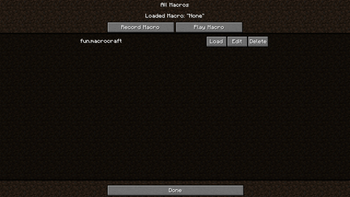
## Key Features !(https://boxadactle.dev/img/macrocraft/huge_2024-04-21_12. 17. 44.png) Easy-to-Use Interface: MacroCraft comes with a user-friendly GUI that lets you effortlessly manage all aspects of macro creation and execution, including:
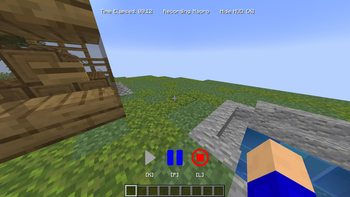
- Record: Capture your precise keyboard and mouse actions with a simple click.
- Play: Replay your recorded macros to automate tasks in-game.
- Edit: Fine-tune your macros by adjusting the sequences or adding new actions.
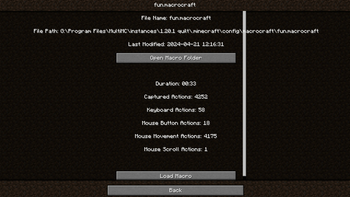
- Save/Load: Save your macros for future use and load them as needed.
- Delete: Remove macros that you no longer need.
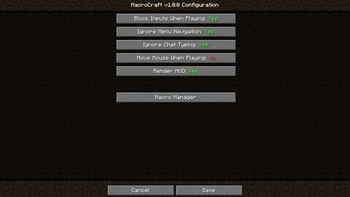
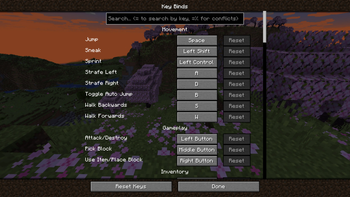
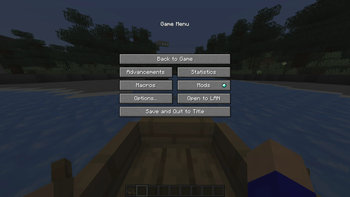
Customizable Access: Access the MacroCraft GUI through multiple methods tailored to your preferences—be it a custom keybind, a command, or even a conveniently placed button on the pause screen. !(https://boxadactle.dev/img/macrocraft/huge_2024-04-21_12. 33. 02.png)
Advanced Configuration Options: Set up detailed configurations for each macro, including playback speed, number of repetitions, and conditional triggers based on in-game events. !(https://boxadactle.dev/img/macrocraft/huge_2024-04-21_12. 19. 19.png)
Compatibility and Performance: Designed to be compatible with a wide range of other Minecraft mods and optimized to ensure minimal impact on game performance.
## How It Works
### 1. Setting Up Start by downloading and installing MacroCraft using Minecraft Forge or Fabric. Once installed, customize your access key or item and familiarize yourself with the GUI.
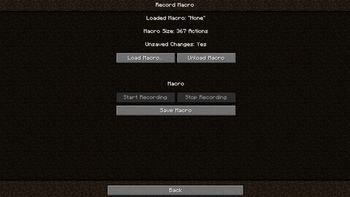
!(https://boxadactle.dev/img/macrocraft/huge_2024-04-21_12. 17. 59.png) ### 2. Recording a Macro Activate the recording feature using your preferred method (keybind, pause menu, command). Perform the desired actions, such as building, mining, or farming. Once done, stop the recording.
!(https://boxadactle.dev/img/macrocraft/huge_2024-04-21_12. 15. 24.png)
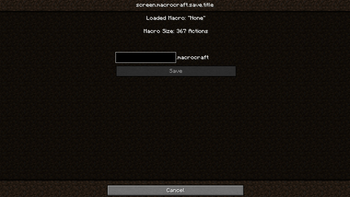
### 3. Saving Navigate to the MacroCraft GUI to save your recorded macro. Be sure to give it a name!
!(https://boxadactle.dev/img/macrocraft/huge_2024-04-21_12. 18. 04.png)
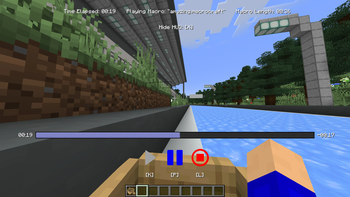
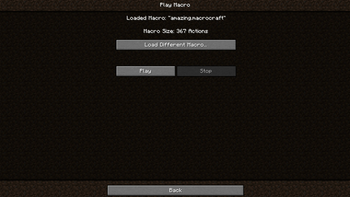
### 4. Playing Back Whenever you need to perform the recorded task, simply select your macro and play it. You can adjust settings like playback speed or repetition based on the current needs.
!(https://boxadactle.dev/img/macrocraft/huge_2024-04-21_12. 18. 39.png)
## Installation Guide
1. Install Minecraft Forge or Fabric: Ensure that you have the latest version installed. 2. Download MacroCraft: Download the latest version of the mod for your Minecraft version. 3. Place the Mod File: Place the downloaded `.jar` file into your Minecraft 'mods' folder. 4. Run Minecraft: Select the Forge or Fabric profile and start the game. MacroCraft should now be loaded and ready to use.
## Building
If you'd like to build this mod on your own machine, follow these steps. - Download the source code from (https://github.com/Boxadactle/MacroCraft) (Code -> Download zip) - Extract the zip file onto your local machine, and open the folder. - Open a terminal prompt in said folder - Run the command "gradlew build" - The fabric build will be in "fabric/build/libs" - The forge build will be in "forge/build/libs"
📊 Mod Details
- Game
- Minecraft Mods
- Author
- Boxadactle
- Version
- 4.0.0-neoforge
- Downloads
- 4,946
- Endorsements
- 27
- Category
- fabric
- Created
- 5/1/2024
- Updated
- 5/24/2024
- Game Versions
- 1.20.5, 1.20.6
- Tags
- game-mechanics, technology, utility
🔧 How to Install Minecraft Mods Mods
Download from Modrinth. Use Prism Launcher or drop into your mods folder.
📖 Full step-by-step install guide for Minecraft Mods →
Visit the official mod page for specific installation instructions for this mod.
🎮 Need cheat codes or console commands? Check ur gaming wiki for Minecraft Mods commands, item IDs, and more.
❓ Frequently Asked Questions
Which Minecraft Mods versions does MacroCraft support?
The author lists 1.20.5, 1.20.6. Other versions may work but are untested by the author.
What is the latest version of MacroCraft?
Version 4.0.0-neoforge, published 2024-05-24 with 4,946 downloads recorded at the source.
Keep browsing — more Minecraft Mods mods await