LoTAS-Light
🟡 Updated this year⚠️ Install Order · 2 steps
Install in this order, then this mod last — most mods fail to load without their framework and dependencies in place.
🖼️ Gallery (2 images)
🔍 Analysis
- 👍 0.1% endorsement rate
- 🏆 #455 of 940 fabric mods in this game by downloads
📋 About This Mod
LoTAS-Light =========== Continuation of (https://modrinth.com/mod/lotas) for versions higher than 1.20.3, but with a reduced feature set Needs **(https://modrinth.com/mod/fabric-api)** Why remove features? -------------------- 1. Updating LoTAS to new versions was always very tedious due to the large feature set… Testing and verifying each feature was hard and with Mojangs faster release schedule, we could not keep up (especially if Mojang rewrites everything between minor versions) 2. Mojang patched a lot of things, so LoTAS's features would be reduced either way Features -------- ### Improved `/tick` command * `/tick rate` supports tickrates lower than 1 * A second `/tick freeze` by simply typing `/tick rate 0`, which also freezes the player * Tickrates higher than 20 also affect the player ### Tickrate keybinds Same deal as LoTAS * `.` increases the tickrate * `,` decreases the tickrate * `F8` toggles `/tick rate 0` * `F9` advances 1 tick while the game is frozen ### Savestates * `/savestate` command for "quicksaving" and "quickloading" a minecraft world * `J` and `K` for saving and loading respectively ### Item Duplication * Press Pause to save the game with the item in your inventory * Throw out the item out of your inventory or put it in a chest * Press `O` * Rejoin the world ### Config * `/lotaslight` for changing the config No Multiplayer support!! ======================== The reason why this mod doesn't support multiplayer is simply: **Savestates**. Basically Mojang never intended a quickloading feature, so to load a different world, it is intended that you stop the Minecraft server (Imagine restarting and reconnecting to the server for every savestate). Changing this requires a *lot* of work, more than I am willing to put into this mod. If you want to see (somewhat) working multiplayer savestates, check out (https://modrinth.com/mod/tasmod) # Translations Help translate this mod with (https://weblate.minecrafttas.com/projects/lotas-light/main/) ### Contributions - Chinese Simplified - Blom - BoredYukolin - JustaSqu1d - French - Elvee - German - ScribbleTAS - Italian - LeoAnimates - Japanese - Naruyoko - Korean - swwgdxed - LOLCAT - ScribbleTAS - Polish - 4NTJ - mamelao - NULLderef - Portuguese (Brazil) - xnqlb Bug reports and TASing help =========================== Bugs can preferably reported on (https://github.com/MinecraftTAS/LoTAS-Light/issues), but you can also use (https://discord.gg/jGhNxpd), where we also provide help!
LoTAS-Light ===========
Continuation of (https://modrinth.com/mod/lotas) for versions higher than 1. 20. 3, but with a reduced feature set
Needs *(https://modrinth.com/mod/fabric-api)**
Why remove features? --------------------
1. Updating LoTAS to new versions was always very tedious due to the large feature set… Testing and verifying each feature was hard and with Mojangs faster release schedule, we could not keep up (especially if Mojang rewrites everything between minor versions) 2. Mojang patched a lot of things, so LoTAS's features would be reduced either way
Features --------
### Improved `/tick` command
`/tick rate` supports tickrates lower than 1 A second `/tick freeze` by simply typing `/tick rate 0`, which also freezes the player Tickrates higher than 20 also affect the player
### Tickrate keybinds
Same deal as LoTAS
`.` increases the tickrate `,` decreases the tickrate `F8` toggles `/tick rate 0` `F9` advances 1 tick while the game is frozen
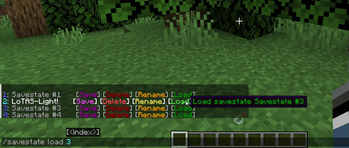
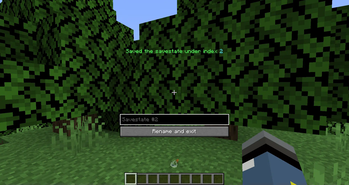
### Savestates
`/savestate` command for "quicksaving" and "quickloading" a minecraft world `J` and `K` for saving and loading respectively
### Item Duplication Press Pause to save the game with the item in your inventory Throw out the item out of your inventory or put it in a chest Press `O` Rejoin the world
### Config `/lotaslight` for changing the config
No Multiplayer support!! ======================== The reason why this mod doesn't support multiplayer is simply: Savestates. Basically Mojang never intended a quickloading feature, so to load a different world, it is intended that you stop the Minecraft server (Imagine restarting and reconnecting to the server for every savestate). Changing this requires a lot* of work, more than I am willing to put into this mod. If you want to see (somewhat) working multiplayer savestates, check out (https://modrinth.com/mod/tasmod)
# Translations Help translate this mod with (https://weblate.minecrafttas.com/projects/lotas-light/main/)
### Contributions - Chinese Simplified - Blom - BoredYukolin - JustaSqu1d - French - Elvee - German - ScribbleTAS - Italian - LeoAnimates - Japanese - Naruyoko - Korean - swwgdxed - LOLCAT - ScribbleTAS - Polish - 4NTJ - mamelao - NULLderef - Portuguese (Brazil) - xnqlb
Bug reports and TASing help ===========================
Bugs can preferably reported on (https://github.com/MinecraftTAS/LoTAS-Light/issues), but you can also use (https://discord.gg/jGhNxpd), where we also provide help!
📊 Mod Details
- Game
- Minecraft Mods
- Author
- Scribble
- Version
- 1.3.6
- Downloads
- 24,718
- Endorsements
- 14
- Category
- fabric
- Created
- 11/10/2024
- Updated
- 6/18/2026
- Game Versions
- 26.2
- Tags
- utility
🔧 How to Install Minecraft Mods Mods
Download from Modrinth. Use Prism Launcher or drop into your mods folder.
📖 Full step-by-step install guide for Minecraft Mods →
Visit the official mod page for specific installation instructions for this mod.
🎮 Need cheat codes or console commands? Check ur gaming wiki for Minecraft Mods commands, item IDs, and more.
❓ Frequently Asked Questions
Which Minecraft Mods versions does LoTAS-Light support?
The author lists 26.2. Other versions may work but are untested by the author.
What is the latest version of LoTAS-Light?
Version 1.3.6, published 2026-06-18 with 24,718 downloads recorded at the source.
Keep browsing — more Minecraft Mods mods await