LockSlot
🟡 Updated this year⚠️ Install Order · 2 steps
Install in this order, then this mod last — most mods fail to load without their framework and dependencies in place.
🖼️ Gallery (6 images)
🔍 Analysis
- 👍 0.1% endorsement rate
- 🏆 #248 of 269 equipment mods in this game by downloads
📋 About This Mod
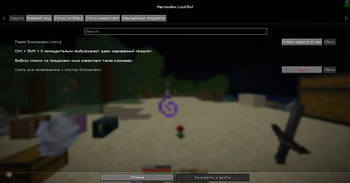
# 🔒 LockSlot **Protect important inventory slots and items from accidental drops.** LockSlot is a client-side Fabric mod for Minecraft 1.21.11 / 1.21.4. It can protect specific hotbar and inventory slots, or protect an item type wherever it appears in your inventory. No server installation is required. ## ✨ Features - 🔐 Lock all 9 hotbar slots and all 27 main inventory slots individually. - 🛡️ Choose one of three slot protection modes: - block dropping only; - block dropping and Shift-click transfers; - fully lock interactions with the slot. - 📋 Maintain a separate list of protected item types that are not tied to particular slots. - 🔎 Search for items using short names such as `netherite_sword`, with matching suggestions shown while typing. - ⌨️ Intentionally drop a protected item with `Ctrl + Shift + Q`. - 🖱️ Keep the inventory-window escape hatch: pick up an item and click outside the inventory to drop it. - 🔒 Choose between a lock icon, colored slot fill, or both. - 🎨 Customize the highlight with an HSV color palette, fill intensity, icon opacity, border visibility, and border opacity. - ⚙️ Configure everything through Mod Menu and Cloth Config. The `/lockslot` command opens the same settings screen in-game. - 🌍 Full English and Russian localization. - 💾 Automatically back up a damaged `config/lockslot.json` before restoring valid defaults. ## 🧩 Slot locks and protected items **🔒 Slot locks** remain attached to the selected slot. Their behavior depends on the protection mode selected in the settings. **🛡️ Protected items** are matched by item ID. They cannot be dropped accidentally with `Q`, regardless of which hotbar or inventory slot contains them, but they can still be moved normally. ## ⚙️ Configuration Open: ```text Mod Menu → LockSlot → Configure ``` You can also run: ```text /lockslot ``` When adding a protected item, enter its short name and select it from the suggestion list. The `minecraft:` namespace is optional for vanilla items: ```text diamond_sword elytra totem_of_undying ``` ## 📦 Requirements - ⛏️ Minecraft **1.21.11** - 🧵 Fabric Loader **0.17.3** or newer - 🧰 Fabric API - 🎛️ Cloth Config **21.11.153** or newer - ☕ Java **21** - 🧭 Mod Menu **17.0.0** or newer is recommended ## 📬 Support For questions and bug reports: Telegram / Discord — **@b1nt1n**
# 🔒 LockSlot
Protect important inventory slots and items from accidental drops.
LockSlot is a client-side Fabric mod for Minecraft 1. 21. 11 / 1. 21. 4. It can protect specific hotbar and inventory slots, or protect an item type wherever it appears in your inventory. No server installation is required.
## ✨ Features
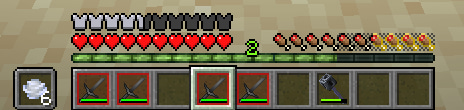
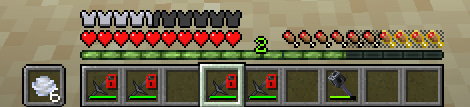
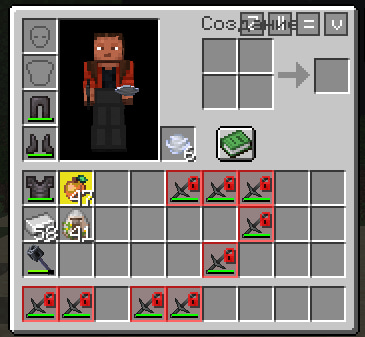
- 🔐 Lock all 9 hotbar slots and all 27 main inventory slots individually.
- 🛡️ Choose one of three slot protection modes:
- - block dropping only;
- - block dropping and Shift-click transfers;
- - fully lock interactions with the slot.
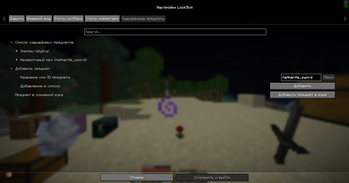
- 📋 Maintain a separate list of protected item types that are not tied to particular slots.
- 🔎 Search for items using short names such as `netherite_sword`, with matching suggestions shown while typing.
- ⌨️ Intentionally drop a protected item with `Ctrl + Shift + Q`.
- 🖱️ Keep the inventory-window escape hatch: pick up an item and click outside the inventory to drop it.
- 🔒 Choose between a lock icon, colored slot fill, or both.
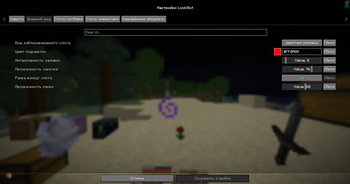
- 🎨 Customize the highlight with an HSV color palette, fill intensity, icon opacity, border visibility, and border opacity.
- ⚙️ Configure everything through Mod Menu and Cloth Config. The `/lockslot` command opens the same settings screen in-game.
- 🌍 Full English and Russian localization.
- 💾 Automatically back up a damaged `config/lockslot.json` before restoring valid defaults.
## 🧩 Slot locks and protected items
🔒 Slot locks remain attached to the selected slot. Their behavior depends on the protection mode selected in the settings.
🛡️ Protected items are matched by item ID. They cannot be dropped accidentally with `Q`, regardless of which hotbar or inventory slot contains them, but they can still be moved normally.
## ⚙️ Configuration
```text Mod Menu → LockSlot → Configure ```
You can also run:
```text /lockslot ```
When adding a protected item, enter its short name and select it from the suggestion list. The `minecraft:` namespace is optional for vanilla items:
```text diamond_sword elytra totem_of_undying ```
## 📦 Requirements
- ⛏️ Minecraft 1. 21. 11
- 🧵 Fabric Loader 0. 17. 3 or newer
- 🧰 Fabric API
- 🎛️ Cloth Config 21. 11. 153 or newer
- ☕ Java 21
- 🧭 Mod Menu 17. 0. 0 or newer is recommended
## 📬 Support
For questions and bug reports: Telegram / Discord — @b1nt1n
📊 Mod Details
- Game
- Minecraft Mods
- Author
- b1nt1n
- Version
- 1.2.3
- Downloads
- 2,178
- Endorsements
- 2
- Category
- equipment
- Created
- 4/20/2026
- Updated
- 8/10/2026
- Game Versions
- 1.21.11
- Tags
- equipment, game-mechanics, minigame
🔧 How to Install Minecraft Mods Mods
Download from Modrinth. Use Prism Launcher or drop into your mods folder.
📖 Full step-by-step install guide for Minecraft Mods →
Visit the official mod page for specific installation instructions for this mod.
🎮 Need cheat codes or console commands? Check ur gaming wiki for Minecraft Mods commands, item IDs, and more.
❓ Frequently Asked Questions
Which Minecraft Mods versions does LockSlot support?
The author lists 1.21.11. Other versions may work but are untested by the author.
What is the latest version of LockSlot?
Version 1.2.3, published 2026-08-10 with 2,178 downloads recorded at the source.
Keep browsing — more Minecraft Mods mods await