Linear Sensitivity
🟠 Updated over a year ago⚠️ Install Order · 2 steps
Install in this order, then this mod last — most mods fail to load without their framework and dependencies in place.
🖼️ Gallery (2 images)

🔍 Analysis
- 👍 0.7% endorsement rate
- 🏆 #176 of 189 cursed mods in this game by downloads
📋 About This Mod
## **_Have you ever_** - Wonder "Why is 200% sensitivity not twice as fast as 100%" **?** - Change your DPI and can't find optimal sens **?** - Find Minecraft's sensitivity setting is terrible **?** ### **_Then Fear Not!_** ## **Linear Sensitivity** is for you! Normally, Minecraft handles mouse sensitivity as a cubic function:\ <img src="https://cdn.modrinth.com/data/E8FRI3Kl/images/7a08401568d54f4331ae4e9c51bd7995d9e3c813.png" alt="Why? Minecraft?"> This mod change it. Instead of a cubic function, the sensitivity will be processed in a linear scale. So now, if you change your DPI from 400 up-to 1600, and your sens from 200% down-to 50%, you will feel exactly the same! ## **_Bonus Feature:_** `/sens` to change your sensitivity (Max: 1, Min: 0), based on (https://modrinth.com/mod/advsensitivity). It supports Float value so you can make your sens 8 digits, like: 0.0000001 (Why you need so many '0'?) ## **_Why I create this mod?_** Long time ago, when I modify Timeless and Classic mod (the original on 1.18.2 one, not TAC:Z), I find zoom sensitivity is so wrong (it's faster than I expect). After 3 hours digging through the code, I found that the way Minecraft process mouse sens is so weird compared to other games. Therefore, I decide to create a mod to change it. After all, I'm a CS player who have fun when creating config files instead of actually playing the game. ## **_Technical detail_** I use a single mixin class to change a variable in `updateMouse()` method. ## **_Planning_** - Custom /m_yaw and /m_pitch like CS2, bonus, /fov ## **_Credit_** - Feature Image: (https://x.com/Mebig_Animation/status/1815454891533619342/photo/1)
## _Have you ever_
- Wonder "Why is 200% sensitivity not twice as fast as 100%" ?
- Change your DPI and can't find optimal sens ?
- Find Minecraft's sensitivity setting is terrible ?
### _Then Fear Not!_
## Linear Sensitivity is for you!
Normally, Minecraft handles mouse sensitivity as a cubic function:\
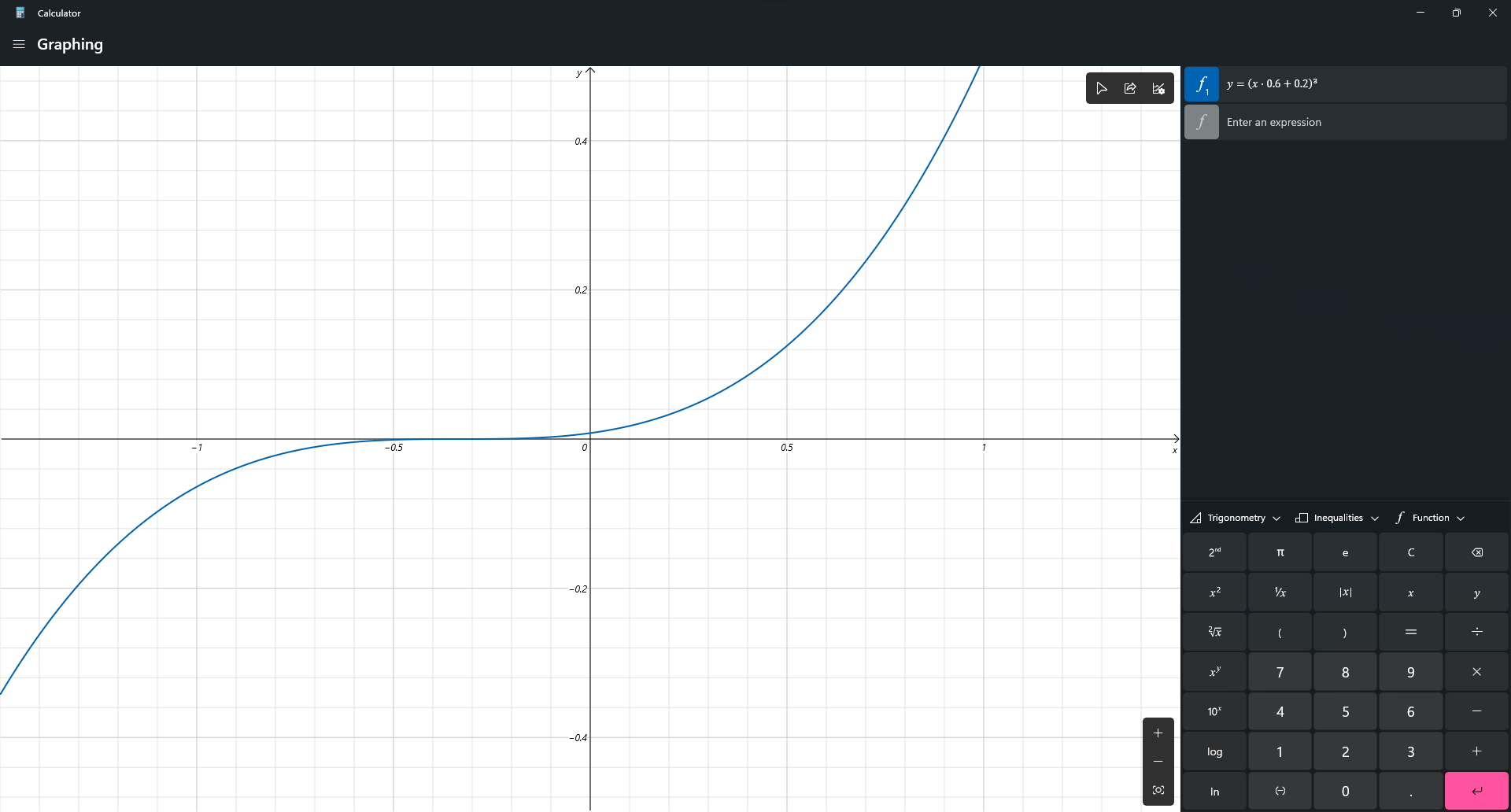
This mod change it. Instead of a cubic function, the sensitivity will be processed in a linear scale. So now, if you change your DPI from 400 up-to 1600, and your sens from 200% down-to 50%, you will feel exactly the same!
## _Bonus Feature:_
`/sens` to change your sensitivity (Max: 1, Min: 0), based on (https://modrinth.com/mod/advsensitivity). It supports Float value so you can make your sens 8 digits, like: 0. 0000001 (Why you need so many '0'?)
## _Why I create this mod?_
Long time ago, when I modify Timeless and Classic mod (the original on 1. 18. 2 one, not TAC:Z), I find zoom sensitivity is so wrong (it's faster than I expect). After 3 hours digging through the code, I found that the way Minecraft process mouse sens is so weird compared to other games. Therefore, I decide to create a mod to change it. After all, I'm a CS player who have fun when creating config files instead of actually playing the game.
## _Technical detail_
I use a single mixin class to change a variable in `updateMouse()` method.
## _Planning_
- Custom /m_yaw and /m_pitch like CS2, bonus, /fov
## _Credit_
- Feature Image: (https://x.com/Mebig_Animation/status/1815454891533619342/photo/1)
📊 Mod Details
- Game
- Minecraft Mods
- Author
- Itsuka_Hiro
- Version
- 0.3.1
- Downloads
- 2,967
- Endorsements
- 22
- Category
- cursed
- Created
- 2/25/2025
- Updated
- 5/20/2025
- Game Versions
- 1.21, 1.21.1, 1.21.2, 1.21.3, 1.21.4
- Tags
- cursed, optimization, utility
🔧 How to Install Minecraft Mods Mods
Download from Modrinth. Use Prism Launcher or drop into your mods folder.
📖 Full step-by-step install guide for Minecraft Mods →
Visit the official mod page for specific installation instructions for this mod.
🎮 Need cheat codes or console commands? Check ur gaming wiki for Minecraft Mods commands, item IDs, and more.
❓ Frequently Asked Questions
Which Minecraft Mods versions does Linear Sensitivity support?
The author lists 1.21, 1.21.1, 1.21.2, 1.21.3, 1.21.4, 1.21.5. Other versions may work but are untested by the author.
What is the latest version of Linear Sensitivity?
Version 0.3.1, published 2025-05-20 with 2,967 downloads recorded at the source.
Keep browsing — more Minecraft Mods mods await