Lava Java
⚪ Last updated 2023⚠️ Install Order · 2 steps
Install in this order, then this mod last — most mods fail to load without their framework and dependencies in place.
🖼️ Gallery (2 images)
🔍 Analysis
- 👍 0.9% endorsement rate
- 🏆 #1 of 37 economy mods in this game by downloads
📋 About This Mod
# Lava Java Lava Java's Lava Javas will warm your blackened bones! Each cup is a melody of unique flavors that will ensure you are able to face the rest of your day. With Lava Javas starting at only 4 gold nuggets, our prices are affordable by any standard. Our friendly staff are always working to improve, so every time you visit they will have new and exciting Lava Javas waiting for you to try. Please forward all complains and concerns to the branch manager. Lava Java adds a structure to the Nether: the Lava Java Café. Within the café is a pair of friendly baristas who will sell you snacks and Lava Javas in exchange for gold nuggets. Each Lava Java will grant one or more buffs based on the drink's flavor and freshness. As you trade with a particular barista it will become more skilled, selling more drinks at once and making more complex brews. ## Data Packs Lava Java uses datapacks to determine the flavors that drinks can have. It looks for json files under data/lavajava/lava_java_flavor. They are formatted like so: ``` { "flavorID": "spellbound:bubbly", "statusID": "spellbound:shielded", "isDrawback": false, "duration": 7200, "magnitude": 4, "weight": 30, "value": 15, "namePriority": 0, "exclusions": } ``` **flavorID**: the ID of your flavor. This is mandatory. Unlike the name of the json file, this must be unique. Otherwise it may conflict with other flavors. **statusID**: the ID of the status effect your flavor provides. This is mandatory. **isDrawback**: determines if the flavor decreases or increases the cost of a Lava Java. Defaults to false. In the future, may effect the conditions under which it can be selected. **duration**: how many ticks the flavor's effect will last. This is mandatory, and must be a positive integer. **magnitude**: determines the magnitude of the effect. This is optional, but recommended. If provided, must be a non-negative integer. Defaults to 0. Keep in mind that internally effect magnitudes are one lower than they are displayed in game. Strength II is actually magnitude 1, for example. **weight**: determines how common the flavor is. This is mandatory, and must be a positive integer. Flavor generation may be seen like a raffle where tickets are pulled from a box, and this is how many tickets point to this flavor if chosen. 45 is for common flavors like Sweet or Creamy, 30 is for flavors that are neither common nor uncommon like Spicy, and 10 is for rare flavors like Thick or Filling. Generally, superior versions of a flavor (such as Extra Spicy) should be 5 times as rare as their lesser variants. **value**: how much the flavor influences prices. This is mandatory, and must be a positive integer. A Lava Java with just your flavor will cost about one quarter this number. If the flavor is negative, it instead determines how much the price is reduced. Generally, superior versions of a flavor (such as Very Creamy) should cost twice as much as their lesser variants. **namePriority**: currently does nothing. This is optional. If provided, must be an integer. Default value is 0. Once implemented, it will determine the order that flavors are listed in a Lava Java's name. Higher priorities will be listed later in the drinks name (a Sweet Spicy Lava Java rather than a Spicy Sweet Lava Java) **exclusions**: a list of flavorIDs that prevents this flavor from co-existing with the listed flavors. This is optional. If it would be selected but an excluded flavor was first, or if an excluded flavor has been selected but it had been selected first, than the second flavor will be rerolled. _These flavors do not need to exist._ This allows you to exclude flavors that come from other mods, even if you do not use that mod as a dependency. Once you have created your flavor, add a line to your language file in the format `"flavor.spellbound.bubbly": "Bubbly",` to set the display name of the flavor.
# Lava Java
Lava Java's Lava Javas will warm your blackened bones! Each cup is a melody of unique flavors that will ensure you are able to face the rest of your day. With Lava Javas starting at only 4 gold nuggets, our prices are affordable by any standard. Our friendly staff are always working to improve, so every time you visit they will have new and exciting Lava Javas waiting for you to try. Please forward all complains and concerns to the branch manager.
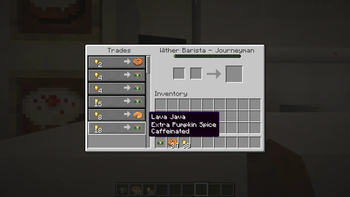
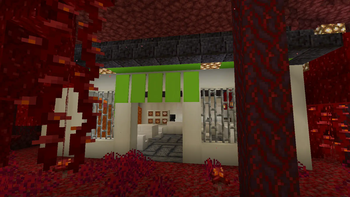
Lava Java adds a structure to the Nether: the Lava Java Café. Within the café is a pair of friendly baristas who will sell you snacks and Lava Javas in exchange for gold nuggets. Each Lava Java will grant one or more buffs based on the drink's flavor and freshness. As you trade with a particular barista it will become more skilled, selling more drinks at once and making more complex brews.
## Data Packs
Lava Java uses datapacks to determine the flavors that drinks can have. It looks for json files under data/lavajava/lava_java_flavor. They are formatted like so:
``` { "flavorID": "spellbound:bubbly", "statusID": "spellbound:shielded", "isDrawback": false, "duration": 7200, "magnitude": 4, "weight": 30, "value": 15, "namePriority": 0, "exclusions": [ "spellbound:extra_bubbly", "spellbound:very_bubbly" ] } ``` flavorID: the ID of your flavor. This is mandatory. Unlike the name of the json file, this must be unique. Otherwise it may conflict with other flavors.
statusID: the ID of the status effect your flavor provides. This is mandatory.
isDrawback: determines if the flavor decreases or increases the cost of a Lava Java. Defaults to false. In the future, may effect the conditions under which it can be selected.
duration: how many ticks the flavor's effect will last. This is mandatory, and must be a positive integer.
magnitude: determines the magnitude of the effect. This is optional, but recommended. If provided, must be a non-negative integer. Defaults to 0. Keep in mind that internally effect magnitudes are one lower than they are displayed in game. Strength II is actually magnitude 1, for example.
weight: determines how common the flavor is. This is mandatory, and must be a positive integer. Flavor generation may be seen like a raffle where tickets are pulled from a box, and this is how many tickets point to this flavor if chosen. 45 is for common flavors like Sweet or Creamy, 30 is for flavors that are neither common nor uncommon like Spicy, and 10 is for rare flavors like Thick or Filling. Generally, superior versions of a flavor (such as Extra Spicy) should be 5 times as rare as their lesser variants.
value: how much the flavor influences prices. This is mandatory, and must be a positive integer. A Lava Java with just your flavor will cost about one quarter this number. If the flavor is negative, it instead determines how much the price is reduced. Generally, superior versions of a flavor (such as Very Creamy) should cost twice as much as their lesser variants.
namePriority: currently does nothing. This is optional. If provided, must be an integer. Default value is 0. Once implemented, it will determine the order that flavors are listed in a Lava Java's name. Higher priorities will be listed later in the drinks name (a Sweet Spicy Lava Java rather than a Spicy Sweet Lava Java)
exclusions: a list of flavorIDs that prevents this flavor from co-existing with the listed flavors. This is optional. If it would be selected but an excluded flavor was first, or if an excluded flavor has been selected but it had been selected first, than the second flavor will be rerolled. _These flavors do not need to exist._ This allows you to exclude flavors that come from other mods, even if you do not use that mod as a dependency.
Once you have created your flavor, add a line to your language file in the format `"flavor.spellbound.bubbly": "Bubbly",` to set the display name of the flavor.
📊 Mod Details
- Game
- Minecraft Mods
- Author
- TigerOfTroy
- Version
- 0.4.4
- Downloads
- 2,867
- Endorsements
- 25
- Category
- economy
- Created
- 7/6/2023
- Updated
- 11/12/2023
- Game Versions
- 1.20, 1.20.1, 1.20.2, 1.20.3, 1.20.4
- Tags
- economy, food, worldgen
🔧 How to Install Minecraft Mods Mods
Download from Modrinth. Use Prism Launcher or drop into your mods folder.
📖 Full step-by-step install guide for Minecraft Mods →
Visit the official mod page for specific installation instructions for this mod.
🎮 Need cheat codes or console commands? Check ur gaming wiki for Minecraft Mods commands, item IDs, and more.
❓ Frequently Asked Questions
Which Minecraft Mods versions does Lava Java support?
The author lists 1.20, 1.20.1, 1.20.2, 1.20.3, 1.20.4. Other versions may work but are untested by the author.
What is the latest version of Lava Java?
Version 0.4.4, published 2023-11-12 with 2,867 downloads recorded at the source.
Keep browsing — more Minecraft Mods mods await