Latitude
🟢 Updated this month⚠️ Install Order · 2 steps
Install in this order, then this mod last — most mods fail to load without their framework and dependencies in place.
🖼️ Gallery (11 images)




🔍 Analysis
- 👍 1.5% endorsement rate — high engagement, a strong quality signal
- 🏆 #22 of 566 adventure mods in this game by downloads
📋 About This Mod
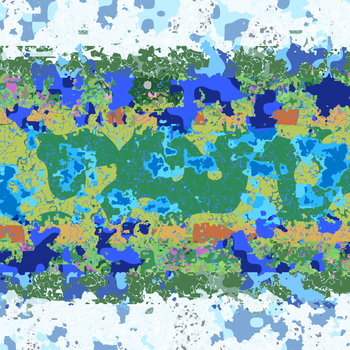
Latitude overhauls world generation so biomes follow realistic latitude bands—from equatorial jungles to polar tundras.
!(https://cdn.modrinth.com/data/cached_images/f36c999956a9adc7ac281851fa7f4f75edac35e5.png)
_A finite world with latitude-based geography and climate bands._
Latitude distributes Minecraft’s biomes according to latitude. Thick jungles and sprawling savannas stretch out from the equator, gradually giving way to cooler climates as you head north or south. Near the poles, snow blankets the landscape and water freezes.
I built Latitude to make Minecraft worlds feel finite and real, and to make the direction you travel matter.
## 🗺️ Latitude-based geography
Five climate bands extend from the equator at the center of the world toward the poles at its northern and southern edges:
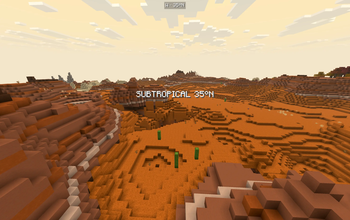
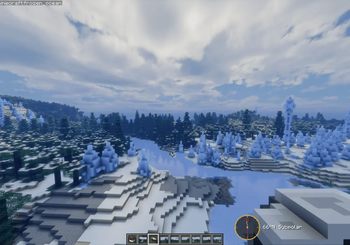
| Zone | Character | Typical biomes | |---|---|---| | 🌴 Tropical | Hot, humid, and lush | Jungle, Bamboo Jungle, Mangrove Swamp, Savanna | | ☀️ Subtropical | Warm and varied, drier toward the edges | Savanna, Desert, Badlands, Plains | | 🌿 Temperate | Mild and forested | Forest, Birch Forest, Meadow | | 🌨️ Subpolar | Cold, with increasingly sparse vegetation | Taiga, Snowy Plains, Grove | | ❄️ Polar | Frozen and forbidding | Snowy Plains, Ice Spikes, Frozen Ocean |
The bands blend gradually, so the landscape changes as you travel without abrupt jumps between hot and cold climates.
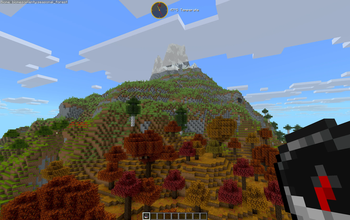
## ⛰️ Snow-capped mountains and tree lines
Forests thin as you climb. Above the tree line, grass and sparse foliage give way to bare rock and snow on the highest peaks.
## 🥾 Wanderlust
Latitude’s geography affects what you encounter along the way:
- Freezing near the poles. The cold becomes a hazard as you approach either pole.
- Fog at the world’s edges. Gradually thickening fog obscures the vanilla world border.
- Climate and hemisphere titles. Cinematic titles announce your crossings between climate bands and hemispheres.
## 🌐 Finite by design
Pick a world size! Latitude worlds are finite, with six sizes to choose from.
| Size | Dimensions in blocks | |---|---| | Itty Bitty | 7,500 × 7,500 | | Tiny | 10,000 × 10,000 | | Small | 15,000 × 15,000 | | Regular | 20,000 × 20,000 | | Large | 30,000 × 30,000 | | Ginormous | 40,000 × 40,000 |
_World size scales the whole climate system, including band widths, borders, and latitude calculations. Smaller worlds bring the climate bands closer together while keeping the full range from equator to poles. With custom biome packs installed, though, smaller worlds may not have room for every biome._
You can also choose your spawn zone. Start near the equator for jungles and warm weather, pick a milder climate, or head straight for the polar snow! ⛄️ Now with more snowballs (probably)!!
## 🧭 Navigate with ease
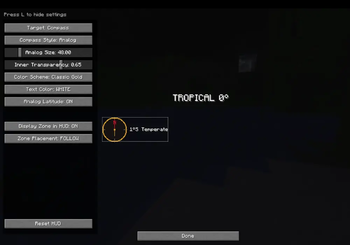
Latitude ships a built-in navigation HUD, fully customizable:
- Compass — digital (cardinal, 8-way, or degrees) or analog with different color themes.
- Latitude readout — your live position in the world
- Biome & zone detail — see where you are, or not!
- Customizable — size, color, opacity, position
HUD Studio: press F9 in-game (rebindable) to open a live editing screen — drag the title, compass, and location readout wherever you want, snap-to-grid or free. A quick keybind toggles the compass on and off.
For server operators, release builds include a small `/latitude` command set (`here`, `explainHere`, `probe`, `tpLat`, `tpBand`) for inspecting and navigating the climate map.
## 🧩 Compatibility
Latitude works through Minecraft's biome-tag system. Pairs nicely with terrain-shaping mods like Tectonic, Geophilic, and William Wyther's Overhauled Overworld. Custom biome support places biomes into the right climate bands automatically. Currently supported packs include Biomes O' Plenty, Terralith, and CliffTree, with more to come.
> ℹ️ A note on big biome-pack stacks: each climate band draws from a finite pool, so the more packs you stack, the smaller each biome's share becomes — you won't necessarily see every biome from every pack. The mix stays coherent and climate-appropriate. Vanilla biomes are given preference.
## 🔭 What's next — Latitude 2. 0 🌏
Latitude 2. 0 is in production. The larger overhaul being showcased publicly — with its more elaborate mechanics — is a separate line and still in development: expanded biome support, broader worlds, and more earthlike generation shaped by continents, oceans, climate, and exploration. And all the cats you could ever want!!! 🐈⬛🐈
1. 5 is the final polish release of the 1.x line, and the best version of this idea to date.
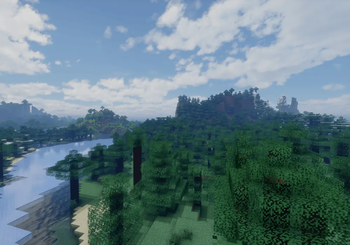
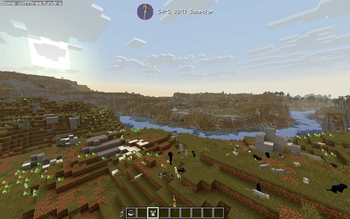
![A Minecraft screenshot showcasing a sprawling landscape generated by the Latitude mod. A wide, blue river winds th
📊 Mod Details
- Game
- Minecraft Mods
- Author
- Peetsa
- Version
- 26.2
- Downloads
- 2,869
- Endorsements
- 44
- Category
- adventure
- Created
- 1/26/2026
- Updated
- 9/7/2026
- Game Versions
- 26.2
- Tags
- adventure, game-mechanics, worldgen
🔧 How to Install Minecraft Mods Mods
Download from Modrinth. Use Prism Launcher or drop into your mods folder.
📖 Full step-by-step install guide for Minecraft Mods →
Visit the official mod page for specific installation instructions for this mod.
🎮 Need cheat codes or console commands? Check ur gaming wiki for Minecraft Mods commands, item IDs, and more.
❓ Frequently Asked Questions
Which Minecraft Mods versions does Latitude support?
The author lists 26.2. Other versions may work but are untested by the author.
What is the latest version of Latitude?
Version 26.2, published 2026-09-07 with 2,869 downloads recorded at the source.
Keep browsing — more Minecraft Mods mods await