Just Graves
🟡 Updated this year⚠️ Install Order · 3 steps
Install in this order, then this mod last — most mods fail to load without their framework and dependencies in place.
🖼️ Gallery (1 images)
🔍 Analysis
- 🏆 #379 of 909 fabric mods in this game by downloads
📋 About This Mod
# JustGraves **Version:** 1.0.0 **Fabric:** 1.21.8-1.21.10 **Dependency:** (https://modrinth.com/mod/collective) >=8.8 --- ## Overview JustGraves adds a simple yet powerful grave system to Minecraft that saves a player's inventory and XP upon death and allows them to retrieve it later. With **Collective** integration, even complex inventories are reliably serialized and restored. The mod is fully compatible with both server and client environments and integrates seamlessly into vanilla gameplay. --- ## Features - 🪦 **Grave System:** Stores XP and inventory on player death. - ⏱️ **Protection Time:** Graves can be protected for a configurable time before others can loot them. - 📜 **Grave Command:** `/graves` lists all your graves with locations and timestamps. - 🔄 **Loot & XP Recovery:** Players can reclaim their items and XP after death. - 🎵 **Sound & Feedback:** Visual and audio cues when opening a grave. - 🔗 **Collective Integration:** Uses Collective for reliable item serialization. - 🛠️ **Easy Configuration:** Protection times and messages can be adjusted in the config files. --- ## Installation 1. Install (https://fabricmc.net/use/) (>=0.15.0). 2. Install (https://www.curseforge.com/minecraft/mc-mods/fabric-api). 3. Install (https://modrinth.com/mod/collective) (>=8.8). 4. Place the `JustGraves` mod file in your `mods` folder. 5. Launch Minecraft with Fabric. --- ## Configuration - Default grave protection time: configurable via `GRAVE_PROTECTION_TIME`. - Messages and chat formatting can be customized in the mod files. - Fully server-synced; no additional plugins required. --- ## Commands - `/graves` – Shows a list of all your graves with coordinates and timestamps. --- ## FAQ **Q: Is Collective required?** A: Yes, JustGraves depends on Collective for proper item storage. Without it, the mod will not work. **Q: Can I loot other players' graves?** A: Only after the protection time has expired or if you are the owner. **Q: Is the mod multiplayer-friendly?** A: Yes, JustGraves works fully on multiplayer servers. --- ## License JustGraves is **MIT licensed**, with the note that it is an addon for **Collective**. See LICENSE for details. --- ## Changelog **1.0.0** - Initial release - Core grave and XP system - `/graves` command - Collective integration --- ## Support / Contact - **Discord:** (https://discord.gg/2rkPqrnBC5) - **Author:** Jakomi1 --- ## Tags Fabric, Minecraft 1.21, Graves, Death, XP, Loot, Server, Client, Collective, JustGraves
# JustGraves
- Version
- 1. 0. 0
- Fabric
- 1. 21. 8-1. 21. 10
- Dependency
- (https://modrinth.com/mod/collective) >=8. 8
## Overview
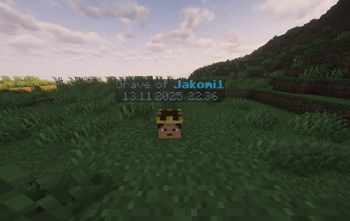
JustGraves adds a simple yet powerful grave system to Minecraft that saves a player's inventory and XP upon death and allows them to retrieve it later.
With Collective integration, even complex inventories are reliably serialized and restored. The mod is fully compatible with both server and client environments and integrates seamlessly into vanilla gameplay.
## Features
- 🪦 Grave System: Stores XP and inventory on player death.
- ⏱️ Protection Time: Graves can be protected for a configurable time before others can loot them.
- 📜 Grave Command: `/graves` lists all your graves with locations and timestamps.
- 🔄 Loot & XP Recovery: Players can reclaim their items and XP after death.
- 🎵 Sound & Feedback: Visual and audio cues when opening a grave.
- 🔗 Collective Integration: Uses Collective for reliable item serialization.
- 🛠️ Easy Configuration: Protection times and messages can be adjusted in the config files.
## Installation
1. Install (https://fabricmc.net/use/) (>=0. 15. 0). 2. Install (https://www.curseforge.com/minecraft/mc-mods/fabric-api). 3. Install (https://modrinth.com/mod/collective) (>=8. 8). 4. Place the `JustGraves` mod file in your `mods` folder. 5. Launch Minecraft with Fabric.
## Configuration
- Default grave protection time: configurable via `GRAVE_PROTECTION_TIME`.
- Messages and chat formatting can be customized in the mod files.
- Fully server-synced; no additional plugins required.
## Commands
- `/graves` – Shows a list of all your graves with coordinates and timestamps.
Q: Is Collective required? A: Yes, JustGraves depends on Collective for proper item storage. Without it, the mod will not work.
Q: Can I loot other players' graves? A: Only after the protection time has expired or if you are the owner.
Q: Is the mod multiplayer-friendly? A: Yes, JustGraves works fully on multiplayer servers.
JustGraves is MIT licensed, with the note that it is an addon for Collective. See LICENSE for details.
## Changelog
1. 0. 0 - Initial release - Core grave and XP system - `/graves` command - Collective integration
## Support / Contact
- Discord: (https://discord.gg/2rkPqrnBC5)
- Author: Jakomi1
Fabric, Minecraft 1. 21, Graves, Death, XP, Loot, Server, Client, Collective, JustGraves
📊 Mod Details
- Game
- Minecraft Mods
- Author
- Jakomi1
- Version
- 1.0.0
- Downloads
- 273
- Endorsements
- 1
- Category
- fabric
- Created
- 11/19/2025
- Updated
- 11/13/2025
- Game Versions
- 1.21.8, 1.21.9, 1.21.10
- Tags
- game-mechanics, utility
📦 Requires 1 Mod
This mod requires these to work — install them first.
🔧 How to Install Minecraft Mods Mods
Download from Modrinth. Use Prism Launcher or drop into your mods folder.
📖 Full step-by-step install guide for Minecraft Mods →
Visit the official mod page for specific installation instructions for this mod.
🎮 Need cheat codes or console commands? Check ur gaming wiki for Minecraft Mods commands, item IDs, and more.
❓ Frequently Asked Questions
What do I need installed before Just Graves?
It depends on 1 other mod: collective. Install that first — the mod will not load without it.
Which Minecraft Mods versions does Just Graves support?
The author lists 1.21.8, 1.21.9, 1.21.10. Other versions may work but are untested by the author.
What is the latest version of Just Graves?
Version 1.0.0, published 2025-11-13 with 273 downloads recorded at the source.
Keep browsing — more Minecraft Mods mods await