JukeBoxPlus
🟡 Updated this year⚠️ Install Order · 2 steps
Install in this order, then this mod last — most mods fail to load without their framework and dependencies in place.
🖼️ Gallery (2 images)

🔍 Analysis
- 👍 0.9% endorsement rate
- 🏆 #790 of 892 fabric mods in this game by downloads
📋 About This Mod
# JukeBoxPlus ## That Song Is Playing And You Don't Know What It Is It happens every session. You're building, exploring, caving — and Minecraft's music kicks in. That piano piece. That ambient hum. That track you've heard a thousand times over the past ten years but can never name. You open the options menu. You look at the jukebox. You try to figure it out from the note particles. Nothing. The song ends and you still don't know what it was. JukeBoxPlus fixes this with a clean, animated overlay that tells you exactly what's playing at all times. Track name. Artist. Duration. Progress bar. Playback controls. A full music library you can browse and search. Think of it like the "Now Playing" widget on your phone, except it lives inside Minecraft. One keybind. That's all it takes. Press H and everything is there. --- ## What You See When You Press H ### The Now Playing Bar At the top (or wherever you position it — fully configurable), a slim HUD bar shows: - The track name in clean text - The artist / source (C418, Lena Raine, disc name, biome, etc.) - A live progress bar that moves in real time - Time elapsed / time remaining - Play/pause indicator This bar is always visible when enabled. You glance up and you know what's playing. No menus. No commands. No interruption to what you're doing. The overlay scales with your GUI scale setting. It doesn't overlap with chat. It doesn't cover your hotbar. It sits in its own space. ### The Full Music Player GUI Press H (default keybind, remappable) and a full music player interface opens. This is where JukeBoxPlus goes from "nice overlay" to "actual music player." **Layout modeled after real music apps:** - Large album art display showing the music disc texture (or a category icon for ambient/biome music) - Track title and artist in prominent text - Full playback controls: play, pause, skip forward, skip back, shuffle, repeat (one track / all tracks) - Volume slider — adjust Minecraft music volume from here without opening the options menu - Progress bar with drag-to-seek (jump to any point in the track) - Category tabs across the top to filter by music type **Categories:** - **Discs** — All 13+ music discs (Cat, Blocks, Chirp, Far, Mall, Mellohi, Stal, Strad, Ward, 11, 13, Pigstep, Otherside, 5, Relic, Creator) - **Ambient** — Overworld ambient/background music that plays randomly while you explore - **Nether** — All Nether biome music tracks - **End** — End dimension music - **Creative** — Creative mode music - **Other** — Menu music, credits music, anything that doesn't fit the above Click a category tab and the library filters instantly. Scroll through the list. Click any track to play it immediately. **Shuffle & Repeat:** - Shuffle: randomizes the order of tracks in the current category - Repeat One: loops the current track - Repeat All: loops through the entire category - No Repeat: plays through the list once and stops These controls work exactly how you'd expect from any music app. No surprises. No weird Minecraft-specific logic. Standard playback behavior. ### Music Library Browser Below the playback controls, a scrollable list shows every track in the selected category. Each entry displays: - Track name - Artist - Duration - Playing indicator (animated bars when that track is active) Click to play. Simple as that. The list is searchable — type to filter tracks by name. Useful when you have dozens of tracks and want to find a specific one fast. The library updates dynamically. If a mod adds new music to the game (like a music disc mod or a biome music expansion), JukeBoxPlus detects it and adds the tracks to the library automatically. --- ## Who Is This For? **Players Who Actually Listen to Minecraft's Music** Minecraft has incredible music. C418's compositions are iconic. Lena Raine's additions are beautiful. But most players have no idea what the tracks are called or who made them. JukeBoxPlus gives that context. You hear a song, you see the name, you can look it up later, add it to your real playlists, whatever. **Builders Who Play With Music On** If you build with Minecraft's soundtrack playing — and a lot of builders do because it's genuinely perfect background music — JukeBoxPlus lets you control what plays without interrupting your flow. Skip a track that doesn't fit the mood. Repeat one that does. All from the overlay. **Content Creators / Streamers** Viewers always ask "what song is that?" in chat. With the Now Playing overlay visible on screen, you never have to answer that question again. The track name is right there. Some streamers use it as a permanent on-screen element. **Players With Music Mods** Running a mod that adds new music discs? A mod that adds ambient music to biomes? JukeBoxPlus picks up those tracks automatically. If it plays through Minecraft's audio system, it shows up in the library. **Completionists** Want to hear every Minecraft track? The library shows you everything available
# JukeBoxPlus
## That Song Is Playing And You Don't Know What It Is
It happens every session. You're building, exploring, caving — and Minecraft's music kicks in. That piano piece. That ambient hum. That track you've heard a thousand times over the past ten years but can never name.
You open the options menu. You look at the jukebox. You try to figure it out from the note particles. Nothing. The song ends and you still don't know what it was.
JukeBoxPlus fixes this with a clean, animated overlay that tells you exactly what's playing at all times. Track name. Artist. Duration. Progress bar. Playback controls. A full music library you can browse and search. Think of it like the "Now Playing" widget on your phone, except it lives inside Minecraft.
One keybind. That's all it takes. Press H and everything is there.
## What You See When You Press H
### The Now Playing Bar
At the top (or wherever you position it — fully configurable), a slim HUD bar shows:
- The track name in clean text
- The artist / source (C418, Lena Raine, disc name, biome, etc.)
- A live progress bar that moves in real time
- Time elapsed / time remaining
- Play/pause indicator
This bar is always visible when enabled. You glance up and you know what's playing. No menus. No commands. No interruption to what you're doing.
The overlay scales with your GUI scale setting. It doesn't overlap with chat. It doesn't cover your hotbar. It sits in its own space.
### The Full Music Player GUI
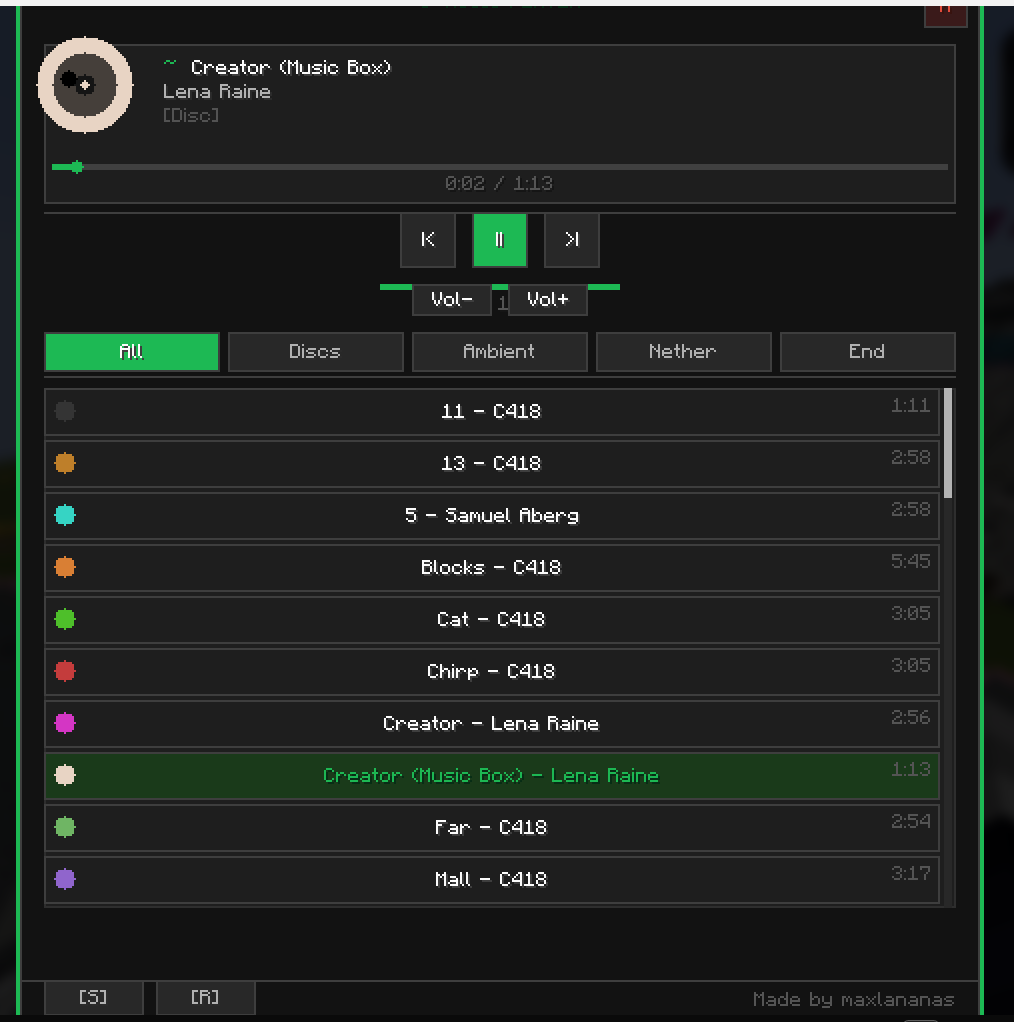
Press H (default keybind, remappable) and a full music player interface opens. This is where JukeBoxPlus goes from "nice overlay" to "actual music player."
Layout modeled after real music apps: - Large album art display showing the music disc texture (or a category icon for ambient/biome music) - Track title and artist in prominent text - Full playback controls: play, pause, skip forward, skip back, shuffle, repeat (one track / all tracks) - Volume slider — adjust Minecraft music volume from here without opening the options menu - Progress bar with drag-to-seek (jump to any point in the track) - Category tabs across the top to filter by music type
Categories: - Discs — All 13+ music discs (Cat, Blocks, Chirp, Far, Mall, Mellohi, Stal, Strad, Ward, 11, 13, Pigstep, Otherside, 5, Relic, Creator) - Ambient — Overworld ambient/background music that plays randomly while you explore - Nether — All Nether biome music tracks - End — End dimension music - Creative — Creative mode music - Other — Menu music, credits music, anything that doesn't fit the above
Click a category tab and the library filters instantly. Scroll through the list. Click any track to play it immediately.
Shuffle & Repeat: - Shuffle: randomizes the order of tracks in the current category - Repeat One: loops the current track - Repeat All: loops through the entire category - No Repeat: plays through the list once and stops
These controls work exactly how you'd expect from any music app. No surprises. No weird Minecraft-specific logic. Standard playback behavior.
### Music Library Browser
Below the playback controls, a scrollable list shows every track in the selected category. Each entry displays:
- Track name
- Artist
- Duration
- Playing indicator (animated bars when that track is active)
Click to play. Simple as that. The list is searchable — type to filter tracks by name. Useful when you have dozens of tracks and want to find a specific one fast.
The library updates dynamically. If a mod adds new music to the game (like a music disc mod or a biome music expansion), JukeBoxPlus detects it and adds the tracks to the library automatically.
## Who Is This For?
Players Who Actually Listen to Minecraft's Music Minecraft has incredible music. C418's compositions are iconic. Lena Raine's additions are beautiful. But most players have no idea what the tracks are called or who made them. JukeBoxPlus gives that context. You hear a song, you see the name, you can look it up later, add it to your real playlists, whatever.
Builders Who Play With Music On If you build with Minecraft's soundtrack playing — and a lot of builders do because it's genuinely perfect background music — JukeBoxPlus lets you control what plays without interrupting your flow. Skip a track that doesn't fit the mood. Repeat one that does. All from the overlay.
Content Creators / Streamers Viewers always ask "what song is that?" in chat. With the Now Playing overlay visible on screen, you never have to answer that question again. The track name is right there. Some streamers use it as a permanent on-screen element.
Players With Music Mods Running a mod that adds new music discs? A mod that adds ambient music to biomes? JukeBoxPlus picks up those tracks automatically. If it plays through Minecraft's audio system, it shows up in the library.
Completionists Want to hear every Minecraft track? The library shows you everything available
📊 Mod Details
- Game
- Minecraft Mods
- Author
- maxlananass
- Version
- 3.6.1
- Downloads
- 1,254
- Endorsements
- 11
- Category
- fabric
- Created
- 12/8/2025
- Updated
- 7/1/2026
- Game Versions
- 1.21.10, 1.21.11
- Tags
- game-mechanics, social, utility
🔧 How to Install Minecraft Mods Mods
Download from Modrinth. Use Prism Launcher or drop into your mods folder.
📖 Full step-by-step install guide for Minecraft Mods →
Visit the official mod page for specific installation instructions for this mod.
🎮 Need cheat codes or console commands? Check ur gaming wiki for Minecraft Mods commands, item IDs, and more.
❓ Frequently Asked Questions
Which Minecraft Mods versions does JukeBoxPlus support?
The author lists 1.21.10, 1.21.11. Other versions may work but are untested by the author.
What is the latest version of JukeBoxPlus?
Version 3.6.1, published 2026-07-01 with 1,254 downloads recorded at the source.
Keep browsing — more Minecraft Mods mods await