HUD bars
🟡 Updated this year⚠️ Install Order · 2 steps
Install in this order, then this mod last — most mods fail to load without their framework and dependencies in place.
🖼️ Gallery (1 images)
🔍 Analysis
- 👍 0.4% endorsement rate
- 🏆 #116 of 162 cursed mods in this game by downloads
📋 About This Mod
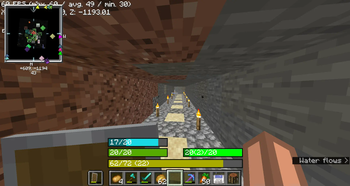
This mod replaces the - health bar - hunger bar - armor bar - xp bar with actual bars with numbers !(https://cdn.modrinth.com/data/cached_images/a99dddc5953d8bed6a9ece4651a17dbe13b38b40.png) ### Health Bar - **Format**: Displays as `"current/maximum"`, where `current` is the player's current health (including absorption), and `maximum` is the total health capacity. - Example: `20/20` - **Color**: - **Normal**: `#55AA00` (green) - **With Absorption**: `#AAAA00` (yellow) - **Poison Effect**: `#004400` (dark green) - **Wither Effect**: `#000000` (black) - **Frozen State**: `#00FFFF` (cyan) - **Border Color**: - **Blinking and Health Changed**: `#FFFFFF` (white) - **Blinking without Health Change**: `#FF0000` (red) - **Health Changed without Blinking**: `#FF80FF` (light purple) - **No Change**: `#000000` (black) ### Food Bar - **Format**: Displays as `"current(saturation)/maximum"`, where `current` is the player's current food level and `saturation` is the saturation level. - Example: `15(5)/20` - **Color**: - **Hunger Effect**: `#AA55AA` (purple) - **Saturation Effect**: `#00FF00` (green) - **Full** (20 food levels): `#00FF00` (green) - **High (18-19 food levels)**: `#33FF00` (bright green) - **Moderate (7-17 food levels)**: `#66FF00` (lime green) - **Low (1-6 food levels)**: `#FFFF00` (yellow) - **Empty**: `#FF0000` (red) - **Saturation Overlay**: - **Color**: A darker shade of the food bar color, indicating the saturation level within the food bar. - **Example**: If the food bar is `#00FF00` (green) and saturation is high, the overlay might be `#007F00` (darker green). ### Armor Bar - **Format**: Displays as `"current/maximum"`, where `current` is the player's current armor level. - Example: `10/20` - **Color**: - Transitions from `#AA` to `#FF` in red-green-blue channels as armor level increases, creating a gradient from grey to green: - **Low Armor**: More red, less green - **High Armor**: More green, less red - **Example**: At low armor, you might see `#AA5555` (greyish-red) and at high armor, you might see `#55FF55` (green). - **Toughness Overlay**: - **Color**: A darker shade of the armor bar color, indicating the armor toughness level within the armor bar. - **Example**: If the armor bar is `#55FF55` (green) and toughness is high, the overlay might be `#2A7F2A` (darker green). ### Experience Bar - **Format**: Displays as `"current/required (level)"`, where `current` is the amount of experience gained towards the next level, `required` is the total experience needed for the next level, and `level` is the current experience level. - Example: `150/300 (10)` - **Color**: - **Experience Bar**: `#AAAA00` (yellow)
This mod replaces the - health bar - hunger bar - armor bar - xp bar
with actual bars with numbers
!(https://cdn.modrinth.com/data/cached_images/a99dddc5953d8bed6a9ece4651a17dbe13b38b40.png)
### Health Bar
- Format: Displays as `"current/maximum"`, where `current` is the player's current health (including absorption), and `maximum` is the total health capacity.
- - Example: `20/20`
- Color:
- - Normal: `#55AA00` (green)
- - With Absorption: `#AAAA00` (yellow)
- - Poison Effect: `#004400` (dark green)
- - Wither Effect: `#000000` (black)
- - Frozen State: `#00FFFF` (cyan)
- Border Color:
- - Blinking and Health Changed: `#FFFFFF` (white)
- - Blinking without Health Change: `#FF0000` (red)
- - Health Changed without Blinking: `#FF80FF` (light purple)
- - No Change: `#000000` (black)
### Food Bar
- Format: Displays as `"current(saturation)/maximum"`, where `current` is the player's current food level and `saturation` is the saturation level.
- - Example: `15(5)/20`
- Color:
- - Hunger Effect: `#AA55AA` (purple)
- - Saturation Effect: `#00FF00` (green)
- - Full (20 food levels): `#00FF00` (green)
- - High (18-19 food levels): `#33FF00` (bright green)
- - Moderate (7-17 food levels): `#66FF00` (lime green)
- - Low (1-6 food levels): `#FFFF00` (yellow)
- - Empty: `#FF0000` (red)
- Saturation Overlay:
- - Color: A darker shade of the food bar color, indicating the saturation level within the food bar.
- - Example: If the food bar is `#00FF00` (green) and saturation is high, the overlay might be `#007F00` (darker green).
### Armor Bar
- Format: Displays as `"current/maximum"`, where `current` is the player's current armor level.
- - Example: `10/20`
- Color:
- - Transitions from `#AA` to `#FF` in red-green-blue channels as armor level increases, creating a gradient from grey to green:
- - Low Armor: More red, less green
- - High Armor: More green, less red
- - Example: At low armor, you might see `#AA5555` (greyish-red) and at high armor, you might see `#55FF55` (green).
- Toughness Overlay:
- - Color: A darker shade of the armor bar color, indicating the armor toughness level within the armor bar.
- - Example: If the armor bar is `#55FF55` (green) and toughness is high, the overlay might be `#2A7F2A` (darker green).
### Experience Bar
- Format: Displays as `"current/required (level)"`, where `current` is the amount of experience gained towards the next level, `required` is the total experience needed for the next level, and `level` is the current experience level.
- - Example: `150/300 (10)`
- Color:
- - Experience Bar: `#AAAA00` (yellow)
📊 Mod Details
- Game
- Minecraft Mods
- Author
- BRNSystems
- Version
- 1.1.6
- Downloads
- 2,286
- Endorsements
- 9
- Category
- cursed
- Created
- 8/25/2024
- Updated
- 12/29/2025
- Game Versions
- 1.21.11
- Tags
- cursed, utility
🔧 How to Install Minecraft Mods Mods
Download from Modrinth. Use Prism Launcher or drop into your mods folder.
📖 Full step-by-step install guide for Minecraft Mods →
Visit the official mod page for specific installation instructions for this mod.
🎮 Need cheat codes or console commands? Check ur gaming wiki for Minecraft Mods commands, item IDs, and more.
❓ Frequently Asked Questions
Which Minecraft Mods versions does HUD bars support?
The author lists 1.21.11. Other versions may work but are untested by the author.
What is the latest version of HUD bars?
Version 1.1.6, published 2025-12-29 with 2,286 downloads recorded at the source.
Keep browsing — more Minecraft Mods mods await