Have Another Pretty Particle. Yayyyyyyyy
🟠 Updated over a year ago⚠️ Install Order · 2 steps
Install in this order, then this mod last — most mods fail to load without their framework and dependencies in place.
🖼️ Gallery (7 images)

🔍 Analysis
- 👍 0.2% endorsement rate
- 🏆 #37 of 280 decoration mods in this game by downloads
📋 About This Mod
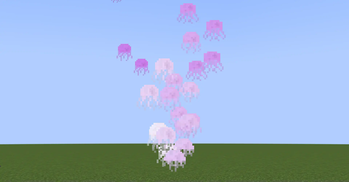
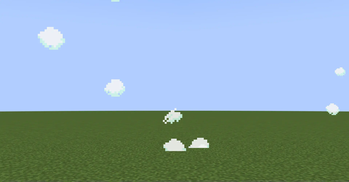
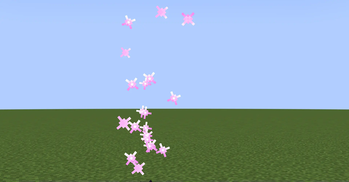
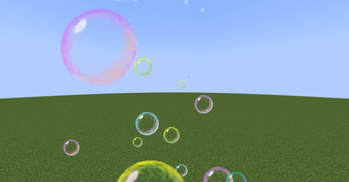
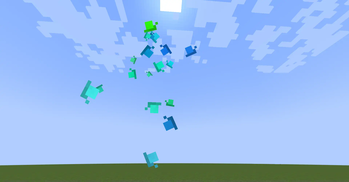
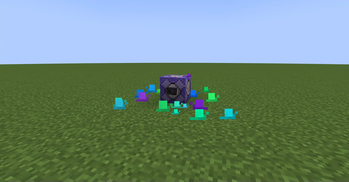
# Have Another Pretty Particle. Yayyyyyyyy!!! ## A collection of custom-made particles for use at BlanketCon 2025! Yippee particles!* Current particles include a colorable jellyfish, colorable snails, simple clouds which disappear upon hitting a block, colored bubbles, and a WIP sparkle particle! *Yippee creature not included (for now). # Particle How-To's Various how-to's for vanilla particle commands. ### Custom Parameters Add a `{<param name>:<param value>}` after the particle id. Example with param. name of `max_age` with an integer of `50`. ```Particle Command /particle happy:jellyfish{max_age:50} ~ ~1 ~ ``` For multiple parameters, add a comma between each parameter. Example with an extra param. name of `scale` with a float value of `5.0f` ```Particle Command /particle happy:jellyfish{max_age:50, scale:5.0f} ~ ~1 ~ ``` Floats can be specified with a decimal point added(e.g. `1.0` or `1.56`), or an "f' added (e.g. `1f`, `1.56f`). #### Vector3f Paremeter Vector3f parameters can be added with the value of `` Example with param. name of `velocity_after_hit` with a value of ``. ```Particle Command /particle happy:cloud{velocity_after_hit:} ~ ~1 ~ ``` **For colors using Vector3f's, it is expected that the values are between 0f and 1f.** # Particle Docs: Unless specified otherwise, all parameters can be assumed to be optional, using a default value if not added. _Note: This only applies to HAPPY's particles. Minecraft's particles almost always require their parameters to be given._ ## Jellyfish ```Particle ID happy:jellyfish ``` - `scale` (float): Determines the size of the particle. - `max_age` (int): Determines the max amount of ticks the particle will last. - `bounces` (int): Determines the amount of bounces the jellyfish will preform throughout its max age. This affects the animation speed, and distance traveled. - `color_mode` (int): ID of how to handle the start/end colors. - 0: Default - Transitions between 2 colors, as given from the start/end colors. - 1: Random color - If start/end colors are left as default, a random color from a preset list(mostly pastel colors) is chosen. If not default, the start/end colors are used as a range of where to pick the random color(e.g. white through black will choose any random color). - 2: Random transition colors - If start/end colors are left as default, 2 random colors from a preset list(mostly pastel colors) will be chosen as the transition colors. If not default, the start/end colors are used as a range of where to pick the random colors. - `start_color` (Vector3f): The start RGB color of a 2 color transition (Note: usage changes based on color mode - see above). - `end_color` (Vector3f): The end RGB color of a 2 color transition (Note: usage changes based on color mode - see above). ## Cloud ```Particle ID happy:cloud ``` - `scale` (float): Determines the size of the particle. - `max_age` (int): Determines the max amount of ticks the particle will last. - `max_age_random` (int): The max number of extra ticks the particle may last. A random number from 0 to this number will be picked and added to the max age. - `hits_until_fade` (int): The max number of times the particle can make contact with a block until it begins to fade out. There is a 10 tick delay between hits, meaning that if it is in a corner, it will count as hitting many blocks. - `fade_amount` (float): The amount of alpha/opacity to remove each tick while fading out. **Alpha is between 0 and 1**, meaning that uses "0" will result in no fade out, and "1" will result in instant fadeout. - `velocity_after_hit` (Vector3f): The amount of velocity to add after the particles comes in contact with a block. Note: This velocity is added after EVERY block hit, not just once! ## Bubble ```Particle ID happy:bubble ``` - `scale` (float): If added, sets the size of the particle. Otherwise, a random triangular with mode 0, deviation 1 is chosen. - `max_age` (int): Determines the max amount of ticks the particle will last. - `max_age_random` (int): The max number of extra ticks the particle may last, chosen randomly from 0 to that number. ## Snail ```Particle ID happy:snail ``` - `scale` (float): If added, sets the size of the particle. Otherwise, 0.15 + a small amount is chosen. - `max_age` (int): Determines the max amount of ticks the particle will last. - `gravity_strength` (float): The strength of gravity for the particle (A 20th of this value is subtracted from the Y velocity every tick) - `speed` (float): The speed of the particle after landing on the ground. Set to "0" to not move and immediately start shrinking upon landing. - `min_color` (Vector3f): The min RGB color when choosing a random color between "min_color" and "max_color". - `max_color` (Vector3f): The max RGB color when choosing a random color between "min_color" and "max_color". - If both `min_color` and `max_color` are not added, a random color(most of the ti
# Have Another Pretty Particle. Yayyyyyyyy!!! ## A collection of custom-made particles for use at BlanketCon 2025!
Yippee particles! Current particles include a colorable jellyfish, colorable snails, simple clouds which disappear upon hitting a block, colored bubbles, and a WIP sparkle particle!
Yippee creature not included (for now).
# Particle How-To's Various how-to's for vanilla particle commands. ### Custom Parameters Add a `{:}` after the particle id. Example with param. name of `max_age` with an integer of `50`. ```Particle Command /particle happy:jellyfish{max_age:50} ~ ~1 ~ ```
For multiple parameters, add a comma between each parameter. Example with an extra param. name of `scale` with a float value of `5. 0f` ```Particle Command /particle happy:jellyfish{max_age:50, scale:5. 0f} ~ ~1 ~ ```
Floats can be specified with a decimal point added(e.g. `1. 0` or `1. 56`), or an "f' added (e.g. `1f`, `1. 56f`).
#### Vector3f Paremeter
Vector3f parameters can be added with the value of `[
```Particle Command /particle happy:cloud{velocity_after_hit:} ~ ~1 ~ ``` For colors using Vector3f's, it is expected that the values are between 0f and 1f.
# Particle Docs:
Unless specified otherwise, all parameters can be assumed to be optional, using a default value if not added. _Note: This only applies to HAPPY's particles. Minecraft's particles almost always require their parameters to be given._
## Jellyfish ```Particle ID happy:jellyfish ``` - `scale` (float): Determines the size of the particle. - `max_age` (int): Determines the max amount of ticks the particle will last. - `bounces` (int): Determines the amount of bounces the jellyfish will preform throughout its max age. This affects the animation speed, and distance traveled. - `color_mode` (int): ID of how to handle the start/end colors. - 0: Default - Transitions between 2 colors, as given from the start/end colors. - 1: Random color - If start/end colors are left as default, a random color from a preset list(mostly pastel colors) is chosen. If not default, the start/end colors are used as a range of where to pick the random color(e.g. white through black will choose any random color). - 2: Random transition colors - If start/end colors are left as default, 2 random colors from a preset list(mostly pastel colors) will be chosen as the transition colors. If not default, the start/end colors are used as a range of where to pick the random colors. - `start_color` (Vector3f): The start RGB color of a 2 color transition (Note: usage changes based on color mode - see above). - `end_color` (Vector3f): The end RGB color of a 2 color transition (Note: usage changes based on color mode - see above).
## Cloud ```Particle ID happy:cloud ``` - `scale` (float): Determines the size of the particle. - `max_age` (int): Determines the max amount of ticks the particle will last. - `max_age_random` (int): The max number of extra ticks the particle may last. A random number from 0 to this number will be picked and added to the max age. - `hits_until_fade` (int): The max number of times the particle can make contact with a block until it begins to fade out. There is a 10 tick delay between hits, meaning that if it is in a corner, it will count as hitting many blocks. - `fade_amount` (float): The amount of alpha/opacity to remove each tick while fading out. Alpha is between 0 and 1, meaning that uses "0" will result in no fade out, and "1" will result in instant fadeout. - `velocity_after_hit` (Vector3f): The amount of velocity to add after the particles comes in contact with a block. Note: This velocity is added after EVERY block hit, not just once!
## Bubble ```Particle ID happy:bubble ``` - `scale` (float): If added, sets the size of the particle. Otherwise, a random triangular with mode 0, deviation 1 is chosen. - `max_age` (int): Determines the max amount of ticks the particle will last. - `max_age_random` (int): The max number of extra ticks the particle may last, chosen randomly from 0 to that number.
## Snail ```Particle ID happy:snail ``` - `scale` (float): If added, sets the size of the particle. Otherwise, 0. 15 + a small amount is chosen. - `max_age` (int): Determines the max amount of ticks the particle will last. - `gravity_strength` (float): The strength of gravity for the particle (A 20th of this value is subtracted from the Y velocity every tick) - `speed` (float): The speed of the particle after landing on the ground. Set to "0" to not move and immediately start shrinking upon landing. - `min_color` (Vector3f): The min RGB color when choosing a random color between "min_color" and "max_color". - `max_color` (Vector3f): The max RGB color when choosing a random color between "min_color" and "max_color". - If both `min_color` and `max_color` are not added, a random color(most of the ti
📊 Mod Details
- Game
- Minecraft Mods
- Author
- Superkat32
- Version
- 0.0.5
- Downloads
- 3,890
- Endorsements
- 7
- Category
- decoration
- Created
- 3/4/2025
- Updated
- 4/25/2025
- Game Versions
- 1.21.1
- Tags
- decoration, utility
🔧 How to Install Minecraft Mods Mods
Download from Modrinth. Use Prism Launcher or drop into your mods folder.
📖 Full step-by-step install guide for Minecraft Mods →
Visit the official mod page for specific installation instructions for this mod.
🎮 Need cheat codes or console commands? Check ur gaming wiki for Minecraft Mods commands, item IDs, and more.
❓ Frequently Asked Questions
Which Minecraft Mods versions does Have Another Pretty Particle. Yayyyyyyyy support?
The author lists 1.21.1. Other versions may work but are untested by the author.
What is the latest version of Have Another Pretty Particle. Yayyyyyyyy?
Version 0.0.5, published 2025-04-25 with 3,890 downloads recorded at the source.
Keep browsing — more Minecraft Mods mods await