Glore
🟡 Updated this year⚠️ Install Order · 2 steps
Install in this order, then this mod last — most mods fail to load without their framework and dependencies in place.
🖼️ Gallery (3 images)


🔍 Analysis
- 👍 0.1% endorsement rate
- 🏆 #125 of 335 decoration mods in this game by downloads
📋 About This Mod
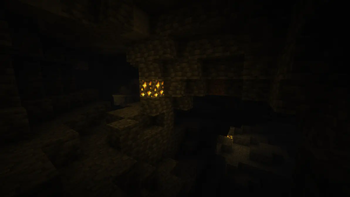
Glore is a mod that adds glowing ores and armor trims. You can adjust the configs to make any block or armor trim material emit various levels of light.
# Brightness ### Blocks - Diamond Ore: 15 - Emerald Ore: 12 - Gold Ore: 10 - Lapis Ore: 7 - Copper Ore: 7 - Iron Ore: 4 - Coal Ore: 4 - Redstone Ore: Dynamic, same behavior as vanilla. ### Armor Trims - Amethyst: 4 per piece. - Redstone: 2 per piece.
# Client / Server Info This mod can work when only on the client, when only on the server, and when on both, but there are issues with it not being on both. Client Only: Only the armor trim glowing effect works. Server Only: Only the block glowing effect works, and new blocks' light emissions do not take effect for clients until they rejoin the server or re-enter the chunk. Both: All effects work without issues.
# Colors To get the light this mod adds to be _colored_ you will need to use this mod alongside a shader that supports colored lighting. This mod was made and tested with Complementary Reimagined + Euphoria Patches' colored lighting setting enabled, but other shaders should work aswell.
# Config
1. 21
There is a main config json (glore.json) in the config folder, which allows you to adjust which blocks emit light, and how much light they emit.
Additionally, there is a second config "glore_trims.json" allowing you to adjust which armor trims make you emit light when worn, and how much light each armor piece emits.
1. 20.x
There are two config jsons for this mod found in the mods folder alongside the mod jar. They are generated when you open the game with the mod installed, and you can adjust them appropriately to change which blocks glow and how brightly they glow.
!(https://cdn.modrinth.com/data/cached_images/9735c54cba338805d96410cfa586d2fef0205bb3.png)
Discord: https://discord.gg/HHqKa8vTAN This mod may be used in any modpack.
[!(https://cdn.modrinth.com/data/cached_images/f620b8ad8be1fc7fba8ec6a160027021a980f6b8.png)](https://billing.kinetichosting.net/aff.php?aff=146)
📊 Mod Details
- Game
- Minecraft Mods
- Author
- Apothicon
- Version
- 1.4.2
- Downloads
- 200,347
- Endorsements
- 257
- Category
- decoration
- Created
- 9/25/2023
- Updated
- 3/28/2026
- Game Versions
- 26.1, 26.1.1, 26.1.2, 26.2
- Tags
- decoration, game-mechanics
🔧 How to Install Minecraft Mods Mods
Download from Modrinth. Use Prism Launcher or drop into your mods folder.
📖 Full step-by-step install guide for Minecraft Mods →
Visit the official mod page for specific installation instructions for this mod.
🎮 Need cheat codes or console commands? Check ur gaming wiki for Minecraft Mods commands, item IDs, and more.
❓ Frequently Asked Questions
Which Minecraft Mods versions does Glore support?
The author lists 26.1, 26.1.1, 26.1.2, 26.2. Other versions may work but are untested by the author.
What is the latest version of Glore?
Version 1.4.2, published 2026-03-28 with 200,347 downloads recorded at the source.
Keep browsing — more Minecraft Mods mods await