Gemini in Minecraft
🟠 Updated over a year ago⚠️ Install Order · 2 steps
Install in this order, then this mod last — most mods fail to load without their framework and dependencies in place.
🖼️ Gallery (4 images)
🔍 Analysis
- 👍 0.9% endorsement rate
- 🏆 #569 of 945 fabric mods in this game by downloads
📋 About This Mod
I close this mod. Cuz i hate everything what i do. Thx y'all for your downloadings and other things. It's only support 1. 21. 4...
[!(https://github.com/BehindThatTeam/GeminiInMinecraft/actions/workflows/build.yml/badge.svg)](https://github.com/BehindThatTeam/GeminiInMinecraft/actions/workflows/build.yml) # Gemini in Minecraft
Brought to you by Roflboy, with love for the Minecraft community. <3
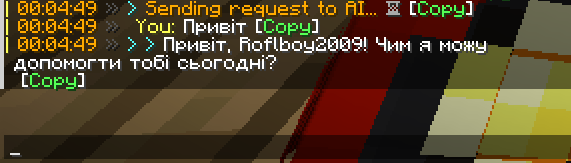
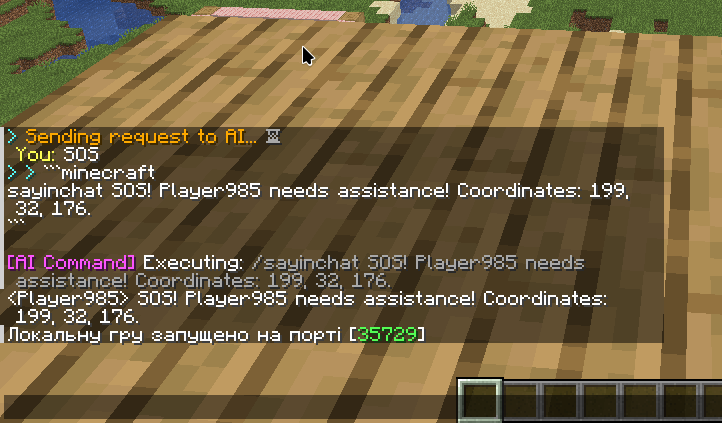
This Fabric mod integrates Google's Gemini AI into Minecraft, allowing you to interact with an AI assistant directly within the game. The AI can answer questions, provide information about your current environment, and even execute in-game commands (if enabled).
[!(https://img.youtube.com/vi/zDPOpKVD3qU/maxresdefault.jpg)](https://www.youtube.com/watch?v=zDPOpKVD3qU)
## Features
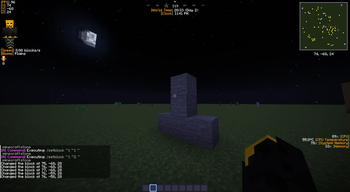
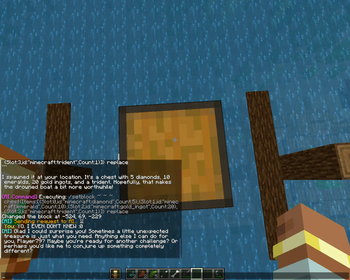
In-Game AI Chat: Ask Gemini questions and receive responses directly in your chat window. Context-Aware Responses: The AI has access to information about your current game state, including: Player coordinates (x, y, z) Current dimension Time of day and weather Game difficulty and mode Player health, food, and XP level Inventory and equipped items Ping and online players Command Execution (Optional): If enabled, Gemini can execute Minecraft commands based on your requests. Commands are provided in a `minecraft` code block within the AI's response. Conversation History (Optional): The mod can remember past conversations, allowing for more natural and context-aware interactions. The size of the conversation history is configurable. Configurable System Prompt: Customize the AI's behavior and personality by modifying the system prompt. A default prompt is provided, focusing on helpfulness and Minecraft-specific information. Customizable Model: Choose which Gemini model to use (default: `gemini-1. 5-flash`). Configurable maxOutputTokens: set maximum size of response, that will AI return (default: 200) Helpful Commands: Access a list of available commands using `/aihelp`. MOTD: Mod have messages of the day, that randomly chosen every time when player log in. Clickable Responses: AI responses are clickable, allowing you to easily follow up on previous messages or suggest new queries. Sound feedback: All actions are sounded.
## Dynamic Variables in System Prompt
The `systemMessage` supports several dynamic variables that are replaced with real-time game information when the AI is queried. This allows the AI to provide context-aware responses. Here's a list of the available variables:
`{username}`: Your Minecraft player name. `{x}`: Your current X-coordinate (formatted to two decimal places). `{y}`: Your current Y-coordinate (formatted to two decimal places). `{z}`: Your current Z-coordinate (formatted to two decimal places). `{time}`: The current world time (in ticks). `{timeOfDay}`: Indicates whether it's "day" or "night" based on the world time. `{health}`: Your current health (formatted to one decimal place, out of 20). `{food}`: Your current food level (out of 20). `{xp}`: Your current experience level. `{dimension}`: The name of the dimension you're currently in (e.g., "minecraft:overworld"). `{difficulty}`: The current game difficulty (e.g., "peaceful", "easy", "normal", "hard"). `{weather}`: The current weather condition ("clear" or "raining"). `{gameMode}`: Your current game mode (e.g., "survival", "creative", "adventure", "spectator"). `{mainHand}`: The item you're holding in your main hand, including the quantity (e.g., "1x Diamond Sword" or "nothing"). `{offHand}`: The item you're holding in your offhand, including the quantity (e.g., "1x Shield" or "nothing"). `{inventory}`: A comma-separated list of the items in your inventory (excluding armor), including quantities (e.g., "64x Cobblestone, 16x Iron Ingot" or "empty"). `{armor}`: A comma-separated list of your equipped armor, including durability (e.g., "Diamond Helmet (150/363), Iron Chestplate (200/240)" or "no armor"). `{ping}`: Your current ping to the server (in milliseconds). `{playerCount}`: The total number of players currently online. `{playerList}`: A comma-separated list of the names of all online players (e.g., "Player1, Player2, Player3" or "no other players").
These variables are automatically updated each time you send a query to the AI, ensuring that the responses are relevant to your current situation. You can use these variables in your custom `systemMessage` to tailor the AI's behavior.
## Commands
`/ai
📊 Mod Details
- Game
- Minecraft Mods
- Author
- BrokenByteOfCode
- Version
- 1.0.5
- Downloads
- 2,394
- Endorsements
- 22
- Category
- fabric
- Created
- 3/9/2025
- Updated
- 8/5/2025
- Game Versions
- 1.21, 1.21.1, 1.21.2, 1.21.3, 1.21.4
- Tags
- social, technology, utility
🔧 How to Install Minecraft Mods Mods
Download from Modrinth. Use Prism Launcher or drop into your mods folder.
📖 Full step-by-step install guide for Minecraft Mods →
Visit the official mod page for specific installation instructions for this mod.
🎮 Need cheat codes or console commands? Check ur gaming wiki for Minecraft Mods commands, item IDs, and more.
❓ Frequently Asked Questions
Which Minecraft Mods versions does Gemini in Minecraft support?
The author lists 1.21, 1.21.1, 1.21.2, 1.21.3, 1.21.4, 1.21.5. Other versions may work but are untested by the author.
What is the latest version of Gemini in Minecraft?
Version 1.0.5, published 2025-08-05 with 2,394 downloads recorded at the source.
Keep browsing — more Minecraft Mods mods await