Fired Pots
🟡 Updated this year⚠️ Install Order · 2 steps
Install in this order, then this mod last — most mods fail to load without their framework and dependencies in place.
🖼️ Gallery (3 images)
🔍 Analysis
- 👍 0.5% endorsement rate
- 🏆 #90 of 289 decoration mods in this game by downloads
📋 About This Mod
!(https://img.shields.io/badge/Mod%20Loaders-NeoForge%20%26%20Fabric-green?style=for-the-badge) (https://img.shields.io/badge/Curseforge-Page-orange?style=for-the-badge&logo=curseforge "Curseforge page")](https://www.curseforge.com/minecraft/mc-mods/fired-pots) (https://img.shields.io/badge/GitHub-Repository-blueviolet?style=for-the-badge&logo=github)](https://www.github.com/MincraftEinstein/FiredPots) (https://img.shields.io/badge/Discord-Einstein%27s%20Lab-blue?style=for-the-badge&logo=discord)](https://discord.gg/gSsaFAvrBM) ### **📘 Description** When decorated pots were first shown off at Minecraft Line 2020, they were made by placing a clay pot above a fire. This mod recreates that by adding clay pots and expanding the feature by adding clay flower pots as well. To create a decorated pot, you now must first craft a clay pot, which when placed can have sherds placed on it. To remove a sherd from a clay pot, use a brush on it. A clay pot or clay flower pot can be fired by placing it near a fire or campfire for 10 seconds. Sherds can be placed on a clay pot at any time during the firing process. The blocks that can be used to fire a clay pot can be customized with a tag located at: `data/fired_pots/tags/block/fires_clay_pot.json` <br> <details> <summary><b>📜 Terms of Use</b></summary> **You may** <br> ✅ Use this mod as a reference to understand and or create something of your own, as long as it is not a copy or recreation <br> ✅ Use this mod in modpacks with credit and one or more links to any of the project pages* <br> ✅ Edit for personal use <br> ✅ Use this mod for/in YouTube videos or streams with credit and one or more links to any of the project pages* <br> ✅ Create resource packs, data packs, and addon mods for this mod <br><br> **You may not** <br> ❌ Reupload/publish this mod to any website without explicit permission from me and one or more links to any of the project pages* <br> ❌ Redistibute edited or unedited assets** from this mod without permission from me and credit <br><br> \* Project pages include CurseForge, Modrinth, Planet Minecraft, GitHub <br> \** Assets include logos, banners, textures, models etc </details> (https://ko-fi.com/mincrafteinstein) --- ### **📷 Images** !(https://i.imgur.com/Vic5qQ4.png) !(https://i.imgur.com/FjTGn3c.png) !(https://i.imgur.com/kJ4P2ed.png) --- ### **🔧 For Developers** To add a new texture for your sherd when it is used on a clay pot, simply call `ClayPotSherdTextureRegistry.INSTANCE.register()` in your client initializer and pass in the sherd item and texture location relative to: `textures/entity/clay_pot/`. If a texture is not registered, it will attempt to get the texture used for the decorated pot. Additionally, make sure the sherd is also in the `minecraft:tags/item/decorated_pot_sherds` item tag so the sherd can be placed on clay pots. --- ### **💬 Translations** Feel free to translate this mod into any language or update existing translations. To get your translation into the mod, make a pull request on GitHub with the translated language file --- Want to play with your friends on a server? Get 15% off your first month with code `einstein`. Click (https://billing.kinetichosting.net/aff.php?aff=124) or on the banner below to get started! (https://i.imgur.com/u6Fn0I0.png)](https://billing.kinetichosting.net/aff.php?aff=124)
 [!(https://img.shields.io/badge/Curseforge-Page-orange?style=for-the-badge&logo=curseforge "Curseforge page")](https://www.curseforge.com/minecraft/mc-mods/fired-pots) [!(https://img.shields.io/badge/GitHub-Repository-blueviolet?style=for-the-badge&logo=github)](https://www.github.com/MincraftEinstein/FiredPots) [!(https://img.shields.io/badge/Discord-Einstein%27s%20Lab-blue?style=for-the-badge&logo=discord)](https://discord.gg/gSsaFAvrBM)
### 📘 Description
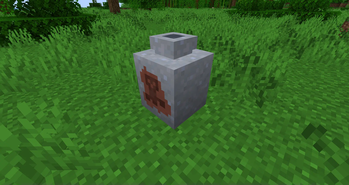
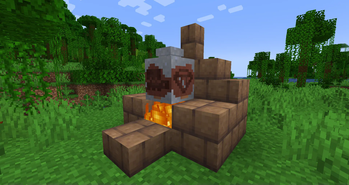
When decorated pots were first shown off at Minecraft Line 2020, they were made by placing a clay pot above a fire. This mod recreates that by adding clay pots and expanding the feature by adding clay flower pots as well.
To create a decorated pot, you now must first craft a clay pot, which when placed can have sherds placed on it. To remove a sherd from a clay pot, use a brush on it. A clay pot or clay flower pot can be fired by placing it near a fire or campfire for 10 seconds. Sherds can be placed on a clay pot at any time during the firing process.
The blocks that can be used to fire a clay pot can be customized with a tag located at: `data/fired_pots/tags/block/fires_clay_pot.json`
📜 Terms of Use
You may
✅ Use this mod as a reference to understand and or create something of your own, as long as it is not a copy or recreation
✅ Use this mod in modpacks with credit and one or more links to any of the project pages
✅ Edit for personal use
✅ Use this mod for/in YouTube videos or streams with credit and one or more links to any of the project pages
✅ Create resource packs, data packs, and addon mods for this mod
You may not
❌ Reupload/publish this mod to any website without explicit permission from me and one or more links to any of the project pages
❌ Redistibute edited or unedited assets from this mod without permission from me and credit
\ Project pages include CurseForge, Modrinth, Planet Minecraft, GitHub
\ Assets include logos, banners, textures, models etc
[ ](https://ko-fi.com/mincrafteinstein)
### 📷 Images


### 🔧 For Developers
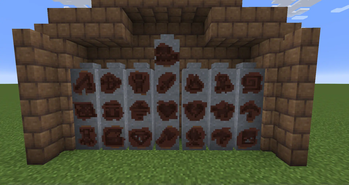
To add a new texture for your sherd when it is used on a clay pot, simply call `ClayPotSherdTextureRegistry. INSTANCE.register()` in your client initializer and pass in the sherd item and texture location relative to: `textures/entity/clay_pot/`. If a texture is not registered, it will attempt to get the texture used for the decorated pot.
Additionally, make sure the sherd is also in the `minecraft:tags/item/decorated_pot_sherds` item tag so the sherd can be placed on clay pots.
### 💬 Translations** Feel free to translate this mod into any language or update existing translations. To get your translation into the mod, make a pull request on GitHub with the translated language file
Want to play with your friends on a server? Get 15% off your first month with code `einstein`. Click (https://billing.kinetichosting.net/aff.php?aff=124) or on the banner below to get started!
[!(https://i.imgur.com/u6Fn0I0.png)](https://billing.kinetichosting.net/aff.php?aff=124)
📊 Mod Details
- Game
- Minecraft Mods
- Author
- MincraftEinstein
- Version
- 1.1.0
- Downloads
- 2,589
- Endorsements
- 12
- Category
- decoration
- Created
- 8/3/2024
- Updated
- 12/29/2025
- Game Versions
- 1.21.11
- Tags
- decoration, game-mechanics
🔧 How to Install Minecraft Mods Mods
Download from Modrinth. Use Prism Launcher or drop into your mods folder.
📖 Full step-by-step install guide for Minecraft Mods →
Visit the official mod page for specific installation instructions for this mod.
🎮 Need cheat codes or console commands? Check ur gaming wiki for Minecraft Mods commands, item IDs, and more.
❓ Frequently Asked Questions
Which Minecraft Mods versions does Fired Pots support?
The author lists 1.21.11. Other versions may work but are untested by the author.
What is the latest version of Fired Pots?
Version 1.1.0, published 2025-12-29 with 2,589 downloads recorded at the source.
Keep browsing — more Minecraft Mods mods await