Fabric Server Essentials
🟠 Updated over a year ago⚠️ Install Order · 2 steps
Install in this order, then this mod last — most mods fail to load without their framework and dependencies in place.
🖼️ Gallery (3 images)

🔍 Analysis
- 👍 1.0% endorsement rate
- 🏆 #205 of 945 fabric mods in this game by downloads
📋 About This Mod
# Fabric-Server-Essentials **Essential features for any Minecraft server, including command scheduling and server restarting!** Listed below are all the features of the mod currently - **Requires Fabric API** - **Now has Permission mod support (such as Luckperms)** ## Command scheduling !(https://cdn.modrinth.com/data/v5D5j0kg/images/fbbd2862e26b343e956bd7079656df4a5255a49c.png) **/scheduleCommand list** to list scheduled commands **/scheduleCommand remove <hour> <minute>** to remove scheduled commands **/scheduleCommand add <repeats> <hour> <minute> <command>** to add scheduled commands **/scheduleCommand reload** to reload the command scheduler The schedule command allows you to schedule certain commands to happen at any time in the day, allowing you to schedule things like restarting the server overnight. Please note that the remove command does not apply until after reloading the scheduler, or after restarting the server. The scheduled commands are also saved in the config, so the schedule can be edited there. **Any command works with this, even ones from other mods.** Additionally, if you make <repeats> false, it will make the command be scheduled to occur only once, and not be saved to the config. Usually though, you will want to set this to true to have it occur at that time every day. ## Item flex command **/flexItem <recipients>** this command sends a message in chat to the specified recipients displaying the item you are holding. Useful for flexing your op gear! If you do not specify anyone, it will send it to everyone on the server. ## Server restarting **/restart** **/restart on shutdown true/false** This restarts the Minecraft server, but there is also an option to make the server restart whenever it stops (apart from using the /stop command), preventing the server being down unintendedly. This can also be edited in the config ## Info command **/info** This command allows players to see information about the server. To change the information displayed, edit it in the config. ## Coords command **/coords or /c** to send to everyone **/coords <recipients> or /c <recipients>** to send to specific players players on the server can type /c or /coords to send their coords to everyone on the server, or they can instead specify the players they want to send their coords to with /coords <Recipients> ## Broadcast command !(https://cdn.modrinth.com/data/v5D5j0kg/images/dfc1a2d45af544367aa09e1f497c59ef87b922c8.png) **/broadcast <color> <message>** This command allows you to broadcast messages to everyone online on the server, which is useful for warning them about things such as server restarts. When paired with the schedule command, it is quite useful. ## Ping command **/ping** This command allows players to see their ping with the minecraft server. --- I am not planning to add too many features, but that is mostly because there is nothing else that I feel like is needed. If you find any bugs or want any new features, feel free to open an issue on the github page and I will work on it when I can.
# Fabric-Server-Essentials Essential features for any Minecraft server, including command scheduling and server restarting! Listed below are all the features of the mod currently
- Requires Fabric API
- Now has Permission mod support (such as Luckperms)
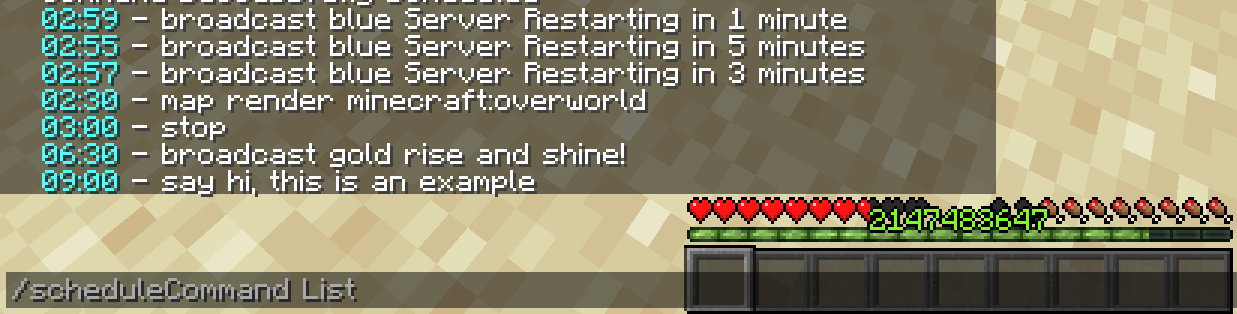
## Command scheduling !(https://cdn.modrinth.com/data/v5D5j0kg/images/fbbd2862e26b343e956bd7079656df4a5255a49c.png)
/scheduleCommand list to list scheduled commands
/scheduleCommand remove to remove scheduled commands
/scheduleCommand add to add scheduled commands
/scheduleCommand reload to reload the command scheduler
The schedule command allows you to schedule certain commands to happen at any time in the day, allowing you to schedule things like restarting the server overnight. Please note that the remove command does not apply until after reloading the scheduler, or after restarting the server. The scheduled commands are also saved in the config, so the schedule can be edited there. Any command works with this, even ones from other mods. Additionally, if you make
## Item flex command
/flexItem
this command sends a message in chat to the specified recipients displaying the item you are holding. Useful for flexing your op gear! If you do not specify anyone, it will send it to everyone on the server.
## Server restarting /restart
/restart on shutdown true/false
This restarts the Minecraft server, but there is also an option to make the server restart whenever it stops (apart from using the /stop command), preventing the server being down unintendedly. This can also be edited in the config
## Info command /info
This command allows players to see information about the server. To change the information displayed, edit it in the config.
## Coords command /coords or /c to send to everyone
/coords or /c to send to specific players
players on the server can type /c or /coords to send their coords to everyone on the server, or they can instead specify the players they want to send their coords to with /coords
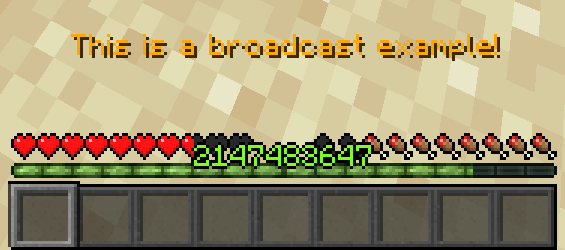
## Broadcast command !(https://cdn.modrinth.com/data/v5D5j0kg/images/dfc1a2d45af544367aa09e1f497c59ef87b922c8.png)
/broadcast
This command allows you to broadcast messages to everyone online on the server, which is useful for warning them about things such as server restarts. When paired with the schedule command, it is quite useful.
## Ping command /ping
This command allows players to see their ping with the minecraft server.
- --
- I am not planning to add too many features, but that is mostly because there is nothing else that I feel like is needed. If you find any bugs or want any new features, feel free to open an issue on the github page and I will work on it when I can.
📊 Mod Details
- Game
- Minecraft Mods
- Author
- Boombabob
- Version
- 1.2.2
- Downloads
- 2,708
- Endorsements
- 27
- Category
- fabric
- Created
- 10/6/2023
- Updated
- 1/12/2025
- Game Versions
- 1.21.4
- Tags
- management, utility
🔧 How to Install Minecraft Mods Mods
Download from Modrinth. Use Prism Launcher or drop into your mods folder.
📖 Full step-by-step install guide for Minecraft Mods →
Visit the official mod page for specific installation instructions for this mod.
🎮 Need cheat codes or console commands? Check ur gaming wiki for Minecraft Mods commands, item IDs, and more.
❓ Frequently Asked Questions
Which Minecraft Mods versions does Fabric Server Essentials support?
The author lists 1.21.4. Other versions may work but are untested by the author.
What is the latest version of Fabric Server Essentials?
Version 1.2.2, published 2025-01-12 with 2,708 downloads recorded at the source.
Keep browsing — more Minecraft Mods mods await