ElytraWEEE
🟡 Updated this year⚠️ Install Order · 2 steps
Install in this order, then this mod last — most mods fail to load without their framework and dependencies in place.
🖼️ Gallery (2 images)

🔍 Analysis
- 👍 0.3% endorsement rate
- 🏆 #115 of 284 equipment mods in this game by downloads
📋 About This Mod
# ElytraWEEE **Hold a firework. Jump. Fly.** Your elytra equips itself and you start gliding instantly — chestplate swapped out safely, never dropped, and put back on when you land. Client-only Fabric mod for **Minecraft 26.1.2**. Works on servers, no server install needed. ## Why firework-triggered, not jump-triggered? Most auto-elytra mods deploy the elytra **every time you jump** — which wrecks combat: every jump-crit you land on an enemy accidentally throws your elytra on. ElytraWEEE only deploys when you're **holding a firework and jump**, so your normal combat jumps and **jump-crit attacks stay completely untouched**. You fly only when you actually mean to. ## What it does - **Jump + firework -> instant flight.** One jump. You glide right away — no second tap. - **Land -> chestplate comes back.** Drop the firework after landing and your chestplate returns automatically. - **Grace window.** Jumped a hair too early? Grab the firework within ~0.5s and it still launches. - **Never drops your gear.** All swaps are safe. No chestplate? The elytra just goes back where it came from. Inventory full? It stays on. ## Fast swap (mace PvP) One key to flip **elytra <-> chestplate instantly — even mid-air.** Swap to chestplate, hit, swap back, and you **keep gliding automatically** (no re-jump). Works even with auto-deploy off. ## Keybinds Under **Options -> Controls -> ElytraWEEE** (all unbound by default — set your own): Fast swap, Toggle on/off, Open settings. ## Settings **Mod Menu -> ElytraWEEE** — tabs for General, Auto-Deploy, Swap-Back, Fast Swap, and Info. > The mod only manages an elytra **it** deployed. Put one on yourself? It leaves your gear alone. ## Requirements - Fabric API - Cloth Config - Mod Menu *(optional — opens the settings screen)* by dev-limucc · MIT
# ElytraWEEE
Hold a firework. Jump. Fly. Your elytra equips itself and you start gliding instantly — chestplate swapped out safely, never dropped, and put back on when you land.
Client-only Fabric mod for Minecraft 26. 1. 2. Works on servers, no server install needed.
## Why firework-triggered, not jump-triggered?
Most auto-elytra mods deploy the elytra every time you jump — which wrecks combat: every jump-crit you land on an enemy accidentally throws your elytra on. ElytraWEEE only deploys when you're holding a firework and jump, so your normal combat jumps and jump-crit attacks stay completely untouched. You fly only when you actually mean to.
## What it does
- Jump + firework -> instant flight. One jump. You glide right away — no second tap.
- Land -> chestplate comes back. Drop the firework after landing and your chestplate returns automatically.
- Grace window. Jumped a hair too early? Grab the firework within ~0. 5s and it still launches.
- Never drops your gear. All swaps are safe. No chestplate? The elytra just goes back where it came from. Inventory full? It stays on.
## Fast swap (mace PvP)
One key to flip elytra <-> chestplate instantly — even mid-air. Swap to chestplate, hit, swap back, and you keep gliding automatically (no re-jump). Works even with auto-deploy off.
## Keybinds
Under Options -> Controls -> ElytraWEEE (all unbound by default — set your own): Fast swap, Toggle on/off, Open settings.
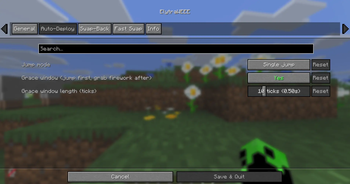
## Settings
Mod Menu -> ElytraWEEE — tabs for General, Auto-Deploy, Swap-Back, Fast Swap, and Info.
> The mod only manages an elytra it deployed. Put one on yourself? It leaves your gear alone.
## Requirements
- Fabric API
- Cloth Config
- Mod Menu (optional — opens the settings screen)
by dev-limucc · MIT
📊 Mod Details
- Game
- Minecraft Mods
- Author
- Limucc
- Version
- 1.3.0
- Downloads
- 1,887
- Endorsements
- 6
- Category
- equipment
- Created
- 6/10/2026
- Updated
- 7/9/2026
- Game Versions
- 26.2
- Tags
- equipment, transportation, utility
🔧 How to Install Minecraft Mods Mods
Download from Modrinth. Use Prism Launcher or drop into your mods folder.
📖 Full step-by-step install guide for Minecraft Mods →
Visit the official mod page for specific installation instructions for this mod.
🎮 Need cheat codes or console commands? Check ur gaming wiki for Minecraft Mods commands, item IDs, and more.
❓ Frequently Asked Questions
Which Minecraft Mods versions does ElytraWEEE support?
The author lists 26.2. Other versions may work but are untested by the author.
What is the latest version of ElytraWEEE?
Version 1.3.0, published 2026-07-09 with 1,887 downloads recorded at the source.
Keep browsing — more Minecraft Mods mods await