Animated GUI
🟡 Updated this year⚠️ Install Order · 2 steps
Install in this order, then this mod last — most mods fail to load without their framework and dependencies in place.
🖼️ Gallery (4 images)
🔍 Analysis
- 👍 0.8% endorsement rate
- 🏆 #436 of 874 fabric mods in this game by downloads
📋 About This Mod
# Animated GUI Animated GUI replaces Minecraft's instant, snappy interface transitions with smooth, fully customizable animations — **without changing how any vanilla screen looks.** Menus fade and slide, item stacks glide between slots, the creative menu scrolls by the pixel, and the hotbar selector slides instead of teleporting. Every animation has its own style, speed and easing curve, all tuned from a clean, flat settings screen. ## What it animates - **Chat** — new messages slide up smoothly as they arrive instead of popping in. - **Item slots** — picked-up and moved stacks glide between slots with a configurable easing curve. - **Creative inventory** — pixel-smooth scrolling instead of jumping a whole row at a time. - **Hotbar selector** — slides between slots as you switch. - **Inventory & pause / menu screens** — fade and scale on open and close, each with its own style and speed. - **Menu navigation** — pick how moving between screens animates: Slide, Zoom, Fade or Swap. - **Smooth list scrolling** — every vanilla-list screen (Options, Mod Menu, config screens and any mod that reuses the vanilla list) scrolls eased instead of snapping. No mod is hardcoded — it just works. ## Fully customizable Open the settings from Mod Menu to reach a flat, Sodium-style tabbed screen (General / Inventory / Game menu / Chat). Every feature has its own toggle, duration and easing curve — Linear, Smooth, Ease-out, Overshoot, Elastic, Bounce and more. A single master switch instantly freezes everything back to vanilla. ## Good to know - This is a **client-side** mod. It changes only your own interface and is not required on servers. - It does **not** restyle vanilla GUIs; it only animates their motion. Textures and layouts stay exactly as Minecraft draws them. - Only the mod's **own** settings screen uses the custom flat style. ## Requirements - Minecraft **26.1.2** - **Fabric Loader** 0.19.2 or newer - **Fabric API** - **Mod Menu** (optional, to open the settings screen) Licensed under MIT.
# Animated GUI
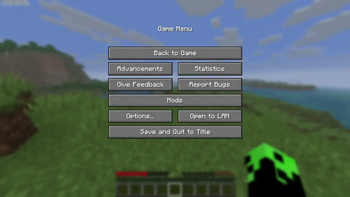
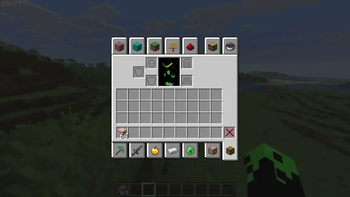
Animated GUI replaces Minecraft's instant, snappy interface transitions with smooth, fully customizable animations — without changing how any vanilla screen looks. Menus fade and slide, item stacks glide between slots, the creative menu scrolls by the pixel, and the hotbar selector slides instead of teleporting. Every animation has its own style, speed and easing curve, all tuned from a clean, flat settings screen.
## What it animates
- Chat — new messages slide up smoothly as they arrive instead of popping in.
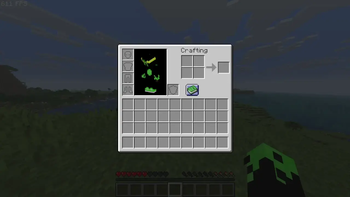
- Item slots — picked-up and moved stacks glide between slots with a configurable easing curve.
- Creative inventory — pixel-smooth scrolling instead of jumping a whole row at a time.
- Hotbar selector — slides between slots as you switch.
- Inventory & pause / menu screens — fade and scale on open and close, each with its own style and speed.
- Menu navigation — pick how moving between screens animates: Slide, Zoom, Fade or Swap.
- Smooth list scrolling — every vanilla-list screen (Options, Mod Menu, config screens and any mod that reuses the vanilla list) scrolls eased instead of snapping. No mod is hardcoded — it just works.
## Fully customizable
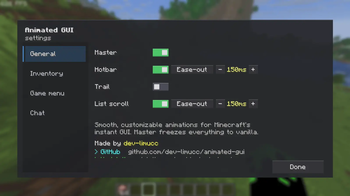
Open the settings from Mod Menu to reach a flat, Sodium-style tabbed screen (General / Inventory / Game menu / Chat). Every feature has its own toggle, duration and easing curve — Linear, Smooth, Ease-out, Overshoot, Elastic, Bounce and more. A single master switch instantly freezes everything back to vanilla.
## Good to know
- This is a client-side mod. It changes only your own interface and is not required on servers.
- It does not restyle vanilla GUIs; it only animates their motion. Textures and layouts stay exactly as Minecraft draws them.
- Only the mod's own settings screen uses the custom flat style.
## Requirements
- Minecraft 26. 1. 2
- Fabric Loader 0. 19. 2 or newer
- Fabric API
- Mod Menu (optional, to open the settings screen)
Licensed under MIT.
📊 Mod Details
- Game
- Minecraft Mods
- Author
- Limucc
- Version
- 1.1.0
- Downloads
- 1,832
- Endorsements
- 14
- Category
- fabric
- Created
- 6/8/2026
- Updated
- 7/9/2026
- Game Versions
- 26.2
- Tags
- utility
🔧 How to Install Minecraft Mods Mods
Download from Modrinth. Use Prism Launcher or drop into your mods folder.
📖 Full step-by-step install guide for Minecraft Mods →
Visit the official mod page for specific installation instructions for this mod.
🎮 Need cheat codes or console commands? Check ur gaming wiki for Minecraft Mods commands, item IDs, and more.
❓ Frequently Asked Questions
Which Minecraft Mods versions does Animated GUI support?
The author lists 26.2. Other versions may work but are untested by the author.
What is the latest version of Animated GUI?
Version 1.1.0, published 2026-07-09 with 1,832 downloads recorded at the source.
Keep browsing — more Minecraft Mods mods await