CustomLag
🟡 Updated this year⚠️ Install Order · 2 steps
Install in this order, then this mod last — most mods fail to load without their framework and dependencies in place.
🖼️ Gallery (1 images)
🔍 Analysis
- 👍 0.1% endorsement rate
- 🏆 #535 of 874 fabric mods in this game by downloads
📋 About This Mod
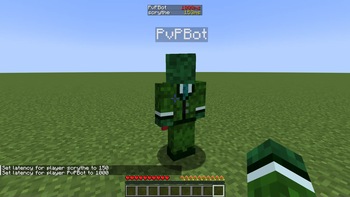
<video autoplay muted loop playsinline controls preload="auto" width="400"> <source src="https://raw.githubusercontent.com/scrythe/CustomLag/refs/heads/main/assets/example-usecase.mp4" type="video/mp4"> Your browser doesn't support HTML video. </video> # About the Mod This Mod simulates lag by delaying the processes of receiving and sending packets. This is done by injecting a ContextHandler inside the ChannelPipeline of a minecraft connection. This mod works only for servers and single player worlds. # Usage To set or change the latency/ping for a player, just use the lag command: ```mcfunction /lag set <playername> <latency> ``` Setting lag will be saved to a toml file, so even after restart, the settings will remain. You can also set the lag of offline players (who have not currently joined yet.) In order to remove the lag of a player, you can use: ```mcfunction /lag remove <playername> ``` (this removes the ContextHandler that delays packets from sending) Some additional commands are: There are also some addional quality of live -ish commands, like increase the keep alive / ping packets interval, to find more, just enter ```mcfunction /customlag ```
# About the Mod This Mod simulates lag by delaying the processes of receiving and sending packets. This is done by injecting a ContextHandler inside the ChannelPipeline of a minecraft connection. This mod works only for servers and single player worlds.
To set or change the latency/ping for a player, just use the lag command:
```mcfunction
/lag set
Setting lag will be saved to a toml file, so even after restart, the settings will remain. You can also set the lag of offline players (who have not currently joined yet.)
In order to remove the lag of a player, you can use:
```mcfunction
/lag remove
(this removes the ContextHandler that delays packets from sending)
Some additional commands are:
There are also some addional quality of live -ish commands, like increase the keep alive / ping packets interval, to find more, just enter
```mcfunction /customlag ```
📊 Mod Details
- Game
- Minecraft Mods
- Author
- scrythe
- Version
- FWA9F3NL
- Downloads
- 1,776
- Endorsements
- 2
- Category
- fabric
- Created
- 8/19/2025
- Updated
- 12/29/2025
- Game Versions
- ZyxhPHic, HOC1puoC, CT5UjZFn, NXUyEIED, SyhxkiRF
- Tags
- game-mechanics, management, utility
🔧 How to Install Minecraft Mods Mods
Download from Modrinth. Use Prism Launcher or drop into your mods folder.
📖 Full step-by-step install guide for Minecraft Mods →
Visit the official mod page for specific installation instructions for this mod.
🎮 Need cheat codes or console commands? Check ur gaming wiki for Minecraft Mods commands, item IDs, and more.
❓ Frequently Asked Questions
Which Minecraft Mods versions does CustomLag support?
The author lists ZyxhPHic, HOC1puoC, CT5UjZFn, NXUyEIED, SyhxkiRF, hcTBtioM. Other versions may work but are untested by the author.
What is the latest version of CustomLag?
Version FWA9F3NL, published 2025-12-29 with 1,776 downloads recorded at the source.
Keep browsing — more Minecraft Mods mods await