Custom Server MOTD
🟡 Updated this year⚠️ Install Order · 2 steps
Install in this order, then this mod last — most mods fail to load without their framework and dependencies in place.
🖼️ Gallery (2 images)

🔍 Analysis
- 👍 0.9% endorsement rate
- 🏆 #99 of 945 fabric mods in this game by downloads
📋 About This Mod
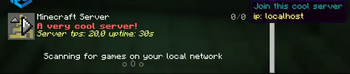
# Custom MOTD This mod gives you access to customize your server join screen. You can change your MOTD, icon, player count, max players and the hover players. It also supports (https://modrinth.com/mod/placeholder-api). The icon is now a link instead of locally. Why?, this is because you can now have a link that has a changing picture, and it will update to it every 10 sec. **Important** If you don't want one of the features you can easily turn them off bye commenting out them in the config. # Example !(https://cdn.modrinth.com/data/cached_images/d508fc2c466d78600efe46053777df98ccec0481.png) !(https://cdn.modrinth.com/data/cached_images/95295c9ca325cc9f6d0cffb9b3ffd2836806437f.png) # Config In your motd if you use placeholders you need to place it between two "", For example "%server:time%" ``` #Motd text (uses vanilla system, use this tool https://mctools.org/motd-creator), You can also use the normal vannila color codes. They are located here (https://minecraft.wiki/w/Formatting_codes) motd: A minecraft server # From here remove "#" if you want to use a feature #Potho link (use this if you want to change the photo at the same time as the server is running) #link-to-photo: link #If you want to change the max player count, (Only visual, not changing your player count) #max-player-count: 420 #If you want to change the current player count, (Only visual) #player-count: 69 #Hover text for player amount, max 12, (Only visual) #plyer-list: #- steve ``` # Looking for a server? Get BisectHosting and save 25% off for new customers using code Lukas at checkout. Thanks for your support - it helps me develop this and other mods I make! #ad (https://www.bisecthosting.com/partners/custom-banners/ca44e941-2306-414c-8c65-7c50bc6fcf48.webp)](https://bisecthosting.com/Lukas)
# Custom MOTD This mod gives you access to customize your server join screen. You can change your MOTD, icon, player count, max players and the hover players. It also supports (https://modrinth.com/mod/placeholder-api).
The icon is now a link instead of locally. Why?, this is because you can now have a link that has a changing picture, and it will update to it every 10 sec.
Important If you don't want one of the features you can easily turn them off bye commenting out them in the config.
# Example !(https://cdn.modrinth.com/data/cached_images/d508fc2c466d78600efe46053777df98ccec0481.png) !(https://cdn.modrinth.com/data/cached_images/95295c9ca325cc9f6d0cffb9b3ffd2836806437f.png)
In your motd if you use placeholders you need to place it between two "", For example "%server:time%"
``` #Motd text (uses vanilla system, use this tool https://mctools.org/motd-creator), You can also use the normal vannila color codes. They are located here (https://minecraft.wiki/w/Formatting_codes) motd: A minecraft server
# From here remove "#" if you want to use a feature
#Potho link (use this if you want to change the photo at the same time as the server is running)
#link-to-photo: link
#If you want to change the max player count, (Only visual, not changing your player count) #max-player-count: 420
#If you want to change the current player count, (Only visual) #player-count: 69
#Hover text for player amount, max 12, (Only visual) #plyer-list: #- steve ```
# Looking for a server? Get BisectHosting and save 25% off for new customers using code Lukas at checkout. Thanks for your support - it helps me develop this and other mods I make! #ad [!(https://www.bisecthosting.com/partners/custom-banners/ca44e941-2306-414c-8c65-7c50bc6fcf48.webp)](https://bisecthosting.com/Lukas)
📊 Mod Details
- Game
- Minecraft Mods
- Author
- lukasabbe
- Version
- 1.4+1.21.11
- Downloads
- 2,800
- Endorsements
- 24
- Category
- fabric
- Created
- 7/31/2024
- Updated
- 12/9/2025
- Game Versions
- 1.21.11
- Tags
- management
🔧 How to Install Minecraft Mods Mods
Download from Modrinth. Use Prism Launcher or drop into your mods folder.
📖 Full step-by-step install guide for Minecraft Mods →
Visit the official mod page for specific installation instructions for this mod.
🎮 Need cheat codes or console commands? Check ur gaming wiki for Minecraft Mods commands, item IDs, and more.
❓ Frequently Asked Questions
Which Minecraft Mods versions does Custom Server MOTD support?
The author lists 1.21.11. Other versions may work but are untested by the author.
What is the latest version of Custom Server MOTD?
Version 1.4+1.21.11, published 2025-12-09 with 2,800 downloads recorded at the source.
Keep browsing — more Minecraft Mods mods await