Custom Portal API Reforged
🟡 Updated this year⚠️ Install Order · 2 steps
Install in this order, then this mod last — most mods fail to load without their framework and dependencies in place.
🖼️ Gallery (1 images)
🔍 Analysis
- 👍 0.0% endorsement rate
- 🏆 #277 of 403 forge mods in this game by downloads
📋 About This Mod
<center> <font size=+4><b>Custom Portal API Reforged</font></b> <font size=+1> Library mod allowing developers to create portals to their custom dimensions easily. These custom portals will function exactly like nether portals, except being fully customizable. You can control the frame block, portal block, tinting, ignition source, destination, and more! </br></br> !(https://i.imgur.com/jqupA9K.png) <font size=+2><b>Usage</font></b> Add the repository/mod to your build.gradle. </font> </center> ```java repositories { maven {url 'https://maven.azuredoom.com/mods'} } dependencies { //1.20.1 implementation fg.deobf('net.kyrptonaught.customportalapi:customportalapi-reforged:MODVERSION') //1.20.2+ implementation fg.deobf("net.kyrptonaught.customportalapi:cpapireforged-neo-1.20.2:MODVERSION") } ``` <center> <font size=+1> Now onto creating and registering the portal itself, this is simple thanks to the (https://github.com/AzureDoom/customportalapi-reforged/blob/1.20.1/src/main/java/net/kyrptonaught/customportalapi/api/CustomPortalBuilder.java) class. We will make use of this in FMLCommonSetupEvent. The following is a very simple portal that will take us to The End, and is lit by right-clicking the frame with an Eye of Ender: </center> ```java CustomPortalBuilder.beginPortal() .frameBlock(Blocks.DIAMOND_BLOCK) .lightWithItem(Items.ENDER_EYE) .destDimID(new ResourceLocation("the_end")) .tintColor(45,65,101) .registerPortal(); ``` A Nether portal would be registered as follows: ```java CustomPortalBuilder.beginPortal() .frameBlock(Blocks.OBSIDIAN) .destDimID(new ResourceLocation("the_nether")) .tintColor(131, 66, 184) .registerPortal(); ``` <center> CustomPortalBuilder is filled with plenty of methods to customize the functionality of your portal, all of which are documented in the class. </br></br> Some noteworthy methods to mention: </center> - lightWithWater/Item/Fluid - These allow you to control how the portal is lit. - onlyLightInOverworld - Only allow the portal to be used in the overworld to your destination of choice - flatPortal - Flat Portal similar to the End or the Twilight Forest portal. </br></br> <center> <font size=+2><b>Credits</font></b> Based off the main Fabric mod (https://github.com/kyrptonaught/customportalapi/) and an older ported mod (https://github.com/Mysticpasta1/customportalapi) </center>
Custom Portal API Reforged
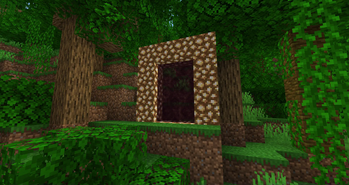
Library mod allowing developers to create portals to their custom dimensions easily. These custom portals will function exactly like nether portals, except being fully customizable. You can control the frame block, portal block, tinting, ignition source, destination, and more!
!(https://i.imgur.com/jqupA9K.png)
Usage
Add the repository/mod to your build.gradle.
```java repositories { maven {url 'https://maven.azuredoom.com/mods'} } dependencies { //1. 20. 1 implementation fg.deobf('net.kyrptonaught.customportalapi:customportalapi-reforged:MODVERSION') //1. 20. 2+ implementation fg.deobf("net.kyrptonaught.customportalapi:cpapireforged-neo-1. 20. 2:MODVERSION") } ```
Now onto creating and registering the portal itself, this is simple thanks to the (https://github.com/AzureDoom/customportalapi-reforged/blob/1. 20. 1/src/main/java/net/kyrptonaught/customportalapi/api/CustomPortalBuilder.java) class. We will make use of this in FMLCommonSetupEvent.
The following is a very simple portal that will take us to The End, and is lit by right-clicking the frame with an Eye of Ender:
```java CustomPortalBuilder.beginPortal() .frameBlock(Blocks. DIAMOND_BLOCK) .lightWithItem(Items. ENDER_EYE) .destDimID(new ResourceLocation("the_end")) .tintColor(45,65,101) .registerPortal(); ```
A Nether portal would be registered as follows: ```java CustomPortalBuilder.beginPortal() .frameBlock(Blocks. OBSIDIAN) .destDimID(new ResourceLocation("the_nether")) .tintColor(131, 66, 184) .registerPortal(); ```
Some noteworthy methods to mention:
- lightWithWater/Item/Fluid - These allow you to control how the portal is lit.
- - onlyLightInOverworld - Only allow the portal to be used in the overworld to your destination of choice
- - flatPortal - Flat Portal similar to the End or the Twilight Forest portal.
Based off the main Fabric mod (https://github.com/kyrptonaught/customportalapi/) and an older ported mod (https://github.com/Mysticpasta1/customportalapi)
📊 Mod Details
- Game
- Minecraft Mods
- Author
- AzureDoom
- Version
- 1.7.0
- Downloads
- 134,564
- Endorsements
- 12
- Category
- forge
- Created
- 8/21/2023
- Updated
- 11/28/2025
- Game Versions
- 1.21.10
- Tags
- library
🔧 How to Install Minecraft Mods Mods
Download from Modrinth. Use Prism Launcher or drop into your mods folder.
📖 Full step-by-step install guide for Minecraft Mods →
Visit the official mod page for specific installation instructions for this mod.
🎮 Need cheat codes or console commands? Check ur gaming wiki for Minecraft Mods commands, item IDs, and more.
❓ Frequently Asked Questions
Which Minecraft Mods versions does Custom Portal API Reforged support?
The author lists 1.21.10. Other versions may work but are untested by the author.
What is the latest version of Custom Portal API Reforged?
Version 1.7.0, published 2025-11-28 with 134,564 downloads recorded at the source.
Keep browsing — more Minecraft Mods mods await