Custom Dimensions
🟡 Updated this year⚠️ Install Order · 2 steps
Install in this order, then this mod last — most mods fail to load without their framework and dependencies in place.
🖼️ Gallery (3 images)
🔍 Analysis
- 👍 0.3% endorsement rate
- 🏆 #87 of 888 fabric mods in this game by downloads
📋 About This Mod
# Custom Dimensions: The Multiverse Engine **Custom Dimensions** is a fully server-side Fabric mod that lets server administrators create custom dimensions, define physical portal frames, and connect worlds with persistent two-way gateways. Players can join with an unmodified vanilla clientonly the server needs the mod and Fabric API. ## Supported Minecraft versions - **Minecraft 1.21 through 1.21.11** - **Minecraft 26.1 through 26.1.2** - **Minecraft 26.2** Use the JAR made for your Minecraft version. All releases use **Fabric Loader**. ## Features ### Create custom dimensions Create void, Overworld-style, Nether-style, or End-style dimensions directly from the server. The mod writes the datapack definition and creates the dimension folder immediately. A full server restart is required after creation so Minecraft can load the new dimension into the live world registry. ### Persistent two-way portals The first time a player enters an activated portal, the mod: 1. Finds or creates a safe destination portal. 2. Creates a safety platform when necessary. 3. Gives both physical portals unique UUIDs. 4. Stores a reciprocal link between the source and destination. 5. Uses that exact portal pair for return travel. After arriving, step completely out of the destination portal, wait for the configured cooldown, and enter it again to return. The cooldown prevents the player from instantly bouncing between dimensions while still standing inside the portal. Portal pairs are saved per world and survive server restarts. ### Flexible physical frames - Build an empty vertical rectangular frame from the configured frame block. - The default allowed interior is **23 through 2121** blocks. - The top, bottom, left side, and right side must be complete. - The four corner blocks are optional. - Use the configured igniter on any frame block. - Frames may face either the X or Z direction. One portal definition can activate multiple physical frames. Every activated frame receives its own UUID and its own reciprocal destination portal. ### Coordinate scaling Each portal definition supports a coordinate multiplier from **0.001 through 1000.0**. - `1.0` keeps the same coordinates. - `0.125` converts Overworld coordinates to Nether-style 1:8 coordinates. - `8.0` performs the inverse conversion. The generated return portal automatically uses the inverse scale. ### Server-side particles Active portal interiors are filled with colored vanilla dust particles. The particle color comes from the RGB value supplied to `/portal link`. Particle density, interval, and spread are configurable. Because particles are sent by the server, players do not need a client mod. ### Live command suggestions TAB completion includes: - Registered block IDs - Registered item IDs - Every dimension currently loaded by the server - Dimensions supplied by vanilla, datapacks, other mods, and Custom Dimensions > **Enhance your server setup!** Check out my other server-side mods over at : (https://modrinth.com/organization/fabric-server-essentials) ## Commands | Command | Description | | :--- | :--- | | `/dimension create <name> <void\|overworld\|nether\|end>` | Creates a dimension definition and its folder | | `/portal link <id> <frame_block> <igniter_item> <target_dimension> <RRGGBB> <light_level> ` | Creates or updates a portal definition | | `/portal activate <id> <x> <y> <z>` | Activates a completed frame from the console or command line | | `/portal list` | Lists saved portal definitions | | `/portal instances` | Lists activated physical portals and their linked UUIDs | | `/portal delete <id>` | Deletes a definition and deactivates its physical portals | ### `/dimension create` ```text /dimension create <name> <void|overworld|nether|end> ``` Example: ```text /dimension create pvp_arena void ``` This creates `customdimensions:pvp_arena`. Restart the server before using it as a portal target. ### `/portal link` ```text /portal link <id> <frame_block> <igniter_item> <target_dimension> <RRGGBB> <light_level> ``` | Argument | Meaning | Example | | :--- | :--- | :--- | | `id` | Unique definition name | `arena_gate` | | `frame_block` | Namespaced frame block ID | `minecraft:obsidian` | | `igniter_item` | Namespaced item ID used to ignite it | `minecraft:flint_and_steel` | | `target_dimension` | Loaded destination dimension | `customdimensions:pvp_arena` | | `RRGGBB` | Six-digit particle color | `FF0000` | | `light_level` | Saved portal light value from 015 | `15` | | `scale` | Optional coordinate multiplier; default `1.0` | `0.125` | Example: ```text /portal link arena_gate minecraft:obsidian minecraft:flint_and_steel customdimensions:pvp_arena FF0000 15 1.0 ``` Then build the matching frame and use flint and steel on any frame block. If several definitions use the same frame block and igniter, physical ignition selects the alphabetically first definition. Use `/portal activate
# Custom Dimensions: The Multiverse Engine
Custom Dimensions is a fully server-side Fabric mod that lets server administrators create custom dimensions, define physical portal frames, and connect worlds with persistent two-way gateways.
Players can join with an unmodified vanilla clientonly the server needs the mod and Fabric API.
## Supported Minecraft versions
- Minecraft 1. 21 through 1. 21. 11
- Minecraft 26. 1 through 26. 1. 2
- Minecraft 26. 2
Use the JAR made for your Minecraft version. All releases use Fabric Loader.
## Features
### Create custom dimensions
Create void, Overworld-style, Nether-style, or End-style dimensions directly from the server. The mod writes the datapack definition and creates the dimension folder immediately.
A full server restart is required after creation so Minecraft can load the new dimension into the live world registry.
### Persistent two-way portals
The first time a player enters an activated portal, the mod:
1. Finds or creates a safe destination portal. 2. Creates a safety platform when necessary. 3. Gives both physical portals unique UUIDs. 4. Stores a reciprocal link between the source and destination. 5. Uses that exact portal pair for return travel.
After arriving, step completely out of the destination portal, wait for the configured cooldown, and enter it again to return. The cooldown prevents the player from instantly bouncing between dimensions while still standing inside the portal.
Portal pairs are saved per world and survive server restarts.
### Flexible physical frames
- Build an empty vertical rectangular frame from the configured frame block.
- The default allowed interior is 23 through 2121 blocks.
- The top, bottom, left side, and right side must be complete.
- The four corner blocks are optional.
- Use the configured igniter on any frame block.
- Frames may face either the X or Z direction.
One portal definition can activate multiple physical frames. Every activated frame receives its own UUID and its own reciprocal destination portal.
### Coordinate scaling
Each portal definition supports a coordinate multiplier from 0. 001 through 1000. 0.
- `1. 0` keeps the same coordinates.
- `0. 125` converts Overworld coordinates to Nether-style 1:8 coordinates.
- `8. 0` performs the inverse conversion.
The generated return portal automatically uses the inverse scale.
### Server-side particles
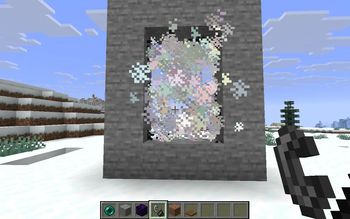
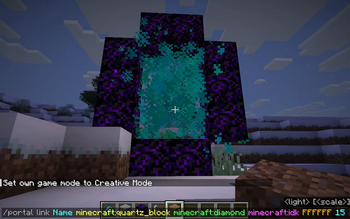
Active portal interiors are filled with colored vanilla dust particles. The particle color comes from the RGB value supplied to `/portal link`.
Particle density, interval, and spread are configurable. Because particles are sent by the server, players do not need a client mod.
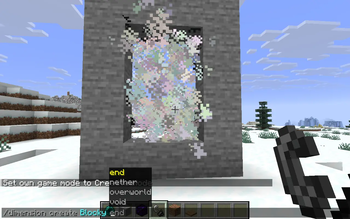
### Live command suggestions
TAB completion includes:
- Registered block IDs
- Registered item IDs
- Every dimension currently loaded by the server
- Dimensions supplied by vanilla, datapacks, other mods, and Custom Dimensions
> Enhance your server setup! Check out my other server-side mods over at : (https://modrinth.com/organization/fabric-server-essentials)
## Commands
| Command | Description |
| :--- | :--- |
| `/dimension create
### `/dimension create`
```text
/dimension create
```text /dimension create pvp_arena void ```
This creates `customdimensions:pvp_arena`. Restart the server before using it as a portal target.
### `/portal link`
```text
/portal link
| Argument | Meaning | Example | | :--- | :--- | :--- | | `id` | Unique definition name | `arena_gate` | | `frame_block` | Namespaced frame block ID | `minecraft:obsidian` | | `igniter_item` | Namespaced item ID used to ignite it | `minecraft:flint_and_steel` | | `target_dimension` | Loaded destination dimension | `customdimensions:pvp_arena` | | `RRGGBB` | Six-digit particle color | `FF0000` | | `light_level` | Saved portal light value from 015 | `15` | | `scale` | Optional coordinate multiplier; default `1. 0` | `0. 125` |
```text /portal link arena_gate minecraft:obsidian minecraft:flint_and_steel customdimensions:pvp_arena FF0000 15 1. 0 ```
Then build the matching frame and use flint and steel on any frame block.
If several definitions use the same frame block and igniter, physical ignition selects the alphabetically first definition. Use `/portal activate
📊 Mod Details
- Game
- Minecraft Mods
- Author
- TOP_G2026
- Version
- 1.2.1
- Downloads
- 923
- Endorsements
- 3
- Category
- fabric
- Created
- 5/16/2026
- Updated
- 7/29/2026
- Game Versions
- 26.1, 26.1.1, 26.1.2
- Tags
- game-mechanics, technology, utility
🔧 How to Install Minecraft Mods Mods
Download from Modrinth. Use Prism Launcher or drop into your mods folder.
📖 Full step-by-step install guide for Minecraft Mods →
Visit the official mod page for specific installation instructions for this mod.
🎮 Need cheat codes or console commands? Check ur gaming wiki for Minecraft Mods commands, item IDs, and more.
❓ Frequently Asked Questions
Which Minecraft Mods versions does Custom Dimensions support?
The author lists 26.1, 26.1.1, 26.1.2. Other versions may work but are untested by the author.
What is the latest version of Custom Dimensions?
Version 1.2.1, published 2026-07-29 with 923 downloads recorded at the source.
Keep browsing — more Minecraft Mods mods await