Cullify
🟡 Updated this year⚠️ Install Order · 2 steps
Install in this order, then this mod last — most mods fail to load without their framework and dependencies in place.
🖼️ Gallery (5 images)

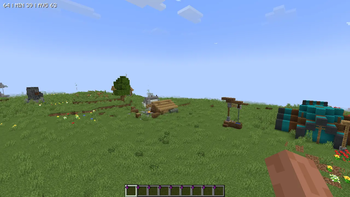
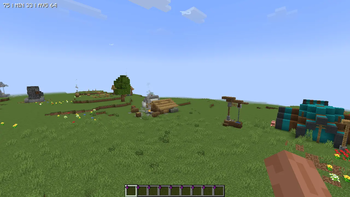
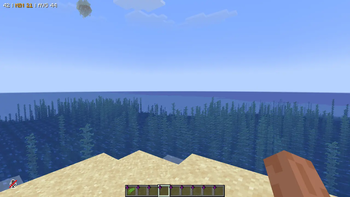
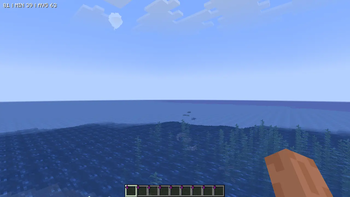
🔍 Analysis
- 👍 0.4% endorsement rate
- 🏆 #420 of 874 fabric mods in this game by downloads
📋 About This Mod
# 🍃 What is Cullify? **Cullify** is a client-side mod that culls decorative vegetation blocks (such as grass, flowers, ferns, algae, and kelp) based on distance from the player and customizable geometric shapes. By preventing distant or non-visible vegetation blocks from rendering, it reduces rendering load (vertex throughput and draw calls) without altering or removing the actual blocks in the world. !(https://cdn.modrinth.com/data/cached_images/9084d66f66c7768b4062be0b7a1b21c03b2c4f3b_0.webp) ## ✨ Features * ⚙️ **Vegetation Culling** — Reduces rendering load by hiding vegetation blocks that are beyond a configured distance. * 📐 **8 Geometric Culling Shapes** — Customizable boundaries to control culling behavior around the player. * 📉 **LOD Density Filter** — Deterministic, hash-based density filtering that thins out outer vegetation (75%, 50%, or 25%) to save CPU overhead near the boundary. * 🌿 **Double-Tall Vegetation Support** — Synchronizes culling between the bottom and top halves of double-tall blocks (like sunflowers or tall grass) to prevent visual discrepancies. * ⚙️ **In-Game Config Menu** — A configuration screen accessible via the `K` keybind, chat commands, or the NeoForge mods menu. * 📊 **Real-Time Statistics HUD** — On-screen overlay tracking culled blocks, water replacements, chunk updates, and draw calls. * 🧪 **Native Sodium Compatibility** — Direct hooks into Sodium's internal LevelSlice rendering pipeline and Sodium Options API. ## 📐 Geometric Culling Shapes Unlike traditional culling mods, Cullify offers flexible mathematical boundary checks on both the horizontal plane (X/Z) and the vertical axis (Y): | Icon | Shape | Geometry Mode | Description | | :---: | :--- | :--- | :--- | | 🟢 | **Sphere** | 3D Sphere | Culls blocks outside a 3D spherical radius. | | 🌀 | **Cylinder** | Cylinder | Culls blocks outside a horizontal circular radius (infinite Y). | | 📦 | **Box** | 3D Box | Culls blocks outside a 3D cubical bounding box. | | 🔺 | **Triangle** | Triangle | Culls blocks outside an equilateral triangular boundary centered on the player. | | ⬡ | **Hexagon** | Hexagon | Culls blocks outside a hexagonal boundary. | | ⭐ | **Star** | Star | Culls blocks outside a 6-point star (union of two intersecting triangles). | | ⏹️ | **Square** | Square | Culls blocks outside a flat square grid. | | 🔵 | **Circle** | Circle | Culls blocks outside a flat horizontal circular boundary. | ## 🎮 Controls & Commands Configuring and inspecting Cullify in-game is straightforward: ### ⌨️ Keybinds * `K` — Opens the custom Cullify GUI Config Screen. ### 💬 Chat Commands * `/cullify menu` — Opens the configuration GUI menu. * `/cullify benchmark` — Performs a benchmark of the mod and displays the results in chat. * `/cullify debug` — Toggles the real-time statistics HUD overlay. * `/cullify stats` — Prints current performance statistics directly into the chat. * `/cullify verbose` — Toggles verbose logging for debugging. * `/cullify reload` — Forces a complete reload of the client level renderer chunks. ## 🔌 Compatibility & Requirements * **Sodium / Embeddium:** Fully integrated. Hooks directly into Sodium's internal LevelSlice rendering pipeline to batch-cull blocks in MDI (*Multi-Draw Indirect*) buffers. The Culling Shape options and configurations are also registered directly inside Sodium's Video Settings menu! * **Vanilla Renderer:** Fallback compatibility included for the standard Minecraft block rendering pipeline. * **🔒 100% Client-Side:** This mod runs entirely on your client. You can join any server (Vanilla, Spigot, Forge, Paper, etc.) without any issues! ## 📄 License & Modpack Usage This mod is available under the **GNU General Public License v3 (GPL-3.0)**. > 📦 **Modpack Permissions:** Feel free to include Cullify in any of your modpacks on CurseForge, Modrinth, or private launchers! Credits are appreciated but not required. ## ⚡ Vibe Coding This mod was built 100% using **Vibe Coding**! Developed entirely through AI-assisted pair programming, dynamic prompt iterations, and automated compilation loops. *Let the vibes render!* ### Developed by Fluxsyum Studios !(https://cdn.modrinth.com/data/cached_images/c5af0be7c5b05f2cdfe85260c828389295387261.png) !(https://cdn.modrinth.com/data/cached_images/4656251e73fa2882d88a1bca3a912f29af9ea810.png)
# 🍃 What is Cullify?
Cullify is a client-side mod that culls decorative vegetation blocks (such as grass, flowers, ferns, algae, and kelp) based on distance from the player and customizable geometric shapes. By preventing distant or non-visible vegetation blocks from rendering, it reduces rendering load (vertex throughput and draw calls) without altering or removing the actual blocks in the world.
!(https://cdn.modrinth.com/data/cached_images/9084d66f66c7768b4062be0b7a1b21c03b2c4f3b_0.webp)
## ✨ Features
⚙️ Vegetation Culling — Reduces rendering load by hiding vegetation blocks that are beyond a configured distance. 📐 8 Geometric Culling Shapes — Customizable boundaries to control culling behavior around the player. 📉 LOD Density Filter — Deterministic, hash-based density filtering that thins out outer vegetation (75%, 50%, or 25%) to save CPU overhead near the boundary. 🌿 Double-Tall Vegetation Support — Synchronizes culling between the bottom and top halves of double-tall blocks (like sunflowers or tall grass) to prevent visual discrepancies. ⚙️ In-Game Config Menu — A configuration screen accessible via the `K` keybind, chat commands, or the NeoForge mods menu. 📊 Real-Time Statistics HUD — On-screen overlay tracking culled blocks, water replacements, chunk updates, and draw calls. 🧪 Native Sodium Compatibility — Direct hooks into Sodium's internal LevelSlice rendering pipeline and Sodium Options API.
## 📐 Geometric Culling Shapes
Unlike traditional culling mods, Cullify offers flexible mathematical boundary checks on both the horizontal plane (X/Z) and the vertical axis (Y):
| Icon | Shape | Geometry Mode | Description | | :---: | :--- | :--- | :--- | | 🟢 | Sphere | 3D Sphere | Culls blocks outside a 3D spherical radius. | | 🌀 | Cylinder | Cylinder | Culls blocks outside a horizontal circular radius (infinite Y). | | 📦 | Box | 3D Box | Culls blocks outside a 3D cubical bounding box. | | 🔺 | Triangle | Triangle | Culls blocks outside an equilateral triangular boundary centered on the player. | | ⬡ | Hexagon | Hexagon | Culls blocks outside a hexagonal boundary. | | ⭐ | Star | Star | Culls blocks outside a 6-point star (union of two intersecting triangles). | | ⏹️ | Square | Square | Culls blocks outside a flat square grid. | | 🔵 | Circle | Circle | Culls blocks outside a flat horizontal circular boundary. |
## 🎮 Controls & Commands
Configuring and inspecting Cullify in-game is straightforward:
### ⌨️ Keybinds `K` — Opens the custom Cullify GUI Config Screen.
### 💬 Chat Commands `/cullify menu` — Opens the configuration GUI menu. `/cullify benchmark` — Performs a benchmark of the mod and displays the results in chat. `/cullify debug` — Toggles the real-time statistics HUD overlay. `/cullify stats` — Prints current performance statistics directly into the chat. `/cullify verbose` — Toggles verbose logging for debugging. `/cullify reload` — Forces a complete reload of the client level renderer chunks.
## 🔌 Compatibility & Requirements
Sodium / Embeddium: Fully integrated. Hooks directly into Sodium's internal LevelSlice rendering pipeline to batch-cull blocks in MDI (Multi-Draw Indirect) buffers. The Culling Shape options and configurations are also registered directly inside Sodium's Video Settings menu! Vanilla Renderer: Fallback compatibility included for the standard Minecraft block rendering pipeline. 🔒 100% Client-Side: This mod runs entirely on your client. You can join any server (Vanilla, Spigot, Forge, Paper, etc.) without any issues!
## 📄 License & Modpack Usage
This mod is available under the GNU General Public License v3 (GPL-3. 0).
> 📦 Modpack Permissions: Feel free to include Cullify in any of your modpacks on CurseForge, Modrinth, or private launchers! Credits are appreciated but not required.
## ⚡ Vibe Coding
This mod was built 100% using Vibe Coding! Developed entirely through AI-assisted pair programming, dynamic prompt iterations, and automated compilation loops. Let the vibes render!*
### Developed by Fluxsyum Studios
!(https://cdn.modrinth.com/data/cached_images/c5af0be7c5b05f2cdfe85260c828389295387261.png) !(https://cdn.modrinth.com/data/cached_images/4656251e73fa2882d88a1bca3a912f29af9ea810.png)
📊 Mod Details
- Game
- Minecraft Mods
- Author
- FluxsyumStudios
- Version
- 1.4.5+mc26.1.2-neoforge
- Downloads
- 1,839
- Endorsements
- 8
- Category
- fabric
- Created
- 7/13/2026
- Updated
- 7/16/2026
- Game Versions
- 26.1.2
- Tags
- optimization, utility
🔧 How to Install Minecraft Mods Mods
Download from Modrinth. Use Prism Launcher or drop into your mods folder.
📖 Full step-by-step install guide for Minecraft Mods →
Visit the official mod page for specific installation instructions for this mod.
🎮 Need cheat codes or console commands? Check ur gaming wiki for Minecraft Mods commands, item IDs, and more.
❓ Frequently Asked Questions
Which Minecraft Mods versions does Cullify support?
The author lists 26.1.2. Other versions may work but are untested by the author.
What is the latest version of Cullify?
Version 1.4.5+mc26.1.2-neoforge, published 2026-07-16 with 1,839 downloads recorded at the source.
Keep browsing — more Minecraft Mods mods await