TPS Detective
🟡 Updated this year⚠️ Install Order · 2 steps
Install in this order, then this mod last — most mods fail to load without their framework and dependencies in place.
🖼️ Gallery (3 images)

🔍 Analysis
- 👍 0.6% endorsement rate
- 🏆 #111 of 401 forge mods in this game by downloads
📋 About This Mod
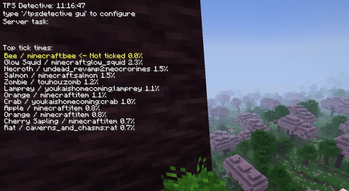
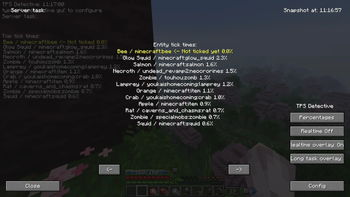
This thing shows tick statistics and also the last task server was busy doing if the server stops responding (frozen world, 0 TPS). The snapshot screen can also be triggered by pressing 'O'. The mod only works in singleplayer and does nothing on dedicated servers. Tick lag caused by a villager example: !(https://cdn.modrinth.com/data/Ndd6WzgN/images/fad955ac71f351abd74d9161b5d87c88e93a642e.png) !(https://cdn.modrinth.com/data/Ndd6WzgN/images/df3bf35bbc9eb5f2f53fff7995b07ef6c1afdeb8.png)
basically ServerFPS+ but better but recommend adding both Serverfps+ and ServerFps++ because their better together but this one is better and has a better way to use to for people and their no bugs and their a command where it increases server tps passive but I still recommend using both files in plugins commands use /chunkhelp and you will see them just type it in don't click enter you will see the commands lined up ⚡ ServerFPS+ The Ultimate Performance Optimization Plugin for Minecraft Servers ServerFPS+ is a powerful Minecraft server optimization plugin designed to reduce RAM usage, minimize disk storage requirements, and improve both server performance and client FPS. Unlike other optimization tools that only focus on one aspect of performance, ServerFPS++ takes a comprehensive approach enhancing both server-side efficiency and player experience. Whether you're running a small SMP or managing a large multiplayer server, this plugin ensures smoother gameplay, fewer lag spikes, and a stable 20 TPS without breaking the core mechanics of the game. 🌍 Built for Multiplayer Minecraft servers often struggle with performance drops as more players join, leading to entity overload, high RAM usage, and FPS drops. ServerFPS+ solves these issues by allowing server owners to limit entity counts per chunk, control how far players can see mobs and animals, and automatically balance server resources based on player activity. With these optimizations, you can handle more players without sacrificing performance, making the game smoother and more enjoyable for everyone. 🔧 Key Features 🏗 Advanced Chunk Memory Management Removes unnecessary memory from chunks without affecting gameplay, keeping TPS stable and server load low. 🎭 Customizable Entity Limits Set limits on how many mobs, animals, or other entities can exist per chunk. This helps reduce lag and prevents massive mob farms from tanking server performance. 👀 Adjustable Render Distance for Entities Let players choose how far they can see mobs and animals, from 3 to 12 chunks, reducing client-side FPS drops caused by excessive entity rendering. 💾 Reduced Disk RAM Usage Optimizes how chunks and world data are stored, resulting in lower memory consumption and smaller world file sizes. 🚀 SMP Large Server Friendly Designed to handle high-player-count servers, keeping performance smooth even with dozens or hundreds of players online. ⚙️ Easy Configuration The plugin provides a detailed settings file that lets you customize entity limits, chunk memory optimizations, and more to fit your server s needs. 📥 Installation Setup Setting up ServerFPS+ is simple. Just drop the JAR file into your server s plugin folder and restart your server. By default, the plugin automatically applies optimizations, but you can fine-tune its settings through the config file to get the best results for your server. If you're not sure if it's working, check your server logs ServerFPS+ will log its optimizations when the server star
📊 Mod Details
- Game
- Minecraft Mods
- Author
- Catomon
- Version
- 1.2.0
- Downloads
- 1,953
- Endorsements
- 12
- Category
- forge
- Created
- 11/5/2025
- Updated
- 6/18/2026
- Game Versions
- 1.21.1
- Tags
- optimization, utility
🔧 How to Install Minecraft Mods Mods
Download from Modrinth. Use Prism Launcher or drop into your mods folder.
📖 Full step-by-step install guide for Minecraft Mods →
Visit the official mod page for specific installation instructions for this mod.
🎮 Need cheat codes or console commands? Check ur gaming wiki for Minecraft Mods commands, item IDs, and more.
❓ Frequently Asked Questions
Which Minecraft Mods versions does TPS Detective support?
The author lists 1.21.1. Other versions may work but are untested by the author.
What is the latest version of TPS Detective?
Version 1.2.0, published 2026-06-18 with 1,953 downloads recorded at the source.
Keep browsing — more Minecraft Mods mods await