Cloud Layers
🟠 Updated over a year ago⚠️ Install Order · 2 steps
Install in this order, then this mod last — most mods fail to load without their framework and dependencies in place.
🖼️ Gallery (4 images)
🔍 Analysis
- 👍 0.3% endorsement rate
- 🏆 #112 of 335 decoration mods in this game by downloads
📋 About This Mod
A simple mod adding multiple layers of clouds with configurable height, thickness, speed and direction.
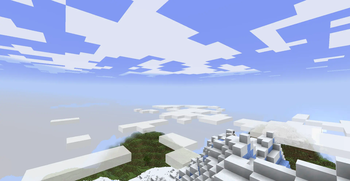
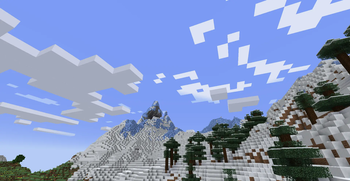
### Default Layers By default, there are two layers of clouds: - _Fancy_ style clouds at Y: 180 - _Fast_ style clouds at Y: 256
These resemble Cumulus and Cirrus clouds.
!(https://cdn.modrinth.com/data/cached_images/43845dc09f8baecb26709a77dd6c1c97674d7a09_0.webp) !(https://cdn.modrinth.com/data/cached_images/85ddaf9d43c26c8e04f5c16eeaa8719c5922fa58_0.webp)
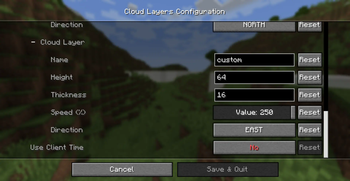
### Custom Layers You can add or edit existing cloud layers using the config menu (accessible with mod menu). Alternatively, edit the config file at _config/cloud-layers.json_.
!(https://cdn.modrinth.com/data/cached_images/4def11aac7cb891731e221167b6fdc0bf4c2af04_0.webp) !(https://cdn.modrinth.com/data/cached_images/8d162d148895d549e2451663b20a8ab76940cf2c_0.webp)
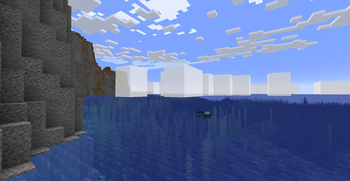
### Cloud Appearance Use the following options to change the shape of clouds: - _Thickness_, the vertical width of the cloud layer - If 0, they are rendered as _Fast_ style clouds - Vanilla _Fancy_ style clouds have thickness 4 - _Scale_, the horizontal width of each cloud pixel - This is always 12 in vanilla
You can also change the opacity, making clouds transparent.
!(https://cdn.modrinth.com/data/cached_images/f3d588a6774287080fd59eb5584b7f32235f2773_0.webp) !(https://cdn.modrinth.com/data/cached_images/b718c93faebf93d946fb867891eedb639421b8b0.png)
### Cloud Movement You can change the speed that clouds move, and select the direction of movement.
!(https://cdn.modrinth.com/data/cached_images/26c67bb0320afbadc36d1e263109caca9bd969c0.gif)
The option _Use Relative Height_ makes a cloud layer appear to stay fixed in the sky, regardless of how high the player goes, simulating a skybox effect.
### Conditions to render You can add layers that only show up when it is raining.
📊 Mod Details
- Game
- Minecraft Mods
- Author
- pymsrps
- Version
- 1.1+1.19.2
- Downloads
- 27,781
- Endorsements
- 84
- Category
- decoration
- Created
- 9/26/2024
- Updated
- 11/6/2024
- Game Versions
- 1.19.2
- Tags
- decoration
🔧 How to Install Minecraft Mods Mods
Download from Modrinth. Use Prism Launcher or drop into your mods folder.
📖 Full step-by-step install guide for Minecraft Mods →
Visit the official mod page for specific installation instructions for this mod.
🎮 Need cheat codes or console commands? Check ur gaming wiki for Minecraft Mods commands, item IDs, and more.
❓ Frequently Asked Questions
Which Minecraft Mods versions does Cloud Layers support?
The author lists 1.19.2. Other versions may work but are untested by the author.
What is the latest version of Cloud Layers?
Version 1.1+1.19.2, published 2024-11-06 with 27,781 downloads recorded at the source.
Keep browsing — more Minecraft Mods mods await