CineFOV
🟠 Updated over a year ago⚠️ Install Order · 2 steps
Install in this order, then this mod last — most mods fail to load without their framework and dependencies in place.
🖼️ Gallery (4 images)


🔍 Analysis
- 🏆 #561 of 876 fabric mods in this game by downloads
📋 About This Mod
# CineFOV **CineFOV** is a client-side mod for Minecraft that enhances the camera's field of view (FOV) with smooth transitions, dynamic zoom, and cinematic motion effects. Perfect for immersive gameplay, aesthetic builds, or content creation. !(https://cdn.modrinth.com/data/cached_images/faca2198d760ce07fb2641369bc16be6b2888c60.jpeg) --- ## ✨ Features - 🎥 Dynamic FOV based on: - Player movement - Vertical motion (jumping/falling) - Head rotation - 🔍 Smooth zoom with: - Scroll wheel - Adjustable damping - 🎯 Mouse sensitivity adjustment while zoomed - 🌀 Optional vertical camera inertia - 🎬 Cinematic look with smooth transitions - 🧩 Full ModMenu integration --- ## 🔧 Settings Overview <details> <summary><strong>General</strong></summary> - **Enable Mod:** ON/OFF toggle - **Mouse FOV:** Enable or disable FOV based on mouse movement - **Vertical Head Motion:** Enable vertical camera movement based on pitch - **Dynamic FOV:** Slider to control base dynamic FOV strength !(https://cdn.modrinth.com/data/cached_images/029f33be292cb31b89ffb8d37e9cd74c462b3ae3_0.webp) </details> <details> <summary><strong>FOV Settings</strong></summary> - **Mouse FOV Force:** Strength of FOV change when rotating - **Mouse FOV Speed:** Speed of interpolation for mouse-based FOV - **Zoom Speed:** Controls smoothness of zoom transitions - **Movement FOV Force:** Controls how much movement affects FOV !(https://cdn.modrinth.com/data/cached_images/9fa8d22c1450feae494054b5544829678727ad57_0.webp) </details> <details> <summary><strong>About</strong></summary> CineFOV enhances camera FOV behavior with: - Dynamic FOV based on movement, vertical motion, and head rotation - Smooth zoom with scroll and damping - Optional vertical camera inertia - Mouse sensitivity adjustment while zooming - Cinematic look with smooth transitions !(https://cdn.modrinth.com/data/cached_images/97cb35ed264617fb7100741cc80bb0162d8283f9_0.webp) </details> <details> <summary><strong>Keybinds</strong></summary> - **Toggle CineFOV GUI** - **Toggle Smooth Camera** - **Zoom** _All keybinds are fully rebindable._ !(https://cdn.modrinth.com/data/cached_images/4008d36b57e48c2447c92ca23fb6fa3d7f43e712_0.webp) </details> <details> <summary>🌐 Language Support</summary> This mod includes full translations for **27 languages**: - Arabic - Czech - Danish - German - Greek - English - Spanish - Finnish - French - Hungarian - Indonesian - Italian - Japanese - Korean - Dutch - Norwegian - Polish - Portuguese (Brazil) - Romanian - Russian - Swedish - Thai - Turkish - Ukrainian - Vietnamese - Chinese (Simplified) - Chinese (Traditional) </details>
CineFOV is a client-side mod for Minecraft that enhances the camera's field of view (FOV) with smooth transitions, dynamic zoom, and cinematic motion effects. Perfect for immersive gameplay, aesthetic builds, or content creation.
!(https://cdn.modrinth.com/data/cached_images/faca2198d760ce07fb2641369bc16be6b2888c60.jpeg)
## ✨ Features
- 🎥 Dynamic FOV based on:
- - Player movement
- - Vertical motion (jumping/falling)
- - Head rotation
- 🔍 Smooth zoom with:
- - Scroll wheel
- - Adjustable damping
- 🎯 Mouse sensitivity adjustment while zoomed
- 🌀 Optional vertical camera inertia
- 🎬 Cinematic look with smooth transitions
- 🧩 Full ModMenu integration
## 🔧 Settings Overview
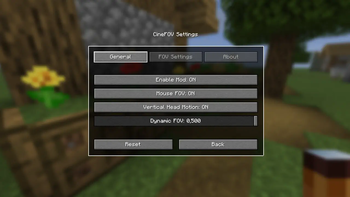
General
- Enable Mod: ON/OFF toggle
- Mouse FOV: Enable or disable FOV based on mouse movement
- Vertical Head Motion: Enable vertical camera movement based on pitch
- Dynamic FOV: Slider to control base dynamic FOV strength
!(https://cdn.modrinth.com/data/cached_images/029f33be292cb31b89ffb8d37e9cd74c462b3ae3_0.webp)
FOV Settings
- Mouse FOV Force: Strength of FOV change when rotating
- Mouse FOV Speed: Speed of interpolation for mouse-based FOV
- Zoom Speed: Controls smoothness of zoom transitions
- Movement FOV Force: Controls how much movement affects FOV
!(https://cdn.modrinth.com/data/cached_images/9fa8d22c1450feae494054b5544829678727ad57_0.webp)
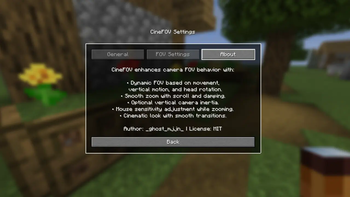
About
CineFOV enhances camera FOV behavior with:
- Dynamic FOV based on movement, vertical motion, and head rotation
- Smooth zoom with scroll and damping
- Optional vertical camera inertia
- Mouse sensitivity adjustment while zooming
- Cinematic look with smooth transitions
!(https://cdn.modrinth.com/data/cached_images/97cb35ed264617fb7100741cc80bb0162d8283f9_0.webp)
Keybinds
- Toggle CineFOV GUI
- Toggle Smooth Camera
- Zoom
_All keybinds are fully rebindable._
!(https://cdn.modrinth.com/data/cached_images/4008d36b57e48c2447c92ca23fb6fa3d7f43e712_0.webp)
🌐 Language Support
This mod includes full translations for 27 languages:
- Arabic
- Czech
- Danish
- German
- Greek
- English
- Spanish
- Finnish
- French
- Hungarian
- Indonesian
- Italian
- Japanese
- Korean
- Dutch
- Norwegian
- Polish
- Portuguese (Brazil)
- Romanian
- Russian
- Swedish
- Thai
- Turkish
- Ukrainian
- Vietnamese
- Chinese (Simplified)
- Chinese (Traditional)
📊 Mod Details
- Game
- Minecraft Mods
- Author
- _ghost_mjjn_
- Version
- 1.0.0
- Downloads
- 325
- Endorsements
- 4
- Category
- fabric
- Created
- 8/3/2025
- Updated
- 8/4/2025
- Game Versions
- 1.21.7
- Tags
- game-mechanics, optimization, utility
🔧 How to Install Minecraft Mods Mods
Download from Modrinth. Use Prism Launcher or drop into your mods folder.
📖 Full step-by-step install guide for Minecraft Mods →
Visit the official mod page for specific installation instructions for this mod.
🎮 Need cheat codes or console commands? Check ur gaming wiki for Minecraft Mods commands, item IDs, and more.
❓ Frequently Asked Questions
Which Minecraft Mods versions does CineFOV support?
The author lists 1.21.7. Other versions may work but are untested by the author.
What is the latest version of CineFOV?
Version 1.0.0, published 2025-08-04 with 325 downloads recorded at the source.
Keep browsing — more Minecraft Mods mods await