Modern Chat
🟡 Updated this year⚠️ Install Order · 2 steps
Install in this order, then this mod last — most mods fail to load without their framework and dependencies in place.
🖼️ Gallery (5 images)
🔍 Analysis
- 🏆 #13 of 51 game-mechanics mods in this game by downloads
📋 About This Mod
# Modern Chat A total reworking of the 1.8.9 chat, providing tons of features from the modern game and various QoL improvements. # Latest Version: v1.1.2 Cleaned up a few of the features and changed the command syntax file reading system. For more details, see the changelog. Let me know your thoughts! As always, report issues on the GitHub ## Features This mod, in addition to its own changes, compiles features from many different mods into one: - (#autocomplete-system) - (#server-command-autocomplete) - (#friend-name-autocomplete) - (#smooth-chat-animations) - (#raise-chat) - (#extended-chat-history) - (#compact-chat-spam) - (#maintain-chat-history) - (#replace-angle-brackets) - (#preserve-chat-input) Many of these features are also present in the (https://modrinth.com/mod/chatpatches) mod by OBro1961. However, Chat Patches is only compatible with modern version of the game. Modern Chat is built for Legacy Fabric 1.8.9. ___ ## Configuration Overview This mod is also highly customizable. To access the config menu, the default keybind is `P`. This can be modified in the game's control settings. - (#mod-configuration) - (#suggestion-color-configuration) - (#friend-list-configuration) - (#command-syntax-configuration) - (#installing-server-syntaxes) ___ ## Developer Overview This mod can also be configured manually with a little technical know-how. - (#developer-details) - (#creating-friend-list-jsons) - (#creating-command-syntax-jsons) ## Autocomplete System Based on modern Minecraft's autocomplete, the mod adds a chat suggestion box above the typing line, allowing you to chat faster! Pressing the `UP` and `DOWN` arrow keys allows you to select different suggestions, which are automatically filled in the chat box. The suggestion highlighted in yellow is the one that is currently selected. Pressing `Tab` will commit the selected suggestion to the typing line. ___ ### Server Command Autocomplete The autocomplete system for this mod is highly configurable. This allows for various command syntax trees, allowing autocomplete suggestions to work on servers with custom commands. In addition to singleplayer commands, the mod supports community-maintained server syntaxes that can be installed in a few clicks directly from the in-game menu. See (#installing-server-syntaxes) for more details. Supported servers display chat autocomplete suggestions just like singleplayer commands, in their unique color: !(images/img_1.png) The autocomplete commands also support `Tokens`, which are specific parameter keywords that trigger special searches in the parsing engine. For example, if I were to type the command: `/give <player> <item>` This would trigger two token searches. The first token search, `<player>`, will grab all active player names in the tab menu and list them as suggestions. Players who are not currently active can still appear here (see (#friend-name-autocomplete)). Next, `<item>` will trigger an item token search, which will display all available items in the game. Each server is given a unique `.json` file, containing an identifier and color, proceeded by the syntax tree. The mod reads this `.json` file and parses it to generate the autocomplete suggestions. If you wish to see more details regarding the format, take a look at the (#developer-details) near the bottom. ___ ### Friend Name Autocomplete In addition to server commands, friend names can also be autocompleted. Each server gets its own unique friends list. When a command syntax requests a player username as an input (parameter), the autocomplete mod suggestions friend names to autocomplete. This is useful for speeding up repetitive commands, such as messaging a player, inviting them to a party, etc., when they are not in the same lobby as you or are not online. Just like server syntaxes, friend names are also read from a `.json` file (albeit a much simpler one). For more details on this, read the (#developer-details) at the bottom. ___ ## Smooth Chat Animations _Inspired by the Chat Animation (Smooth Chat) mod by Ezzenix_ Modern Chat implements a smooth animations for the typing line and chat messages as they appear. Check out the original mod here: https://modrinth.com/mod/chatanimation ___ ## Raise Chat _Inspired by the Chat Up! mod by Gnembon_ This mod adds a simple tweak to the chat positioning. To prevent overlap with health and armor bars, this tweak raises the chat so it
# Modern Chat
A total reworking of the 1. 8. 9 chat, providing tons of features from the modern game and various QoL improvements.
# Latest Version: v1. 1. 2 Cleaned up a few of the features and changed the command syntax file reading system. For more details, see the changelog. Let me know your thoughts! As always, report issues on the GitHub
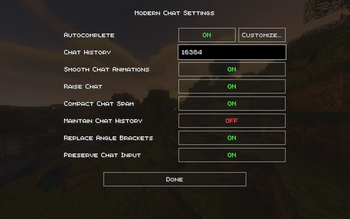
## Features This mod, in addition to its own changes, compiles features from many different mods into one: - (#autocomplete-system) - (#server-command-autocomplete) - (#friend-name-autocomplete) - (#smooth-chat-animations) - (#raise-chat) - (#extended-chat-history) - (#compact-chat-spam) - (#maintain-chat-history) - (#replace-angle-brackets) - (#preserve-chat-input)
Many of these features are also present in the (https://modrinth.com/mod/chatpatches) mod by OBro1961. However, Chat Patches is only compatible with modern version of the game. Modern Chat is built for Legacy Fabric 1. 8. 9. ___
## Configuration Overview This mod is also highly customizable. To access the config menu, the default keybind is `P`. This can be modified in the game's control settings.
- (#mod-configuration)
- - (#suggestion-color-configuration)
- - (#friend-list-configuration)
- - (#command-syntax-configuration)
- - (#installing-server-syntaxes)
- ___
## Developer Overview This mod can also be configured manually with a little technical know-how. - (#developer-details) - (#creating-friend-list-jsons) - (#creating-command-syntax-jsons)
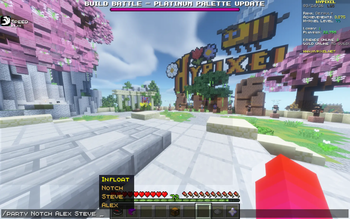
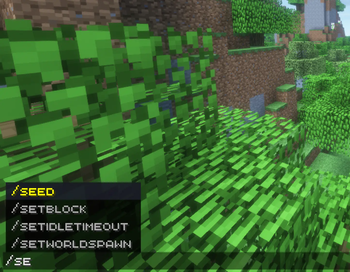
## Autocomplete System Based on modern Minecraft's autocomplete, the mod adds a chat suggestion box above the typing line, allowing you to chat faster!
Pressing the `UP` and `DOWN` arrow keys allows you to select different suggestions, which are automatically filled in the chat box. The suggestion highlighted in yellow is the one that is currently selected. Pressing `Tab` will commit the selected suggestion to the typing line. ___
### Server Command Autocomplete The autocomplete system for this mod is highly configurable. This allows for various command syntax trees, allowing autocomplete suggestions to work on servers with custom commands.
In addition to singleplayer commands, the mod supports community-maintained server syntaxes that can be installed in a few clicks directly from the in-game menu. See (#installing-server-syntaxes) for more details.
Supported servers display chat autocomplete suggestions just like singleplayer commands, in their unique color:
!(images/img_1.png)
The autocomplete commands also support `Tokens`, which are specific parameter keywords that trigger special searches in the parsing engine. For example, if I were to type the command:
`/give
This would trigger two token searches. The first token search, `
Each server is given a unique `.json` file, containing an identifier and color, proceeded by the syntax tree. The mod reads this `.json` file and parses it to generate the autocomplete suggestions. If you wish to see more details regarding the format, take a look at the (#developer-details) near the bottom. ___
### Friend Name Autocomplete In addition to server commands, friend names can also be autocompleted. Each server gets its own unique friends list. When a command syntax requests a player username as an input (parameter), the autocomplete mod suggestions friend names to autocomplete. This is useful for speeding up repetitive commands, such as messaging a player, inviting them to a party, etc., when they are not in the same lobby as you or are not online.
Just like server syntaxes, friend names are also read from a `.json` file (albeit a much simpler one). For more details on this, read the (#developer-details) at the bottom. ___
## Smooth Chat Animations _Inspired by the Chat Animation (Smooth Chat) mod by Ezzenix_
Modern Chat implements a smooth animations for the typing line and chat messages as they appear.
Check out the original mod here: https://modrinth.com/mod/chatanimation ___
## Raise Chat _Inspired by the Chat Up! mod by Gnembon_
This mod adds a simple tweak to the chat positioning. To prevent overlap with health and armor bars, this tweak raises the chat so it
📊 Mod Details
- Game
- Minecraft Mods
- Author
- infloat
- Version
- 1.1.2
- Downloads
- 352
- Endorsements
- 0
- Category
- game-mechanics
- Created
- 3/30/2026
- Updated
- 4/1/2026
- Game Versions
- 1.8.9
- Tags
- game-mechanics, optimization, utility
🔧 How to Install Minecraft Mods Mods
Download from Modrinth. Use Prism Launcher or drop into your mods folder.
📖 Full step-by-step install guide for Minecraft Mods →
Visit the official mod page for specific installation instructions for this mod.
🎮 Need cheat codes or console commands? Check ur gaming wiki for Minecraft Mods commands, item IDs, and more.
❓ Frequently Asked Questions
Which Minecraft Mods versions does Modern Chat support?
The author lists 1.8.9. Other versions may work but are untested by the author.
What is the latest version of Modern Chat?
Version 1.1.2, published 2026-04-01 with 352 downloads recorded at the source.
Keep browsing — more Minecraft Mods mods await