Chat Calc
⚪ Last updated 2023⚠️ Install Order · 2 steps
Install in this order, then this mod last — most mods fail to load without their framework and dependencies in place.
🖼️ Gallery (5 images)

🔍 Analysis
- 👍 0.3% endorsement rate
- 🏆 #86 of 940 fabric mods in this game by downloads
📋 About This Mod
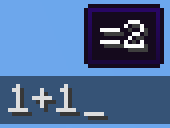
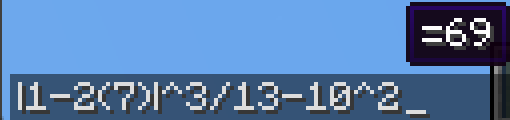
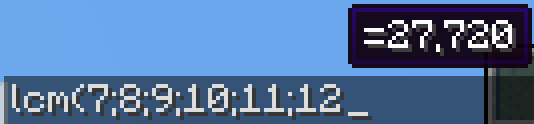
Firstly, I should clarify how you use ChatCalc, simply type an expression into chat, and it'll show the answer above. If you need to get the answer in text, just press tab. If you need the answer and the expression, type an equals sign and press tab.
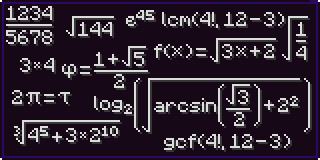
!(https://cdn.modrinth.com/data/a7X986Fs/images/a67de4c6459328c423945596359b25d16120a662.png) !(https://cdn.modrinth.com/data/a7X986Fs/images/7f9c4d56fca113b22989b6874f69c1c7d97bb23b.png) !(https://cdn.modrinth.com/data/a7X986Fs/images/77283fb94a69212d57ed15623b4d9697b5c654ec.png) !(https://cdn.modrinth.com/data/a7X986Fs/images/aa5a0f67f9603344707daa977702977a7793e324.png)
`1+2` (will make a tooltip showing `=3` above)\ `1+2` → TAB → `3`\ `1+2=` → TAB → `1+2=3`
(Do note that ChatCalc evaluates the block of text that your cursor is in , this means that you can type one thing beside another and ChatCalc will work completely fine )
ChatCalc also lets you define your own functions and constants, for example:\ `f(z)=2z-1` → TAB → ` ` (empty to give feedback that it's defined that function)\ `f(4)` → TAB → `7`
`c=sqrt(2)/2` → TAB → ` ` (empty to give feedback that it's defined that constant)\ `arcsin(c)` → TAB → `45`
You can also remove functions and constants like this:\ `f(z)=` → TAB → ` ` (empty to give feedback that it's removed that function)\ `c=` → TAB → ` ` (empty to give feedback that it's removed that constant)\
Functions can support as many parameters as you want, each separated by a semicolon (they cannot use a comma due to commas being permitted in constants, i.e. `1,0002` → TAB → `2,000`)
Here's an example function that can do some very complex behavior:\ `angle(a;b)=round((((arctan((b-(z-0. 5))/(a-(x-0. 5)))+90+(min(1;cmp(a;(x-0. 5))+1)180)+180)%360)-180)*10)/10` (credit to thecolonel63)\ This function takes in the x and y coordinates of a block and tells you the yaw to put your camera at to walk toward that block.
You can view the list of defined functions and constants by typing `functions?` or `constants?` into chat and pressing TAB.
ChatCalc features several config settings, each configurable by typing in the chat window; for example:\ `radians` → TAB → `false` (by default)\ `radians=` → TAB → `radians=false` (by default)\ `radians=true` → TAB ` ` (empty to give feedback that the value is set)\ To change the format that values are outputted in, you can change the `decimal_format`; for example:\ `decimal_format` → TAB → `#,##0.##` (by default)\ `decimal_format=#0.##` → TAB → ` ` (to remove commas)\ `decimal_format=#,###.##` → TAB → ` ` (to remove the leading 0 on values like 0. 23)\ `decimal_format=#,##0.####` → TAB → ` ` (to get 4 decimal places of accuracy)\ By default, ChatCalc stores previously evaluated expressions in the chat history (`chat_history`). You can set `copy_type` to `none` or `clipboard` to change this to the respective values. If you (for whatever reason) want to disable the tooltip showing expressions above, you can change `display_above` to `false`.
Appendix A (function list) - `sqrt` - `cbrt` - `sin` - `cos` - `tan` - `csc` - `sec` - `cot` - `arcsin` - `asin` - `arccos` - `acos` - `arctan` - `atan` - `arccsc` - `acsc` - `arcsec` - `asec` - `arccot` - `acot` - `floor` - `ceil` - `round` - `abs` - `log` - `ln` - `exp` - `sgn` - `min` - `max` - `gcf` - `lcm` - `clamp` - `cmp`
Appendix B (constant list) - `random` - `rand` - `rad` - `deg` - `yaw` - `pitch` - `pi` - `tau` - `e` - `phi` - `x` - `y` - `z`
📊 Mod Details
- Game
- Minecraft Mods
- Author
- realrttv
- Version
- 3.0.24b
- Downloads
- 32,629
- Endorsements
- 108
- Category
- fabric
- Created
- 7/1/2022
- Updated
- 12/17/2023
- Game Versions
- 1.20.1
- Tags
- utility
🔧 How to Install Minecraft Mods Mods
Download from Modrinth. Use Prism Launcher or drop into your mods folder.
📖 Full step-by-step install guide for Minecraft Mods →
Visit the official mod page for specific installation instructions for this mod.
🎮 Need cheat codes or console commands? Check ur gaming wiki for Minecraft Mods commands, item IDs, and more.
❓ Frequently Asked Questions
Which Minecraft Mods versions does Chat Calc support?
The author lists 1.20.1. Other versions may work but are untested by the author.
What is the latest version of Chat Calc?
Version 3.0.24b, published 2023-12-17 with 32,629 downloads recorded at the source.
Keep browsing — more Minecraft Mods mods await