Censor Chat
⚪ Last updated 2024⚠️ Install Order · 2 steps
Install in this order, then this mod last — most mods fail to load without their framework and dependencies in place.
🖼️ Gallery (1 images)
🔍 Analysis
- 👍 0.8% endorsement rate
- 🏆 #277 of 945 fabric mods in this game by downloads
📋 About This Mod
# **Censor Chat** - **Create** a **blacklist** of an **infinite** number of words to be **removed** from the chat! - Any blacklisted word will be **replaced** with a single **space**, allowing you to read the rest of the message without the clutter of a bunch of ******** - **DO NOT** add this to your server mods folder, it is a client-sided mod **ONLY!** ## **HOW-TO** 1. Drag and drop into the mods folder 2. Launch the game 3. Close the game 4. Go into the config folder (should be somewhere above the mods folder) 5. Open the censor_chat.json with notepad or whatever program you use to edit .json files. ``` { "deleteMessage": false, // Delete the entire message if a blacklisted word is found "blacklist": , "repeatCharForLengthOfWord": false, // will replace the blacklisted word for the entire length of the word "customChar": false, // if you want to use your own character instead of the default space "replaceWith": "*", // if customChar is set to true, will use this character instead of default space "repeatChar": 1 // if this number (integer) is higher than 1, and repeatCharForLengthOfWord is set to false, this will replace the blacklisted word for the length of this number } ``` ## **COMING SOON:** ### **Version Support:** - Forge 1.20.X support. (I _might_ do 1.12.2-1.20.4 if people want it on multiple versions I can swiss cheese the version builds since this is such a simple mod it probably wouldn't be too difficult) - ~~Fabric 1.20.X support.~~ **_DONE_** - Quilt 1.20.X support. - Neoforge might be getting 1.20.X support, however, I'm not entirely sure how neoforge works yet so that might have to be placed on hold lmao. ### **New features:** - ~~Adding a new config option to choose what character to replace the blacklisted word, and how many (repeat the character X amount of times; for example, if you set the character to "x" and set it to repeat 4 times, then "badword1" would be replaced with "xxxx"~~ **_CONFIG OVERHAULED_**
# Censor Chat
- Create a blacklist of an infinite number of words to be removed from the chat!
- Any blacklisted word will be replaced with a single space, allowing you to read the rest of the message without the clutter of a bunch of *****
- DO NOT add this to your server mods folder, it is a client-sided mod ONLY!
## HOW-TO
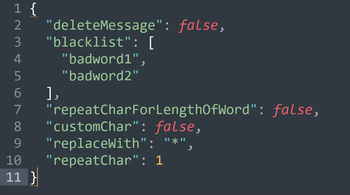
1. Drag and drop into the mods folder 2. Launch the game 3. Close the game 4. Go into the config folder (should be somewhere above the mods folder) 5. Open the censor_chat.json with notepad or whatever program you use to edit .json files.
``` { "deleteMessage": false, // Delete the entire message if a blacklisted word is found "blacklist": [ // add your own words here (replace badword1 etc) "badword1", "badword2", // make sure you add commas at the end of every entry to the list "badword3" // DON'T add a comma at the end of the final entry in the list ], "repeatCharForLengthOfWord": false, // will replace the blacklisted word for the entire length of the word "customChar": false, // if you want to use your own character instead of the default space "replaceWith": "", // if customChar is set to true, will use this character instead of default space "repeatChar": 1 // if this number (integer) is higher than 1, and repeatCharForLengthOfWord is set to false, this will replace the blacklisted word for the length of this number } ```
## COMING SOON:
### Version Support: - Forge 1. 20. X support. (I _might_ do 1. 12. 2-1. 20. 4 if people want it on multiple versions I can swiss cheese the version builds since this is such a simple mod it probably wouldn't be too difficult) - ~~Fabric 1. 20. X support.~~ _DONE_ - Quilt 1. 20. X support. - Neoforge might be getting 1. 20. X support, however, I'm not entirely sure how neoforge works yet so that might have to be placed on hold lmao.
### New features: - ~~Adding a new config option to choose what character to replace the blacklisted word, and how many (repeat the character X amount of times; for example, if you set the character to "x" and set it to repeat 4 times, then "badword1" would be replaced with "xxxx"~~ _CONFIG OVERHAULED_
📊 Mod Details
- Game
- Minecraft Mods
- Author
- confusingfool93
- Version
- 2.2-1.20-1.21
- Downloads
- 2,650
- Endorsements
- 20
- Category
- fabric
- Created
- 4/18/2024
- Updated
- 6/15/2024
- Game Versions
- 1.20, 1.20.1, 1.20.2, 1.20.3, 1.20.4
- Tags
- management, social, utility
🔧 How to Install Minecraft Mods Mods
Download from Modrinth. Use Prism Launcher or drop into your mods folder.
📖 Full step-by-step install guide for Minecraft Mods →
Visit the official mod page for specific installation instructions for this mod.
🎮 Need cheat codes or console commands? Check ur gaming wiki for Minecraft Mods commands, item IDs, and more.
❓ Frequently Asked Questions
Which Minecraft Mods versions does Censor Chat support?
The author lists 1.20, 1.20.1, 1.20.2, 1.20.3, 1.20.4, 1.20.5. Other versions may work but are untested by the author.
What is the latest version of Censor Chat?
Version 2.2-1.20-1.21, published 2024-06-15 with 2,650 downloads recorded at the source.
Keep browsing — more Minecraft Mods mods await