Bundle Backport-ish
🟡 Updated this year⚠️ Install Order · 2 steps
Install in this order, then this mod last — most mods fail to load without their framework and dependencies in place.
🖼️ Gallery (2 images)
🔍 Analysis
- 👍 0.1% endorsement rate
- 🏆 #31 of 225 equipment mods in this game by downloads
📋 About This Mod
# Bundle Backport-ish (https://modrinth.com/mod/fabric-api/) An opinionated backport of the bundle scrolling and dyeing mechanics from 1.21.2. The UI is unchanged (other than showing which slot is selected), so you still can see all the items. !(https://cdn.modrinth.com/data/91hOfmS6/images/1ff55d56a7a13815713413351f55f54ccccadc21.gif) !(https://cdn.modrinth.com/data/cached_images/65cf5d2087a63e5121aacb18413b89c3c7ab7108.png) ## Details - You can dye a bundle by combining it with the respective dye in a crafting grid. !(https://cdn.modrinth.com/data/cached_images/a79ec261829b18c3595a9b84d4c27b63c5638a58.png) - It retains its items, like a shulker box. - You can scroll the mouse wheel to select different slots in the bundle which determines what item you pull out of it. - Currently, the slot stays selected when you mouse off the bundle or pass it to another player. - All interactions are still through right click, like in 1.21.1-. - The recipe is updated to only require one leather and one string, like 1.21.2. !(https://cdn.modrinth.com/data/cached_images/9c4134487e1f11af727f3dededf3801fe2b4e764.png) - There is also a datapack you can enable with `/datapack enable "bundle-backportish:rabbithide"` or in the world creation menu which lets you craft it with either leather or rabbit hide. !(https://cdn.modrinth.com/data/cached_images/4940cad91245fa434a8cb8f1c7db0595f7ad1db7.png) - You do not need to enable the bundles experiment, it is enabled by default and hidden. - Currently, right clicking a bundle in the world still dumps all the items out, although this may be changed in the future. --- <details> <summary>Compat</summary> Contains integration with (https://modrinth.com/mod/emi) to show the bundle dyeing recipes, as they are NBT crafting and wouldn't show up normally. Works with (https://modrinth.com/mod/mouse-tweaks): scrolling will change bundle selection instead of extracting items </details> Also check out (https://modrinth.com/mod/backbundled) if you're looking for a more accurate backport of vanilla bundles ## Credits Scrolling implementation based on (https://modrinth.com/mod/bundle-tweaks) by (https://modrinth.com/user/zacharybarbanell) (MIT License) --- <details> <summary>Known Bugs</summary> - If you make the crafting recipe for a dyed bundle but then manipulate the contents of the bundle, it will not update the result bundle. Hopefully this will be fixed in a future release. </details>
# Bundle Backport-ish
[ ](https://modrinth.com/mod/fabric-api/)
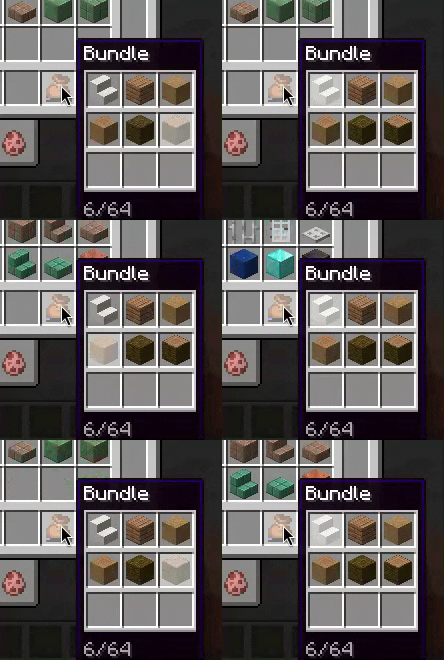
An opinionated backport of the bundle scrolling and dyeing mechanics from 1. 21. 2. The UI is unchanged (other than showing which slot is selected), so you still can see all the items.
!(https://cdn.modrinth.com/data/91hOfmS6/images/1ff55d56a7a13815713413351f55f54ccccadc21.gif)
!(https://cdn.modrinth.com/data/cached_images/65cf5d2087a63e5121aacb18413b89c3c7ab7108.png)
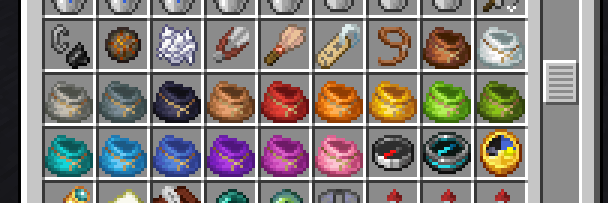
- You can dye a bundle by combining it with the respective dye in a crafting grid.
- !(https://cdn.modrinth.com/data/cached_images/a79ec261829b18c3595a9b84d4c27b63c5638a58.png)
- - It retains its items, like a shulker box.
- You can scroll the mouse wheel to select different slots in the bundle which determines what item you pull out of it.
- - Currently, the slot stays selected when you mouse off the bundle or pass it to another player.
- - All interactions are still through right click, like in 1. 21. 1-.
- The recipe is updated to only require one leather and one string, like 1. 21. 2.
- !(https://cdn.modrinth.com/data/cached_images/9c4134487e1f11af727f3dededf3801fe2b4e764.png)
- - There is also a datapack you can enable with `/datapack enable "bundle-backportish:rabbithide"` or in the world creation menu which lets you craft it with either leather or rabbit hide.
- !(https://cdn.modrinth.com/data/cached_images/4940cad91245fa434a8cb8f1c7db0595f7ad1db7.png)
- You do not need to enable the bundles experiment, it is enabled by default and hidden.
- Currently, right clicking a bundle in the world still dumps all the items out, although this may be changed in the future.
Contains integration with (https://modrinth.com/mod/emi) to show the bundle dyeing recipes, as they are NBT crafting and wouldn't show up normally.
Works with (https://modrinth.com/mod/mouse-tweaks): scrolling will change bundle selection instead of extracting items
Also check out (https://modrinth.com/mod/backbundled) if you're looking for a more accurate backport of vanilla bundles
Scrolling implementation based on (https://modrinth.com/mod/bundle-tweaks) by (https://modrinth.com/user/zacharybarbanell) (MIT License)
- If you make the crafting recipe for a dyed bundle but then manipulate the contents of the bundle, it will not update the result bundle. Hopefully this will be fixed in a future release.
📊 Mod Details
- Game
- Minecraft Mods
- Author
- ThePotatoArchivist
- Version
- 1.1.5+mc1.21.1
- Downloads
- 31,204
- Endorsements
- 30
- Category
- equipment
- Created
- 12/5/2024
- Updated
- 1/8/2026
- Game Versions
- 1.21, 1.21.1
- Tags
- equipment, storage
🔧 How to Install Minecraft Mods Mods
Download from Modrinth. Use Prism Launcher or drop into your mods folder.
📖 Full step-by-step install guide for Minecraft Mods →
Visit the official mod page for specific installation instructions for this mod.
🎮 Need cheat codes or console commands? Check ur gaming wiki for Minecraft Mods commands, item IDs, and more.
❓ Frequently Asked Questions
Which Minecraft Mods versions does Bundle Backport-ish support?
The author lists 1.21, 1.21.1. Other versions may work but are untested by the author.
What is the latest version of Bundle Backport-ish?
Version 1.1.5+mc1.21.1, published 2026-01-08 with 31,204 downloads recorded at the source.
Keep browsing — more Minecraft Mods mods await