Block Beams
🟡 Updated this year⚠️ Install Order · 2 steps
Install in this order, then this mod last — most mods fail to load without their framework and dependencies in place.
🖼️ Gallery (2 images)
🔍 Analysis
- 👍 0.5% endorsement rate
- 🏆 #182 of 280 decoration mods in this game by downloads
📋 About This Mod
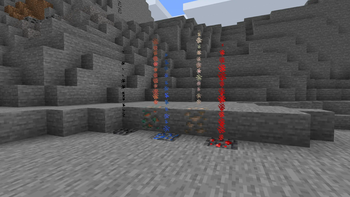
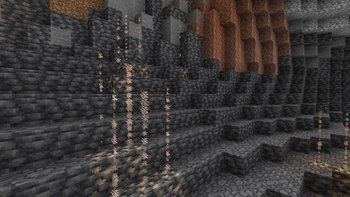
# Block Beams A very simple mod that spawns a beam of colored particles above a block --- A very simple mod that spawns a beam of colored particles above a block if the block has 3 block of air or other "passable" blocks above it *(see config for more info)*. Which helps you spot the block better. I originally came up with this idea when I was mining for ores with my world eater. But with how big the 1.18 caves are this is going to be useful there as well. Plus it can also be used as an aesthetic feature, in case you want to have a water fountain you can make a not useful block have blue particles and boom you have a fountain. #### Warning Some server owners / admins may see this mod as unfair. So be respectful and ask the server owners / admins if you can you this mod. Also mention the "server side" config of the mod. *(Se bellow)* ### Dependencies This mod Depends on: (https://modrinth.com/mod/fabric-language-kotlin) *(My apologies for dependency)* ### Config This mod has extensive configuration for what little it adds. There are 2 types of config : <details> <summary>"Server" side</summary> Block Beams is not supported on the server but there is a server side type config. The only think you can configure server side is the block pass list. It is configured by a vanilla tag, so you just have to set up a tag on the severer, then all the clients that use the mod will be configured, no need to install the mod on the server. *(Only thing to add is that the clients can override if they use the server tag or not)* If you wish to: - make your own tag just go (https://github.com/theendercore/BlockBeams/tree/1.19/examples/exmple_pack) and then just reconfigure it as you like. - use the (https://github.com/theendercore/BlockBeams/raw/1.19/examples/DefaultPack.zip) - disable to mod (https://github.com/theendercore/BlockBeams/raw/1.19/examples/EmptyPack.zip) </details> <details> <summary>Client side</summary> As stated in server config most configs are on the client: - "blockBeams" is the list of blocks that will emit the particles and there color. It has a very simple format of `` - "blockCheckType" is the way the mod check for what blocks to pass through - SERVER_ONLY - Gets the tag from the server and checks based on that, if the server has no tag then the mod is disabled \ - CLIENT_ONLY - Uses the client tag from his config (Use only if it is okay to do on the server) - "clientTag" The client equivalent of the server side tag. Works like vanilla tag. </details> (https://cdn.modrinth.com/data/cached_images/b1a434cb888cd675034184ac4173bb6e379e5f3a.png) Click on the banner or here to support me and my projects! :)](https://billing.kinetichosting.net/aff.php?aff=853) (https://ko-fi.com/img/githubbutton_sm.svg)](https://ko-fi.com/M4M7DWJCH)
# Block Beams
A very simple mod that spawns a beam of colored particles above a block ---
A very simple mod that spawns a beam of colored particles above a block if the block has 3 block of air or other "passable" blocks above it (see config for more info). Which helps you spot the block better. I originally came up with this idea when I was mining for ores with my world eater. But with how big the 1. 18 caves are this is going to be useful there as well. Plus it can also be used as an aesthetic feature, in case you want to have a water fountain you can make a not useful block have blue particles and boom you have a fountain.
#### Warning
Some server owners / admins may see this mod as unfair. So be respectful and ask the server owners / admins if you can you this mod. Also mention the "server side" config of the mod. (Se bellow)
### Dependencies
This mod Depends on: (https://modrinth.com/mod/fabric-language-kotlin) (My apologies for dependency)
This mod has extensive configuration for what little it adds. There are 2 types of config :
"Server" side
Block Beams is not supported on the server but there is a server side type config.
The only think you can configure server side is the block pass list. It is configured by a vanilla tag, so you just have to set up a tag on the severer, then all the clients that use the mod will be configured, no need to install the mod on the server. (Only thing to add is that the clients can override if they use the server tag or not)
If you wish to:
- make your own tag just
- go (https://github.com/theendercore/BlockBeams/tree/1. 19/examples/exmple_pack) and then
- just reconfigure it as you like.
- use the (https://github.com/theendercore/BlockBeams/raw/1. 19/examples/DefaultPack.zip)
- disable to mod (https://github.com/theendercore/BlockBeams/raw/1. 19/examples/EmptyPack.zip)
Client side
As stated in server config most configs are on the client:
- "blockBeams" is the list of blocks that will emit the particles and there color. It has a very simple format
- of `["namespace:block": hex color]`
- "blockCheckType" is the way the mod check for what blocks to pass through
- - SERVER_ONLY - Gets the tag from the server and checks based on that, if the server has no tag then the mod is
- disabled \
- - CLIENT_ONLY - Uses the client tag from his config (Use only if it is okay to do on the server)
- "clientTag" The client equivalent of the server side tag. Works like vanilla tag.
[!(https://cdn.modrinth.com/data/cached_images/b1a434cb888cd675034184ac4173bb6e379e5f3a.png) Click on the banner or here to support me and my projects! :)](https://billing.kinetichosting.net/aff.php?aff=853)
[!(https://ko-fi.com/img/githubbutton_sm.svg)](https://ko-fi.com/M4M7DWJCH)
📊 Mod Details
- Game
- Minecraft Mods
- Author
- TheEnderCore
- Version
- 1.2.2
- Downloads
- 3,300
- Endorsements
- 18
- Category
- decoration
- Created
- 7/22/2023
- Updated
- 9/30/2025
- Game Versions
- 1.21.9, 1.21.10, 1.21.11
- Tags
- decoration, game-mechanics, utility
🔧 How to Install Minecraft Mods Mods
Download from Modrinth. Use Prism Launcher or drop into your mods folder.
📖 Full step-by-step install guide for Minecraft Mods →
Visit the official mod page for specific installation instructions for this mod.
🎮 Need cheat codes or console commands? Check ur gaming wiki for Minecraft Mods commands, item IDs, and more.
❓ Frequently Asked Questions
Which Minecraft Mods versions does Block Beams support?
The author lists 1.21.9, 1.21.10, 1.21.11. Other versions may work but are untested by the author.
What is the latest version of Block Beams?
Version 1.2.2, published 2025-09-30 with 3,300 downloads recorded at the source.
Keep browsing — more Minecraft Mods mods await