Blackhole
🟡 Updated this year⚠️ Install Order · 2 steps
Install in this order, then this mod last — most mods fail to load without their framework and dependencies in place.
🖼️ Gallery (2 images)
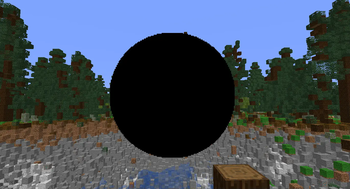

🔍 Analysis
- 👍 0.1% endorsement rate
- 🏆 #441 of 647 adventure mods in this game by downloads
📋 About This Mod
# Black Hole Mod A Minecraft mod that adds destructive, dynamic black holes to your world. - **Github:** https://github.com/IDoTheHax/Blackhole - **Modrinth:** https://modrinth.com/mod/blackhole - **Discord:** https://discord.com/faPd8MQ3Ke - **Youtube:** <iframe width="560" height="315" src="https://www.youtube-nocookie.com/embed/LeALlIde120" title="YouTube video player" frameborder="0" allow="accelerometer; autoplay; clipboard-write; encrypted-media; gyroscope; picture-in-picture; web-share" allowfullscreen></iframe> ## Overview The Black Hole mod introduces a new block that creates a simulated black hole in your Minecraft world. These black holes have realistic gravitational effects, pulling in nearby entities and blocks. They can grow over time, follow players, and cause destruction in their path. ### PSA: DONT USE THIS IN YOUR WORLD WITHOUT MAKING A BACKUP!! ## Features - **Realistic Physics**: Black holes exert gravitational force on nearby entities and blocks based on configurable mass values - **Growing Black Holes**: Black holes can expand over time, increasing their area of effect - **Player Tracking**: Black holes can follow players within a configurable range - **Visual Effects**: Features customizable particle effects for an immersive experience - **Fully Configurable**: All aspects of black hole behavior can be adjusted via commands or configuration file - **Creative Mode Integration**: Black hole item available in both custom creative tab and vanilla Redstone Blocks tab ## Texture Pack This mod uses Polymer for custom rendering and requires a texture pack for the black hole visuals. Use the `/polymer generatepack` command in-game to create a default texture pack, then drag the generated pack (named resource_pack in the polymer folder) into your resources folder or use a serverside resource pack. See the (https://polymer.pb4.eu/polymer/resource-packs/#building-resource-pack) for more details. ## Commands All commands require operator permission level 2 or higher and begin with `/blackhole`: ### Configuration Commands | Command | Description | |---------|-------------| | `getmaxscale` / `setmaxscale <value>` | Get/set maximum size a black hole can grow to | | `getgravity` / `setgravity <value>` | Get/set gravitational constant | | `getplayermass` / `setplayermass <value>` | Get/set mass value for players | | `getblockmass` / `setblockmass <value>` | Get/set mass value for blocks | | `getitementitymass` / `setitementitymass <value>` | Get/set mass value for item entities | | `getanimalmass` / `setanimalmass <value>` | Get/set mass value for animal entities | | `getchunkloadradius` / `setchunkloadradius <value>` | Get/set radius of chunks to force-load around a black hole | | `getmaxblockspertick` / `setmaxblockspertick <value>` | Get/set maximum blocks processed per tick | | `getmovementspeed` / `setmovementspeed <value>` | Get/set movement speed of following black holes | | `getdefaultfollowrange` / `setdefaultfollowrange <value>` | Get/set default range for black holes to detect players | | `getplayerdetectioninterval` / `setplayerdetectioninterval <value>` | Get/set ticks between player detection checks | | `getgrowthrate` / `setgrowthrate <value>` | Get/set growth rate for black holes | | `getparticles` / `toggleparticles` | Get/toggle particle effects on/off globally | ### Black Hole Manipulation Commands | Command | Description | |---------|-------------| | `togglefollow` | Toggle whether the nearest black hole follows players | | `togglegrowth` | Toggle whether the nearest black hole grows over time | | `setfollowrange <range>` | Set the follow range for the nearest black hole | | `kill` | Permanently remove the nearest black hole and its visuals (requires server-side 1.21.11+ features) | ## Configuration The mod creates a configuration file at `config/black_hole.json` with the following default values: ```json { "maxScale": 40.0, "gravity": 60.0, "playerMass": 700.0, "blockMass": 10.0, "itemEntityMass": 0.1, "animalMass": 50.0, "chunkLoadRadius": 2, "maxBlocksPerTick": 500, "movementSpeed": 1.0, "defaultFollowRange": 256.0, "playerDetectionInterval": 60, "growthRate": 0.04, "particlesEnabled": true } ``` ### Configuration Properties | Property | Description | Default | |----------|-------------|---------| | `maxScale` | Maximum size a black hole can grow to | 40.0 | | `gravity` | Gravitational constant affecting pull strength | 60.0 | | `playerMass` | Mass value for players (affects how strongly they're pulled) | 700.0 | | `blockMass` | Mass value for blocks | 10.0 | | `itemEntityMass` | Mass value for item entities | 0.1 | | `animalMass` | Mass value for animal entities | 50.0 | | `chunkLoadRadius` | Radius of chunks to force-load around a black hole | 2 | | `maxBlocksPerTick` | Maximum blocks processed per tick (performance setting) | 500 | | `movementSpeed` | Movement speed when following players | 1.0 | | `defaultFo
# Black Hole Mod
A Minecraft mod that adds destructive, dynamic black holes to your world.
- Github: https://github.com/IDoTheHax/Blackhole
- Modrinth: https://modrinth.com/mod/blackhole
- Discord: https://discord.com/faPd8MQ3Ke
- Youtube:
## Overview
The Black Hole mod introduces a new block that creates a simulated black hole in your Minecraft world. These black holes have realistic gravitational effects, pulling in nearby entities and blocks. They can grow over time, follow players, and cause destruction in their path.
### PSA: DONT USE THIS IN YOUR WORLD WITHOUT MAKING A BACKUP!!
## Features
- Realistic Physics: Black holes exert gravitational force on nearby entities and blocks based on configurable mass values
- Growing Black Holes: Black holes can expand over time, increasing their area of effect
- Player Tracking: Black holes can follow players within a configurable range
- Visual Effects: Features customizable particle effects for an immersive experience
- Fully Configurable: All aspects of black hole behavior can be adjusted via commands or configuration file
- Creative Mode Integration: Black hole item available in both custom creative tab and vanilla Redstone Blocks tab
## Texture Pack
This mod uses Polymer for custom rendering and requires a texture pack for the black hole visuals. Use the `/polymer generatepack` command in-game to create a default texture pack, then drag the generated pack (named resource_pack in the polymer folder) into your resources folder or use a serverside resource pack. See the (https://polymer.pb4.eu/polymer/resource-packs/#building-resource-pack) for more details.
## Commands
All commands require operator permission level 2 or higher and begin with `/blackhole`:
### Configuration Commands
| Command | Description |
|---------|-------------|
| `getmaxscale` / `setmaxscale
### Black Hole Manipulation Commands
| Command | Description |
|---------|-------------|
| `togglefollow` | Toggle whether the nearest black hole follows players |
| `togglegrowth` | Toggle whether the nearest black hole grows over time |
| `setfollowrange
## Configuration
The mod creates a configuration file at `config/black_hole.json` with the following default values:
```json { "maxScale": 40. 0, "gravity": 60. 0, "playerMass": 700. 0, "blockMass": 10. 0, "itemEntityMass": 0. 1, "animalMass": 50. 0, "chunkLoadRadius": 2, "maxBlocksPerTick": 500, "movementSpeed": 1. 0, "defaultFollowRange": 256. 0, "playerDetectionInterval": 60, "growthRate": 0. 04, "particlesEnabled": true } ```
### Configuration Properties
| Property | Description | Default | |----------|-------------|---------| | `maxScale` | Maximum size a black hole can grow to | 40. 0 | | `gravity` | Gravitational constant affecting pull strength | 60. 0 | | `playerMass` | Mass value for players (affects how strongly they're pulled) | 700. 0 | | `blockMass` | Mass value for blocks | 10. 0 | | `itemEntityMass` | Mass value for item entities | 0. 1 | | `animalMass` | Mass value for animal entities | 50. 0 | | `chunkLoadRadius` | Radius of chunks to force-load around a black hole | 2 | | `maxBlocksPerTick` | Maximum blocks processed per tick (performance setting) | 500 | | `movementSpeed` | Movement speed when following players | 1. 0 | | `defaultFo
📊 Mod Details
- Game
- Minecraft Mods
- Author
- IDoTheHax
- Version
- 2.0.0+1.21.11
- Downloads
- 11,459
- Endorsements
- 13
- Category
- adventure
- Created
- 3/20/2025
- Updated
- 4/20/2026
- Game Versions
- 1.21.11
- Tags
- adventure, cursed, technology
🔧 How to Install Minecraft Mods Mods
Download from Modrinth. Use Prism Launcher or drop into your mods folder.
📖 Full step-by-step install guide for Minecraft Mods →
Visit the official mod page for specific installation instructions for this mod.
🎮 Need cheat codes or console commands? Check ur gaming wiki for Minecraft Mods commands, item IDs, and more.
❓ Frequently Asked Questions
Which Minecraft Mods versions does Blackhole support?
The author lists 1.21.11. Other versions may work but are untested by the author.
What is the latest version of Blackhole?
Version 2.0.0+1.21.11, published 2026-04-20 with 11,459 downloads recorded at the source.
Keep browsing — more Minecraft Mods mods await