Biome Spreader
🟡 Updated this year⚠️ Install Order · 2 steps
Install in this order, then this mod last — most mods fail to load without their framework and dependencies in place.
🖼️ Gallery (2 images)
🔍 Analysis
- 👍 0.8% endorsement rate
- 🏆 #137 of 274 decoration mods in this game by downloads
📋 About This Mod
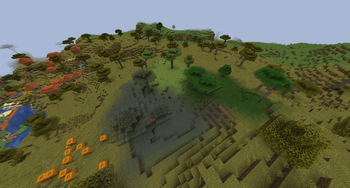
# Biome Spreader This mod works by creating a datapack when the server loads a world which provides the crafting recipes. For that reason, the potions to spread the biomes need to be crafted at the crafting table and can't be brewed. It is written in a way that new potions can be added without modifying the mod itself. The event that spreads the biomes looks for potions with a specific naming scheme and then spreads the corresponding biome, so you can add custom biome potions yourself if the provided ones aren't enough. It looks for the "potion_contents" nbt compound and checks the custom name of the potion. If the name ends with "_fertilizer", the prefix is converted to a biome. So to add a potion that spreads the ocean biome, you need to name the potion "ocean_fertilizer". For examples you can look through the datapack in the assets directory of the mod. Even though the mod is a server-only mod, it can also be installed on the client to be used in singleplayer. ## Configuration The following things can be configured in the config.json: - Radius In blocks - How the biomes are spread on the vertical axis Possible values in the config are **CYLINDER** and **SPHERE** - If the datapack that provides the recipes should be recreated on startup This is on by default, but can be disabled after the first start - Whether the potions can be used in each dimension By default, potions can only spread biomes in the overworld dimension - Biomes that should not be overwritten The names have to include the namespace, eg. "minecraft:lush_caves" By default, biomes are spread in a 16 block radius from the bottom of the world to the top, but can't replace lush and dripstone caves. Keep in mind, since biomes are stored in 4x4x4 cubes and not for each block, the biome will not be spread perfectly centered where the potion lands. Also, setting the radius to a number that is not divisible by 4 might not work as expected. ## Recipes Every recipe is shapeless and follows the same pattern: 1x bone meal, 1x blaze powder, 1x splash potion of water and 1 item or block that represents the biome. These are the biomes that can be spread by default: - Badlands (Dead Bush) - Bamboo Jungle (Bamboo) - Birch Forest (Birch Sapling) - Cherry Grove (Cherry Sapling) - Dark Forest (Dark Oak Sapling) - Desert (Cactus) - Flower Forest (Allium) - Forest (Oak Sapling) - Jungle (Jungle Sapling) - Mangrove Swamp (Propagule) - Meadow (Dandelion) - Mushroom Fields (Mycelium) - Pale Garden (Pale Oak Sapling) - Plains (Short Grass) - Savanna (Acacia Sapling) - Snowy Plains (Snowball) - Sunflower Plains (Sunflower) - Swamp (Lilypad) - Taiga (Spruce Sapling)
# Biome Spreader This mod works by creating a datapack when the server loads a world which provides the crafting recipes. For that reason, the potions to spread the biomes need to be crafted at the crafting table and can't be brewed. It is written in a way that new potions can be added without modifying the mod itself.
The event that spreads the biomes looks for potions with a specific naming scheme and then spreads the corresponding biome, so you can add custom biome potions yourself if the provided ones aren't enough. It looks for the "potion_contents" nbt compound and checks the custom name of the potion. If the name ends with "_fertilizer", the prefix is converted to a biome. So to add a potion that spreads the ocean biome, you need to name the potion "ocean_fertilizer". For examples you can look through the datapack in the assets directory of the mod.
Even though the mod is a server-only mod, it can also be installed on the client to be used in singleplayer.
## Configuration The following things can be configured in the config.json: - Radius In blocks - How the biomes are spread on the vertical axis Possible values in the config are CYLINDER and SPHERE - If the datapack that provides the recipes should be recreated on startup This is on by default, but can be disabled after the first start - Whether the potions can be used in each dimension By default, potions can only spread biomes in the overworld dimension - Biomes that should not be overwritten The names have to include the namespace, eg. "minecraft:lush_caves"
By default, biomes are spread in a 16 block radius from the bottom of the world to the top, but can't replace lush and dripstone caves. Keep in mind, since biomes are stored in 4x4x4 cubes and not for each block, the biome will not be spread perfectly centered where the potion lands. Also, setting the radius to a number that is not divisible by 4 might not work as expected.
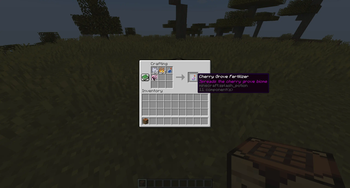
## Recipes Every recipe is shapeless and follows the same pattern: 1x bone meal, 1x blaze powder, 1x splash potion of water and 1 item or block that represents the biome.
These are the biomes that can be spread by default: - Badlands (Dead Bush) - Bamboo Jungle (Bamboo) - Birch Forest (Birch Sapling) - Cherry Grove (Cherry Sapling) - Dark Forest (Dark Oak Sapling) - Desert (Cactus) - Flower Forest (Allium) - Forest (Oak Sapling) - Jungle (Jungle Sapling) - Mangrove Swamp (Propagule) - Meadow (Dandelion) - Mushroom Fields (Mycelium) - Pale Garden (Pale Oak Sapling) - Plains (Short Grass) - Savanna (Acacia Sapling) - Snowy Plains (Snowball) - Sunflower Plains (Sunflower) - Swamp (Lilypad) - Taiga (Spruce Sapling)
📊 Mod Details
- Game
- Minecraft Mods
- Author
- Masy
- Version
- 2.0.1
- Downloads
- 1,841
- Endorsements
- 14
- Category
- decoration
- Created
- 2/14/2025
- Updated
- 12/13/2025
- Game Versions
- 1.21.11
- Tags
- decoration, game-mechanics, worldgen
🔧 How to Install Minecraft Mods Mods
Download from Modrinth. Use Prism Launcher or drop into your mods folder.
📖 Full step-by-step install guide for Minecraft Mods →
Visit the official mod page for specific installation instructions for this mod.
🎮 Need cheat codes or console commands? Check ur gaming wiki for Minecraft Mods commands, item IDs, and more.
❓ Frequently Asked Questions
Which Minecraft Mods versions does Biome Spreader support?
The author lists 1.21.11. Other versions may work but are untested by the author.
What is the latest version of Biome Spreader?
Version 2.0.1, published 2025-12-13 with 1,841 downloads recorded at the source.
Keep browsing — more Minecraft Mods mods await