Backpack Attribute
🟡 Updated this year⚠️ Install Order · 2 steps
Install in this order, then this mod last — most mods fail to load without their framework and dependencies in place.
🖼️ Gallery (2 images)
🔍 Analysis
- 👍 0.1% endorsement rate
- 🏆 #579 of 647 adventure mods in this game by downloads
📋 About This Mod
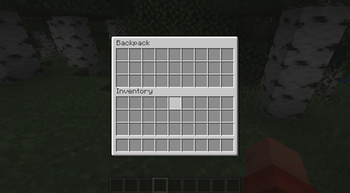
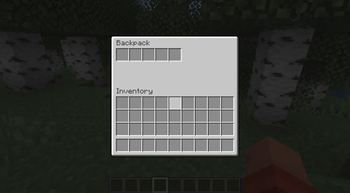
# Backpack Attribute This is a different approach to a backpack in Minecraft. No backpack items are added, the backpack can be accessed at any time (depending on the config settings). The player can open the new backpack screen via a hotkey (B by default). The minimum amount of slots is 0, in which case the backpack screen won't open. The player gets notified that they currently don't have backpack slots. The maximum amount of slots is 27. ## Configuration The "natural_backpack_capacity" server config option controls the amount of backpack slots each player has by default. The entity attribute "backpackattribute:backpack_capacity" controls how many slots are added to/removed from the default amount. This is 0 by default, but with entity attribute modifiers (EAMs) it can be changed. The background texture of disabled slots is not shown. This can be disabled in the client config. ## "What happens to items in my backpack when my backpack gets smaller?" When a backpack slot contains an item and becomes inactive, that item is moved to the normal inventory or dropped at the players location, when the inventory is full. This is announced to the player via a chat message. ## "What happens to items in my backpack when I die?" Several server config options control what happens in the case of player death. When the "keep_backpack_inventory_on_death" option is set to true, the items stay in the backpack. This is similar to the vanilla "keepInventory" game rule. When "keep_backpack_inventory_on_death" is set to false, two outcomes are possible, depending on the "clear_backpack_inventory_on_death" option: - When the option is true, the items are destroyed. - When the option is false, the items are dropped on the players position.
# Backpack Attribute
This is a different approach to a backpack in Minecraft. No backpack items are added, the backpack can be accessed at any time (depending on the config settings).
The player can open the new backpack screen via a hotkey (B by default).
The minimum amount of slots is 0, in which case the backpack screen won't open. The player gets notified that they currently don't have backpack slots.
The maximum amount of slots is 27.
## Configuration
The "natural_backpack_capacity" server config option controls the amount of backpack slots each player has by default.
The entity attribute "backpackattribute:backpack_capacity" controls how many slots are added to/removed from the default amount. This is 0 by default, but with entity attribute modifiers (EAMs) it can be changed.
The background texture of disabled slots is not shown. This can be disabled in the client config.
## "What happens to items in my backpack when my backpack gets smaller?"
When a backpack slot contains an item and becomes inactive, that item is moved to the normal inventory or dropped at the players location, when the inventory is full. This is announced to the player via a chat message.
## "What happens to items in my backpack when I die?"
Several server config options control what happens in the case of player death.
When the "keep_backpack_inventory_on_death" option is set to true, the items stay in the backpack. This is similar to the vanilla "keepInventory" game rule.
When "keep_backpack_inventory_on_death" is set to false, two outcomes are possible, depending on the "clear_backpack_inventory_on_death" option: - When the option is true, the items are destroyed. - When the option is false, the items are dropped on the players position.
📊 Mod Details
- Game
- Minecraft Mods
- Author
- TheRedBrain
- Version
- Hzp59gAc
- Downloads
- 10,233
- Endorsements
- 11
- Category
- adventure
- Created
- 5/15/2024
- Updated
- 4/21/2026
- Game Versions
- 6Kc4rKNy, sgHfFyt7, i1TH1Drs, nxyxzo9d, 1AMkIAdy
- Tags
- adventure, library, storage
🔧 How to Install Minecraft Mods Mods
Download from Modrinth. Use Prism Launcher or drop into your mods folder.
📖 Full step-by-step install guide for Minecraft Mods →
Visit the official mod page for specific installation instructions for this mod.
🎮 Need cheat codes or console commands? Check ur gaming wiki for Minecraft Mods commands, item IDs, and more.
❓ Frequently Asked Questions
Which Minecraft Mods versions does Backpack Attribute support?
The author lists 6Kc4rKNy, sgHfFyt7, i1TH1Drs, nxyxzo9d, 1AMkIAdy, LEaYUd67. Other versions may work but are untested by the author.
What is the latest version of Backpack Attribute?
Version Hzp59gAc, published 2026-04-21 with 10,233 downloads recorded at the source.
Keep browsing — more Minecraft Mods mods await