Advancements Tracker
⚪ Last updated 2024⚠️ Install Order · 2 steps
Install in this order, then this mod last — most mods fail to load without their framework and dependencies in place.
🖼️ Gallery (3 images)
🔍 Analysis
- 👍 0.1% endorsement rate
- 🏆 #29 of 386 forge mods in this game by downloads
📋 About This Mod
# Advancements Tracker and Overview (http://cf.way2muchnoise.eu/full_453074_downloads.svg)](https://www.curseforge.com/minecraft/mc-mods/advancements-tracker) (http://cf.way2muchnoise.eu/versions/Minecraft_453074_all.svg)](https://www.curseforge.com/minecraft/mc-mods/advancements-tracker) Advancements Tracker is a powerful Minecraft Forge Client Mod that enhances your gaming experience by providing you with an intuitive overlay. This overlay enables you to easily track your progress towards completing your selected advancements, making the process smoother and more enjoyable. With Advancements Tracker, you can also access advanced sorting and filtering options, allowing you to gain a better overview of your advancements. This feature helps you identify which advancements to prioritize and which ones require more effort, making the overall gameplay experience more rewarding and meaningful. Say goodbye to the frustration of trying to keep track of your advancements on your own. With Advancements Tracker, you'll have all the information you need at your fingertips, making achieving your Minecraft goals a breeze. Note: For Fabric please take a look at which offers similar functionality. (https://i.ytimg.com/vi/om_lcypqmmM/maxresdefault.jpg)](https://www.youtube.com/watch?v=om_lcypqmmM&t=337s "") Example Video by (https://www.youtube.com/c/PwrDown) ## 🚀Features - Client side only, but works with multiplayer servers. - List Overview of advancements with sorting and filter. - Displaying of completed and missing criteria to make it easier to complete an advancement. - Easy way to track specific advancements and their process. - Most criteria will be translated to more meaningful names. ### 📜Advancements Overview The overview could be open with **CTRL + L** and displays all current advancements and allow the tracking of single advancements. ### 🔎 Advancement Details By clicking on the advancements inside the overview you will see the details about the completed and missing criteria and a list of rewards, if any. ### 🎯Advancements Widget The widget could be show/hide with **ALT + L** and displays the currently tracked advancements and their progress. ### 💾Storing tracked advancements The tracked advancements are stored directly in the client settings file and could be easily adjusted. They are stored per server, so you can have different tracked advancements for each single server. Local games (single-player) however sharing the same tracked advancements. ## 🌐 Criteria Translation Support This mods adds support for criteria translation instead of having cryptic requirements like 1, 2, 3. The translated text is added over language files and you will see a corresponding message in the client log for untranslated advancements like: `Unable to translate summoned (advancement.minecraft.nether.summon_wither.summoned) to a more meaningful name.` Example **en_us.json** entry for the former line: `"advancement.minecraft.nether.summon_wither.summoned": "Summon a Wither",` You can add the translation directly into your mods, mod packs or in this mod over a PR. ## 🗄️Setting file The setting file allows you to disable / enable the overview or widget screen. You could also adjust the position and size of the widget overlay. ## 🧳Mod pack Support You could define tracked advancements over the settings file which should be displayed by default in a specific order. This is helpful for mod packs so that the user gets first an tutorial advancement / tasks and later other pre-defined tasks. If you are defining a pre-defined order you could disable the overview screen to make sure that the user is not un-tracking them by mistake. ## 🙋FAQ ### Is this a server side / client side mod❓ Its a pure client side mode, but will not harm if it is installed on the server. ### Does it work with data packs❓ If the data pack is not using a custom advancement system it should work out of the box. I recommending the data pack which adds a plenty of advancements and recipes. : https://modrinth.com/mod/advancementinfo : https://www.curseforge.com/minecraft/customization/platys-advancement-and-recipe-pack
# Advancements Tracker and Overview
[!(http://cf.way2muchnoise.eu/full_453074_downloads.svg)](https://www.curseforge.com/minecraft/mc-mods/advancements-tracker) [!(http://cf.way2muchnoise.eu/versions/Minecraft_453074_all.svg)](https://www.curseforge.com/minecraft/mc-mods/advancements-tracker)
Advancements Tracker is a powerful Minecraft Forge Client Mod that enhances your gaming experience by providing you with an intuitive overlay. This overlay enables you to easily track your progress towards completing your selected advancements, making the process smoother and more enjoyable.
With Advancements Tracker, you can also access advanced sorting and filtering options, allowing you to gain a better overview of your advancements. This feature helps you identify which advancements to prioritize and which ones require more effort, making the overall gameplay experience more rewarding and meaningful.
Say goodbye to the frustration of trying to keep track of your advancements on your own. With Advancements Tracker, you'll have all the information you need at your fingertips, making achieving your Minecraft goals a breeze.
[](https://www.youtube.com/watch?v=om_lcypqmmM&t=337s "") Example Video by (https://www.youtube.com/c/PwrDown)
## 🚀Features
- Client side only, but works with multiplayer servers.
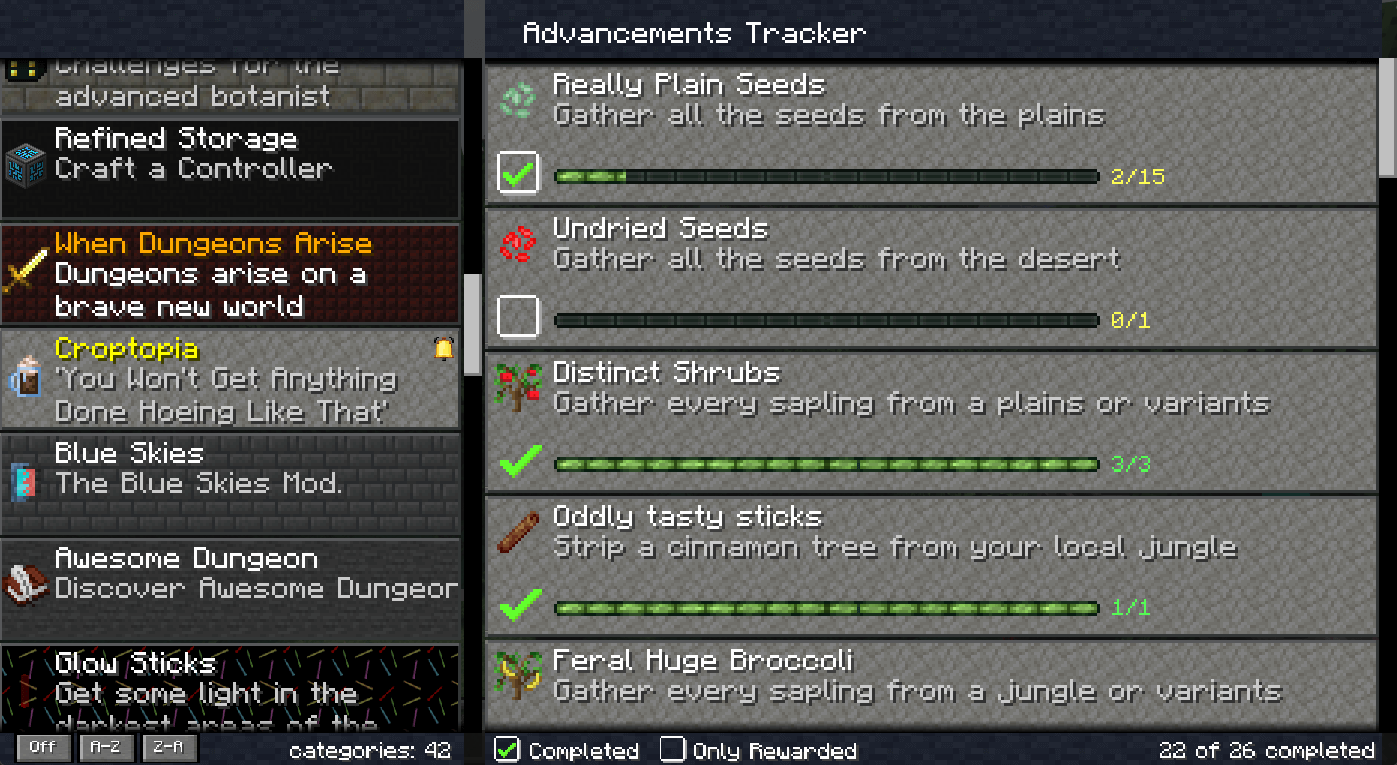
- List Overview of advancements with sorting and filter.
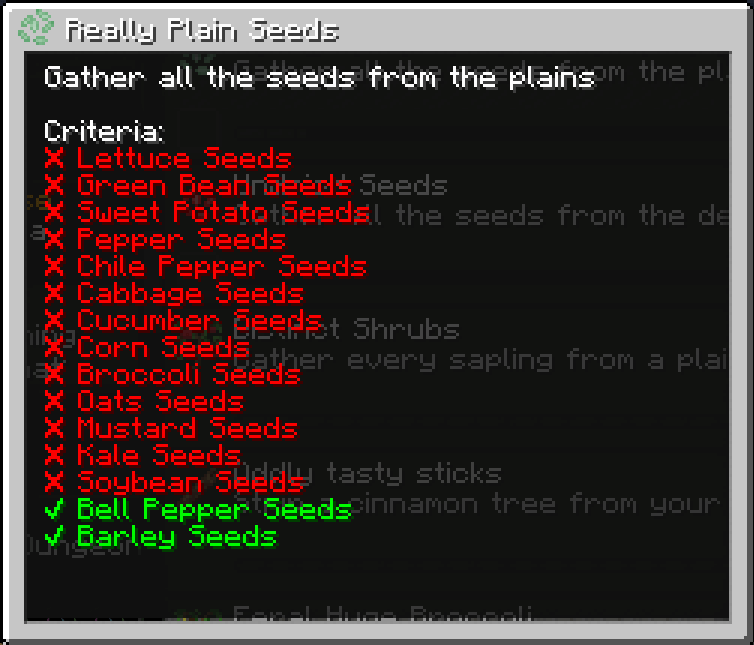
- Displaying of completed and missing criteria to make it easier to complete an advancement.
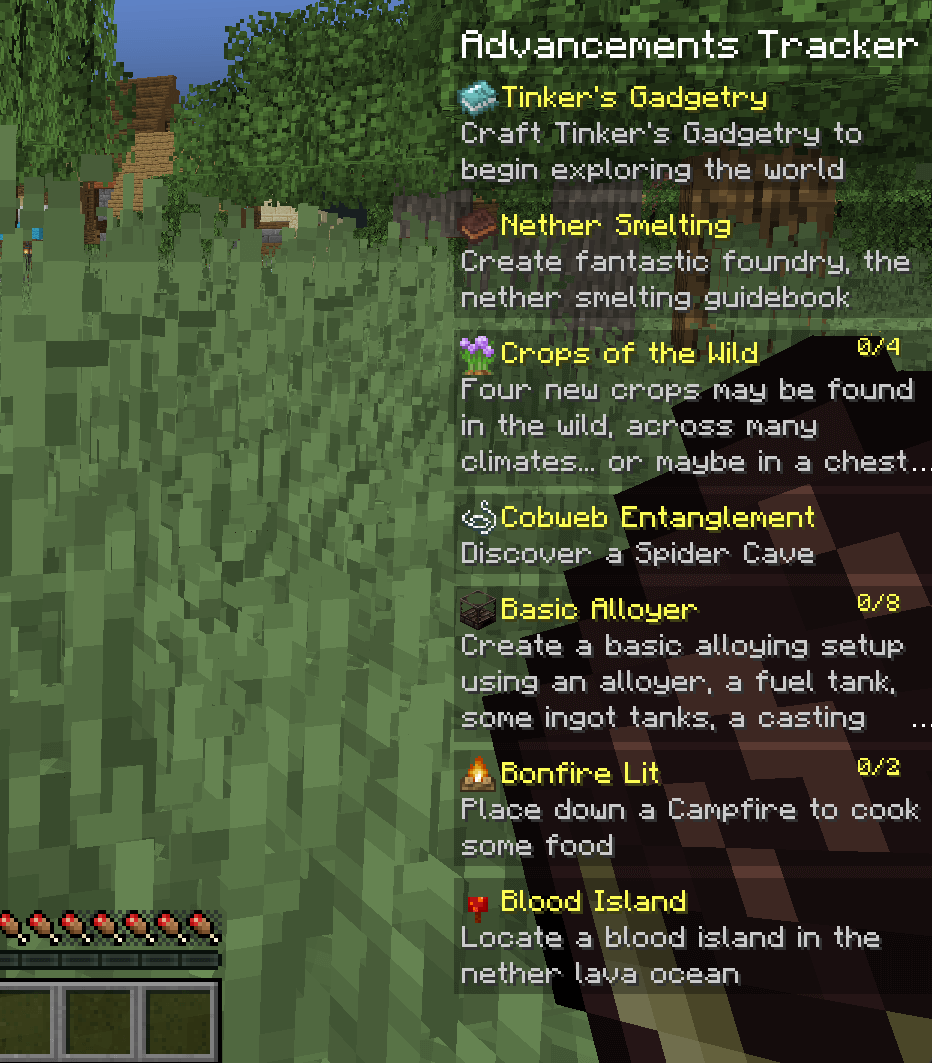
- Easy way to track specific advancements and their process.
- Most criteria will be translated to more meaningful names.
### 📜Advancements Overview
The overview could be open with CTRL + L and displays all current advancements and allow the tracking of single advancements.
### 🔎 Advancement Details
By clicking on the advancements inside the overview you will see the details about the completed and missing criteria and a list of rewards, if any.
### 🎯Advancements Widget
The widget could be show/hide with ALT + L and displays the currently tracked advancements and their progress.
### 💾Storing tracked advancements
The tracked advancements are stored directly in the client settings file and could be easily adjusted. They are stored per server, so you can have different tracked advancements for each single server. Local games (single-player) however sharing the same tracked advancements.
## 🌐 Criteria Translation Support
This mods adds support for criteria translation instead of having cryptic requirements like 1, 2, 3. The translated text is added over language files and you will see a corresponding message in the client log for untranslated advancements like: `Unable to translate summoned (advancement.minecraft.nether.summon_wither.summoned) to a more meaningful name.`
Example en_us.json entry for the former line: `"advancement.minecraft.nether.summon_wither.summoned": "Summon a Wither",`
You can add the translation directly into your mods, mod packs or in this mod over a PR.
## 🗄️Setting file
The setting file allows you to disable / enable the overview or widget screen. You could also adjust the position and size of the widget overlay.
## 🧳Mod pack Support
You could define tracked advancements over the settings file which should be displayed by default in a specific order. This is helpful for mod packs so that the user gets first an tutorial advancement / tasks and later other pre-defined tasks. If you are defining a pre-defined order you could disable the overview screen to make sure that the user is not un-tracking them by mistake.
### Is this a server side / client side mod❓
Its a pure client side mode, but will not harm if it is installed on the server.
### Does it work with data packs❓
If the data pack is not using a custom advancement system it should work out of the box. I recommending the data pack which adds a plenty of advancements and recipes.
: https://modrinth.com/mod/advancementinfo : https://www.curseforge.com/minecraft/customization/platys-advancement-and-recipe-pack
📊 Mod Details
- Game
- Minecraft Mods
- Author
- Kaworru
- Version
- 6.1.0
- Downloads
- 82,865
- Endorsements
- 64
- Category
- forge
- Created
- 3/25/2023
- Updated
- 4/26/2024
- Game Versions
- 1.20.1
- Tags
- utility
🔧 How to Install Minecraft Mods Mods
Download from Modrinth. Use Prism Launcher or drop into your mods folder.
📖 Full step-by-step install guide for Minecraft Mods →
Visit the official mod page for specific installation instructions for this mod.
🎮 Need cheat codes or console commands? Check ur gaming wiki for Minecraft Mods commands, item IDs, and more.
❓ Frequently Asked Questions
Which Minecraft Mods versions does Advancements Tracker support?
The author lists 1.20.1. Other versions may work but are untested by the author.
What is the latest version of Advancements Tracker?
Version 6.1.0, published 2024-04-26 with 82,865 downloads recorded at the source.
Keep browsing — more Minecraft Mods mods await