Routine Falling Blocks Cleanup
🟠 Updated over a year ago🖼️ Gallery (3 images)


🔍 Analysis
- 🏆 #1201 of 2169 datapack mods in this game by downloads
📋 About This Mod
# Description A datapack that runs every half hour to determine if there is an excessive number of falling_blocks (>100). If so, kills ALL of them immediately. **_This fixes the lag, but does not address the offending mod(s) or vanillaness that caused/causes it in the first place._** This was made in response to the _Meteors_ datapack spawning a ton of slow/none(?) decaying falling_blocks - (https://modrinth.com/datapack/meteors) . I'm not smart enough to put a watch timer on the methods of Meteors to clean up the mess in response to their events firing, so you'll lag until the cleanup runs. # Background While trying to resolve a performance problem with a huge mod pack (450+), I discovered that my world had a ton of entities through the Spark mod. Not a significant number of villagers or birds or zombies, but over 3500 falling_block entities were loaded! Just look at this lovely log line: BEFORE -> <details> <summary>Spoiler</summary> : Can't keep up! Is the server overloaded? Running 29013ms or 580 ticks behind </details> Confounded by the lack of documentation on this, I fumbled around with the Internets until I discovered https://www.reddit.com/r/admincraft/comments/muw8zk/new_lag_chunk_ban_exploit_with_sand/, where the author 'blockswerker' had a helpful command for dealing with falling block exploits in their unrelated server issue. So, I fired that command into the console and my lag instantly cleared. I mean, there's a tiny bit of lag here and there, but the results are conclusive... AFTER -> <details> <summary>Spoiler</summary> : Can't keep up! Is the server overloaded? Running 4260ms or 85 ticks behind (this is also while flying around in creative loading a lot of chunks while trying to get this mod running) Also, that's nearly 85% improvement! </details> The natural thing to do is to find a mod that solved this problem. Doesn't exist. I'm running a Fabric server, so no easy scheduler mod. Then I learned about datapacks and %*I&EUY$ this was an awful experience to get working with near-zero knowledge of how this stuff works. I imagine that with minor tweaking of the embedded commands, you can back-port or forward-port this to fit your needs. It's also an acceptable (not really a scheduler) tutorial on how to reliabily run commands using a infinite timer. So, this is my first 'mod' I guess for MC. Maybe there's a better way. I hope it helps. # Install 1. Before installing, either run a Spark profiler job and check your entities count for 'falling_blocks', or you can run these commands in sequence to verify you have a large quantity of 'falling_blocks' and need this tool. a: ``` scoreboard objectives add testEntityCount dummy ``` b: ``` scoreboard players set @s testEntityCount 0 ``` c: ``` execute as @e run scoreboard players add @p testEntityCount 1 ``` d: ``` tellraw @s ``` 2A. For single player or self-hosted LAN users: place into your 'saves/<your world>/datapacks' folder 2B. For dedicated servers, place into your server World/Datapacks folder --------------------------------------------------------- # More Sauce <details> <summary>Spoiler</summary> Since Modrinth doesn't have comments or DMs, I figure some of you might be interested in the mods and settings I have. I am running Minecraft 1.21.1, on a Ryzen 5800x 128GB RAM system, paired with a 4080. That's it. I allot 12GB to Java v22 - flags are: ``` -Xms12288M -Xmx12288M -XX:+AlwaysPreTouch -XX:+DisableExplicitGC -XX:+ParallelRefProcEnabled -XX:+PerfDisableSharedMem -XX:+UnlockExperimentalVMOptions -XX:+UseG1GC -XX:G1HeapRegionSize=24M -XX:G1HeapWastePercent=5 -XX:G1MaxNewSizePercent=40 -XX:G1MixedGCCountTarget=4 -XX:G1MixedGCLiveThresholdPercent=90 -XX:G1NewSizePercent=30 -XX:G1RSetUpdatingPauseTimePercent=5 -XX:G1ReservePercent=20 -XX:InitiatingHeapOccupancyPercent=15 -XX:MaxGCPauseMillis=200 -XX:MaxTenuringThreshold=1 -XX:SurvivorRatio=32 -Dusing.aikars.flags=https://mcflags.emc.gs -Daikars.new.flags=true ``` Fabric Mods: - abandoned: Abandoned 1.0.2 - additionalstructures: Additional Structures 5.0.1-fabric - adorabuild_structures: AdoraBuild: Structures 2.10.1 - advancednetherite: Advanced Netherite 2.2.1-1.21.1 - alternate-current: Alternate Current 1.9.0 - anvianslib: Anvian's Lib 1.1 - appleskin: AppleSkin 3.0.6+mc1.21 - architectury: Architectury 13.0.8 - areas: Areas 6.1 - armorchroma: Armor Chroma 1.2.8 - async: Async 0.1.7+alpha.3-1.21.1 - atg: Attack Through Grass 2.0.3 - athena: Athena 4.0.1 - atmosfera: Atmosfera 2.2.0+mc1.21.1 - badoptimizations: BadOptimizations 2.2.1 - balm: Balm 21.0.41 - basicweapons: Basic Weapons 2.1.1+1.21.1 - beavermod: Eager Beavers 1.3.0 - betterf1: BetterF1 1.1 - betterf3: BetterF3 11.0.3 - betterfurnacesreforged: Better Furnaces Reforged
# Description
A datapack that runs every half hour to determine if there is an excessive number of falling_blocks (>100). If so, kills ALL of them immediately.
_This fixes the lag, but does not address the offending mod(s) or vanillaness that caused/causes it in the first place._
This was made in response to the _Meteors_ datapack spawning a ton of slow/none(?) decaying falling_blocks - (https://modrinth.com/datapack/meteors) . I'm not smart enough to put a watch timer on the methods of Meteors to clean up the mess in response to their events firing, so you'll lag until the cleanup runs.
# Background
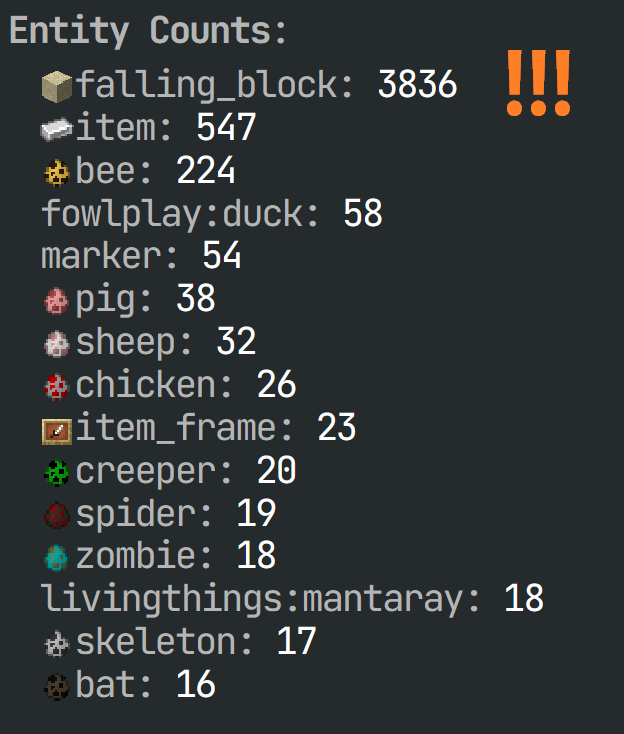
While trying to resolve a performance problem with a huge mod pack (450+), I discovered that my world had a ton of entities through the Spark mod. Not a significant number of villagers or birds or zombies, but over 3500 falling_block entities were loaded! Just look at this lovely log line:
BEFORE ->
Spoiler
: Can't keep up! Is the server overloaded? Running 29013ms or 580 ticks behind
Confounded by the lack of documentation on this, I fumbled around with the Internets until I discovered https://www.reddit.com/r/admincraft/comments/muw8zk/new_lag_chunk_ban_exploit_with_sand/, where the author 'blockswerker' had a helpful command for dealing with falling block exploits in their unrelated server issue. So, I fired that command into the console and my lag instantly cleared. I mean, there's a tiny bit of lag here and there, but the results are conclusive...
AFTER ->
Spoiler
: Can't keep up! Is the server overloaded? Running 4260ms or 85 ticks behind (this is also while flying around in creative loading a lot of chunks while trying to get this mod running)
Also, that's nearly 85% improvement!
The natural thing to do is to find a mod that solved this problem. Doesn't exist. I'm running a Fabric server, so no easy scheduler mod. Then I learned about datapacks and %*I&EUY$ this was an awful experience to get working with near-zero knowledge of how this stuff works.
I imagine that with minor tweaking of the embedded commands, you can back-port or forward-port this to fit your needs. It's also an acceptable (not really a scheduler) tutorial on how to reliabily run commands using a infinite timer.
So, this is my first 'mod' I guess for MC. Maybe there's a better way. I hope it helps.
1. Before installing, either run a Spark profiler job and check your entities count for 'falling_blocks', or you can run these commands in sequence to verify you have a large quantity of 'falling_blocks' and need this tool. a: ``` scoreboard objectives add testEntityCount dummy ```
b: ``` scoreboard players set @s testEntityCount 0 ```
c: ``` execute as @e run scoreboard players add @p testEntityCount 1 ```
d: ``` tellraw @s [{"score":{"name":"@a","objective":"testEntityCount"}}," falling_block entities loaded"] ```
2A. For single player or self-hosted LAN users: place into your 'saves/
2B. For dedicated servers, place into your server World/Datapacks folder
---------------------------------------------------------
# More Sauce
Spoiler
Since Modrinth doesn't have comments or DMs, I figure some of you might be interested in the mods and settings I have.
I am running Minecraft 1. 21. 1, on a Ryzen 5800x 128GB RAM system, paired with a 4080. That's it.
I allot 12GB to Java v22 - flags are:
``` -Xms12288M -Xmx12288M -XX:+AlwaysPreTouch -XX:+DisableExplicitGC -XX:+ParallelRefProcEnabled -XX:+PerfDisableSharedMem -XX:+UnlockExperimentalVMOptions -XX:+UseG1GC -XX:G1HeapRegionSize=24M -XX:G1HeapWastePercent=5 -XX:G1MaxNewSizePercent=40 -XX:G1MixedGCCountTarget=4 -XX:G1MixedGCLiveThresholdPercent=90 -XX:G1NewSizePercent=30 -XX:G1RSetUpdatingPauseTimePercent=5 -XX:G1ReservePercent=20 -XX:InitiatingHeapOccupancyPercent=15 -XX:MaxGCPauseMillis=200 -XX:MaxTenuringThreshold=1 -XX:SurvivorRatio=32 -Dusing.aikars.flags=https://mcflags.emc.gs -Daikars.new.flags=true ```
Fabric Mods: - abandoned: Abandoned 1. 0. 2 - additionalstructures: Additional Structures 5. 0. 1-fabric - adorabuild_structures: AdoraBuild: Structures 2. 10. 1 - advancednetherite: Advanced Netherite 2. 2. 1-1. 21. 1 - alternate-current: Alternate Current 1. 9. 0 - anvianslib: Anvian's Lib 1. 1 - appleskin: AppleSkin 3. 0. 6+mc1. 21 - architectury: Architectury 13. 0. 8 - areas: Areas 6. 1 - armorchroma: Armor Chroma 1. 2. 8 - async: Async 0. 1. 7+alpha. 3-1. 21. 1 - atg: Attack Through Grass 2. 0. 3 - athena: Athena 4. 0. 1 - atmosfera: Atmosfera 2. 2. 0+mc1. 21. 1 - badoptimizations: BadOptimizations 2. 2. 1 - balm: Balm 21. 0. 41 - basicweapons: Basic Weapons 2. 1. 1+1. 21. 1 - beavermod: Eager Beavers 1. 3. 0 - betterf1: BetterF1 1. 1 - betterf3: BetterF3 11. 0. 3 - betterfurnacesreforged: Better Furnaces Reforged
📊 Mod Details
- Game
- Minecraft Data Packs
- Author
- moomoolamoo
- Version
- 3
- Downloads
- 109
- Endorsements
- 1
- Category
- datapack
- Created
- 4/30/2025
- Updated
- 4/29/2025
- Game Versions
- 1.21.1
- Tags
- management, optimization, utility
🔧 How to Install Minecraft Data Packs Mods
Download from Modrinth. Use Prism Launcher or drop into your mods folder.
📖 Full step-by-step install guide for Minecraft Data Packs →
Visit the official mod page for specific installation instructions for this mod.
🎮 Need cheat codes or console commands? Check ur gaming wiki for Minecraft Data Packs commands, item IDs, and more.
❓ Frequently Asked Questions
Which Minecraft Data Packs versions does Routine Falling Blocks Cleanup support?
The author lists 1.21.1. Other versions may work but are untested by the author.
What is the latest version of Routine Falling Blocks Cleanup?
Version 3, published 2025-04-29 with 109 downloads recorded at the source.
Keep browsing — more Minecraft Data Packs mods await