Playtime counter
🟡 Updated this year🖼️ Gallery (1 images)
🔍 Analysis
- 🏆 #254 of 2169 datapack mods in this game by downloads
📋 About This Mod
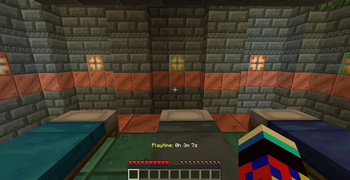
**Playtime Tracker** This utility is a lightweight, lag-free solution for monitoring player activity. It converts raw game ticks into a readable format without requiring a permanent, clunky scoreboard on the side of your screen. Players can use these /trigger commands without needing operator (OP) permissions: **/trigger pt_show:** This displays the player's Total World Playtime (Hours, Minutes, and Seconds) directly in the chat. It pulls data from the engine-level statistics, so it includes time spent before the datapack was installed. **/trigger pt_on:** This enables a persistent Hotbar Display. The playtime will appear and update in real-time right above the player's item bar. **/trigger pt_off:** This disables the hotbar display and clears the text from the screen if a player prefers a clean UI. **How to Install/Download the File**: Ensure you have the Playtime_Datapack_Fixed_V2.zip ready.Navigate to **Save Folder**: Open your Minecraft directory, go to saves, and select your specific world folder. **Drop in Datapacks:** Open the datapacks folder and move the ZIP file inside.Reload the **How to UseThe Command:** To see your current time, simply type: /trigger pt_show. The Display: You will see a private chat message formatted as: Your total playtime: 1h 12m 30s. **Caution: This datapack will only show the playtime from the amount of time you have installed this datapack**
Playtime Tracker This utility is a lightweight, lag-free solution for monitoring player activity. It converts raw game ticks into a readable format without requiring a permanent, clunky scoreboard on the side of your screen.
Players can use these /trigger commands without needing operator (OP) permissions:
/trigger pt_show: This displays the player's Total World Playtime (Hours, Minutes, and Seconds) directly in the chat. It pulls data from the engine-level statistics, so it includes time spent before the datapack was installed.
/trigger pt_on: This enables a persistent Hotbar Display. The playtime will appear and update in real-time right above the player's item bar.
/trigger pt_off: This disables the hotbar display and clears the text from the screen if a player prefers a clean UI.
How to Install/Download the File: Ensure you have the Playtime_Datapack_Fixed_V2.zip ready. Navigate to Save Folder: Open your Minecraft directory, go to saves, and select your specific world folder.
Drop in Datapacks: Open the datapacks folder and move the ZIP file inside. Reload the
How to UseThe Command: To see your current time, simply type: /trigger pt_show. The Display: You will see a private chat message formatted as: Your total playtime: 1h 12m 30s.
Caution: This datapack will only show the playtime from the amount of time you have installed this datapack
📊 Mod Details
- Game
- Minecraft Data Packs
- Author
- DJjougo
- Version
- 4
- Downloads
- 184
- Endorsements
- 2
- Category
- datapack
- Created
- 1/6/2026
- Updated
- 5/6/2026
- Game Versions
- 1.21.2, 1.21.3, 1.21.4, 1.21.5, 1.21.7
🔧 How to Install Minecraft Data Packs Mods
Download from Modrinth. Use Prism Launcher or drop into your mods folder.
📖 Full step-by-step install guide for Minecraft Data Packs →
Visit the official mod page for specific installation instructions for this mod.
🎮 Need cheat codes or console commands? Check ur gaming wiki for Minecraft Data Packs commands, item IDs, and more.
❓ Frequently Asked Questions
Which Minecraft Data Packs versions does Playtime counter support?
The author lists 1.21.2, 1.21.3, 1.21.4, 1.21.5, 1.21.7, 1.21.8. Other versions may work but are untested by the author.
What is the latest version of Playtime counter?
Version 4, published 2026-05-06 with 184 downloads recorded at the source.
Keep browsing — more Minecraft Data Packs mods await