MCF: EntityMap
🟡 Updated this year🖼️ Gallery (2 images)
🔍 Analysis
- 🏆 #1158 of 2169 datapack mods in this game by downloads
📋 About This Mod
# MCF (Minecraft Collections Framework): EntityMap ### JCF-style per-entity mapping for Minecraft datapacks MCF: EntityMap is a datapack library for incredibly fast and easy per-entity data storage. Inspired by Java's `HashMap` API, EntityMap allows for storing attributes and other relevant data on entities without having to handle UUIDs and enables high-level interaction. Thanks to (https://github.com/CJDevZ/UUID-Hex) for UUID conversion! ## Map or EntityMap? These libraries are similar, but specialized for different purposes. **MCF: Map is superior for general data management** as it is not tied to in-game objects such as entities, making it a better choice if your datapack relies on non-entity-based storage. **MCF: EntityMap stores data on a per-entity basis** with automatic UUID handling (MCF: Map does not do this). It becomes a better choice if your datapack is heavily entity-based. ## Features - **Per-entity storage** - supports multiple instances of the same entity under different paths. Data is not synchronized. - **Functions to mirror nearly all `HashMap` methods** - familiar, simple, and intuitive functionality! - **Automatic UUID resolution and handling** - don't worry about doing anything with UUIDs, as it's all handled under the hood. - **No direct storage manipulation required** - other than outputs from getters, storage locations are all accessed and modified internally. - **Debug tools** - easy printing and error catching to make life easier. - **Documented and commented code** - all top-level functions include a brief description and parameter list. ## Usage **All functions intended to be used are at the top level or under `settings`.** Calling any functions in `internal` directly is strongly discouraged as the result will more than likely not be as intended and may potentially cause issues. ### Example ```mcfunction function mcfentitymap:new {path: "entities"} function mcfentitymap:put {path: "entities", key: "class", value: "mage"} ``` The example above shows how an entity would be registered to the storage path `mcfentitymap:maps entities`, then have the attribute `class: mage` added. These values can be modified or accessed in largely the same way they could be in JCF maps using the provided functions. Note: it may be helpful to change the namespace for this datapack to match that of your project. The simplest way to achieve this in VSCode is by replacing all instances of `mcfentitymap` with `mynamespace` in the search tab. ### What is the "path", and how do I know what parameters to use? All provided functions require a path to be passed in. As Minecraft functions cannot be overloaded, storage paths cannot be inferred by the datapack or disregarded by the user. The path is used to store a given entity at the user's choice of storage location under `mcfentitymap:maps`. For instance, as stated above, the provided example stores the added entity at `mcfentitymap:maps entities`. To be exact, the `path` parameter refers to a list in which entity entries are stored. Again, feel free to configure namespaces and storage locations as you see fit. ## Debugging There are multiple debugging tools at your disposal. For example, to easily view an entity's entry, simply run the function `mcfentitymap:print_entity` as the entity whom you wish to view. This will print their mappings line-by-line in chat. Additionally, this datapack will catch errors and stop execution when they occur. These errors can include, but are not limited to: - Invalid parameters - Attempting to access a path that doesn't exist - Attempting to modify an entry that doesn't exist By default, these are not shown in chat, but running the function `mcfentitymap:settings/show_errors` or simply setting your score `mcfem.show_errors` to `1` will allow you to see in chat when these errors are caught. If you wish, you can disable error catching entirely by running the function `mcfentitymap:settings/disable_errors`, but this strongly discouraged and only recommended if error catching poses an actual problem to your project. ___ To get in contact for any reason, message wisoven on Discord! MIT licensed.
# MCF (Minecraft Collections Framework): EntityMap ### JCF-style per-entity mapping for Minecraft datapacks MCF: EntityMap is a datapack library for incredibly fast and easy per-entity data storage. Inspired by Java's `HashMap` API, EntityMap allows for storing attributes and other relevant data on entities without having to handle UUIDs and enables high-level interaction.
Thanks to (https://github.com/CJDevZ/UUID-Hex) for UUID conversion!
## Map or EntityMap? These libraries are similar, but specialized for different purposes. MCF: Map is superior for general data management as it is not tied to in-game objects such as entities, making it a better choice if your datapack relies on non-entity-based storage. MCF: EntityMap stores data on a per-entity basis with automatic UUID handling (MCF: Map does not do this). It becomes a better choice if your datapack is heavily entity-based.
## Features - Per-entity storage - supports multiple instances of the same entity under different paths. Data is not synchronized. - Functions to mirror nearly all `HashMap` methods - familiar, simple, and intuitive functionality! - Automatic UUID resolution and handling - don't worry about doing anything with UUIDs, as it's all handled under the hood. - No direct storage manipulation required - other than outputs from getters, storage locations are all accessed and modified internally. - Debug tools - easy printing and error catching to make life easier. - Documented and commented code - all top-level functions include a brief description and parameter list.
## Usage All functions intended to be used are at the top level or under `settings`. Calling any functions in `internal` directly is strongly discouraged as the result will more than likely not be as intended and may potentially cause issues.
### Example ```mcfunction function mcfentitymap:new {path: "entities"} function mcfentitymap:put {path: "entities", key: "class", value: "mage"} ```
The example above shows how an entity would be registered to the storage path `mcfentitymap:maps entities`, then have the attribute `class: mage` added. These values can be modified or accessed in largely the same way they could be in JCF maps using the provided functions.
### What is the "path", and how do I know what parameters to use? All provided functions require a path to be passed in. As Minecraft functions cannot be overloaded, storage paths cannot be inferred by the datapack or disregarded by the user.
The path is used to store a given entity at the user's choice of storage location under `mcfentitymap:maps`. For instance, as stated above, the provided example stores the added entity at `mcfentitymap:maps entities`. To be exact, the `path` parameter refers to a list in which entity entries are stored.
Again, feel free to configure namespaces and storage locations as you see fit.
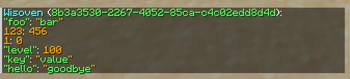
## Debugging There are multiple debugging tools at your disposal. For example, to easily view an entity's entry, simply run the function `mcfentitymap:print_entity` as the entity whom you wish to view. This will print their mappings line-by-line in chat.
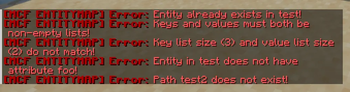
Additionally, this datapack will catch errors and stop execution when they occur. These errors can include, but are not limited to: - Invalid parameters - Attempting to access a path that doesn't exist - Attempting to modify an entry that doesn't exist
By default, these are not shown in chat, but running the function `mcfentitymap:settings/show_errors` or simply setting your score `mcfem.show_errors` to `1` will allow you to see in chat when these errors are caught.
If you wish, you can disable error catching entirely by running the function `mcfentitymap:settings/disable_errors`, but this strongly discouraged and only recommended if error catching poses an actual problem to your project.
To get in contact for any reason, message wisoven on Discord!
MIT licensed.
📊 Mod Details
- Game
- Minecraft Data Packs
- Author
- Wisoven
- Version
- 1.0.1
- Downloads
- 112
- Endorsements
- 0
- Category
- datapack
- Created
- 5/16/2026
- Updated
- 5/17/2026
- Game Versions
- 26.1, 26.1.1, 26.1.2
- Tags
- library, management, storage
🔧 How to Install Minecraft Data Packs Mods
Download from Modrinth. Use Prism Launcher or drop into your mods folder.
📖 Full step-by-step install guide for Minecraft Data Packs →
Visit the official mod page for specific installation instructions for this mod.
🎮 Need cheat codes or console commands? Check ur gaming wiki for Minecraft Data Packs commands, item IDs, and more.
❓ Frequently Asked Questions
Which Minecraft Data Packs versions does MCF: EntityMap support?
The author lists 26.1, 26.1.1, 26.1.2. Other versions may work but are untested by the author.
What is the latest version of MCF: EntityMap?
Version 1.0.1, published 2026-05-17 with 112 downloads recorded at the source.
Keep browsing — more Minecraft Data Packs mods await