KOHATS
🟡 Updated this year🖼️ Gallery (3 images)

🔍 Analysis
- 🏆 #1582 of 2169 datapack mods in this game by downloads
📋 About This Mod
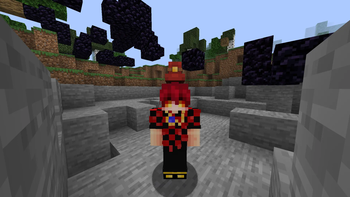
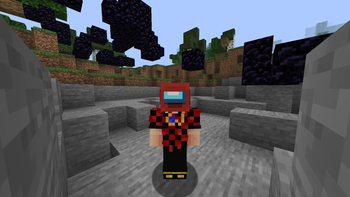
# KOHATS KOHATS is a datapack and resourcepack. That adds hats and easier system for them using new dialog system. Also it's fully support English and Russian. ## How to use 1. Install and enable both datapack and resourcepack. 2. Hold helmet you want to convert in your hand and open KOHATS menu using button in `Pause Menu` or by pressing `Quick Action` (`G` by default). !(https://cdn.modrinth.com/data/cached_images/d4b1e275d94f4e6f182cbfb880207fe8b74b0e61.png) 3. Select hat you want (There you can see hat previews). If hat supports dye coloring. You can set color you want. For example you want color #EB4034. Open any hex to decimal converter and convert your color. For #EB4034 it will be 15417396. Press `Ok`. !(https://cdn.modrinth.com/data/cached_images/776d9c2e903fbd92696032227685be462ccd8af6.png) 4. Minecraft will ask a confirmation. Press `Yes` and your helmet will be replaced with hat. !(https://cdn.modrinth.com/data/cached_images/8a827a52bc03ee1bafd4818a4cd9ace4a2f8a155_0.webp) ## Custom hats You can use your custom hats. Model and translation key is required, tint is optional. However your hat wont appear in `Select Hat` dialog, but you still can get it in `Select Custom Hat` dialog by manually writing translation key and item model. Take a look at resource pack for examples. ## QA 1. Why use `Leather Horse Armor` instead of `Curved Pumpkin`? * `Leather Horse Armor` allow both, changing item model and dye coloring. 2. Why color select so ugly? * Currently it's best I can do with dialog limitations. 3. I can't get hat in multiplayer. * It's due dialog limitation of running at user permissions. So to use it you must have access to `/function` command.
# KOHATS KOHATS is a datapack and resourcepack. That adds hats and easier system for them using new dialog system. Also it's fully support English and Russian. ## How to use 1. Install and enable both datapack and resourcepack. 2. Hold helmet you want to convert in your hand and open KOHATS menu using button in `Pause Menu` or by pressing `Quick Action` (`G` by default). !(https://cdn.modrinth.com/data/cached_images/d4b1e275d94f4e6f182cbfb880207fe8b74b0e61.png) 3. Select hat you want (There you can see hat previews). If hat supports dye coloring. You can set color you want. For example you want color #EB4034. Open any hex to decimal converter and convert your color. For #EB4034 it will be 15417396. Press `Ok`. !(https://cdn.modrinth.com/data/cached_images/776d9c2e903fbd92696032227685be462ccd8af6.png) 4. Minecraft will ask a confirmation. Press `Yes` and your helmet will be replaced with hat. !(https://cdn.modrinth.com/data/cached_images/8a827a52bc03ee1bafd4818a4cd9ace4a2f8a155_0.webp) ## Custom hats You can use your custom hats. Model and translation key is required, tint is optional. However your hat wont appear in `Select Hat` dialog, but you still can get it in `Select Custom Hat` dialog by manually writing translation key and item model. Take a look at resource pack for examples. ## QA 1. Why use `Leather Horse Armor` instead of `Curved Pumpkin`? `Leather Horse Armor` allow both, changing item model and dye coloring. 2. Why color select so ugly? Currently it's best I can do with dialog limitations. 3. I can't get hat in multiplayer. * It's due dialog limitation of running at user permissions. So to use it you must have access to `/function` command.
📊 Mod Details
- Game
- Minecraft Data Packs
- Author
- KOMETA
- Version
- 0
- Downloads
- 89
- Endorsements
- 1
- Category
- datapack
- Created
- 9/30/2025
- Updated
- 9/29/2025
- Game Versions
- 1.21.8
- Tags
- decoration, equipment, social
🔧 How to Install Minecraft Data Packs Mods
Download from Modrinth. Use Prism Launcher or drop into your mods folder.
📖 Full step-by-step install guide for Minecraft Data Packs →
Visit the official mod page for specific installation instructions for this mod.
🎮 Need cheat codes or console commands? Check ur gaming wiki for Minecraft Data Packs commands, item IDs, and more.
❓ Frequently Asked Questions
Which Minecraft Data Packs versions does KOHATS support?
The author lists 1.21.8. Other versions may work but are untested by the author.
What is the latest version of KOHATS?
Version 0, published 2025-09-29 with 89 downloads recorded at the source.
Keep browsing — more Minecraft Data Packs mods await