GreetTitle
🟡 Updated this year🖼️ Gallery (2 images)

🔍 Analysis
- 🏆 #824 of 2169 datapack mods in this game by downloads
📋 About This Mod
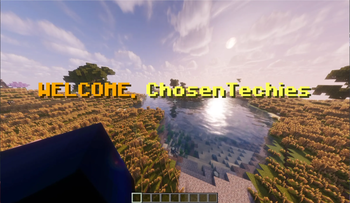
# GreetTitle Datapack GreetTitle is a simple and lightweight Minecraft Java 1.20 and 1.20.1 datapack that displays a clean on-screen title when a player joins your world or multiplayer server. When a player joins, only that player sees their own title, such as: **WELCOME, PlayerName** Each player can also choose their own saved GreetTitle style using easy in-game `/trigger` commands. One player changing their title will not affect anyone else. ## Features - Shows a join title when a player enters - Only the joining player sees the title - Supports multiplayer servers - Per-player saved settings - Players can choose their own title style - Uses simple `/trigger` commands - No mods required - Lightweight and easy to install - Made for Minecraft Java Edition 1.20 and 1.20.1 ## Player Commands Players can use these commands in chat: `/trigger wm_set set 1` Set your title to the default style. `/trigger wm_set set 2` Set your title to the HELLO style. `/trigger wm_set set 3` Set your title to the server style. `/trigger wm_set set 8` Preview your own saved title. `/trigger wm_set set 9` Show the help menu. ## Installation 1. Download the datapack. 2. Put it inside your world or server `datapacks` folder. 3. Run `/reload` or restart the world/server. 4. Join the world/server and enjoy GreetTitle. ## Compatibility - Minecraft Java Edition 1.20 and 1.20.1 - Works in singleplayer and multiplayer - Does not require Fabric, Forge, Quilt, or any other mod loader
# GreetTitle Datapack
GreetTitle is a simple and lightweight Minecraft Java 1. 20 and 1. 20. 1 datapack that displays a clean on-screen title when a player joins your world or multiplayer server.
When a player joins, only that player sees their own title, such as:
WELCOME, PlayerName
Each player can also choose their own saved GreetTitle style using easy in-game `/trigger` commands. One player changing their title will not affect anyone else.
## Features
- Shows a join title when a player enters
- Only the joining player sees the title
- Supports multiplayer servers
- Per-player saved settings
- Players can choose their own title style
- Uses simple `/trigger` commands
- No mods required
- Lightweight and easy to install
- Made for Minecraft Java Edition 1. 20 and 1. 20. 1
## Player Commands
Players can use these commands in chat:
`/trigger wm_set set 1` Set your title to the default style.
`/trigger wm_set set 2` Set your title to the HELLO style.
`/trigger wm_set set 3` Set your title to the server style.
`/trigger wm_set set 8` Preview your own saved title.
`/trigger wm_set set 9` Show the help menu.
## Installation
1. Download the datapack. 2. Put it inside your world or server `datapacks` folder. 3. Run `/reload` or restart the world/server. 4. Join the world/server and enjoy GreetTitle.
## Compatibility
- Minecraft Java Edition 1. 20 and 1. 20. 1
- Works in singleplayer and multiplayer
- Does not require Fabric, Forge, Quilt, or any other mod loader
📊 Mod Details
- Game
- Minecraft Data Packs
- Author
- Chosentechies
- Version
- v1.17.0
- Downloads
- 133
- Endorsements
- 0
- Category
- datapack
- Created
- 5/3/2026
- Updated
- 6/25/2026
- Game Versions
- 26.2
- Tags
- game-mechanics, social, utility
🔧 How to Install Minecraft Data Packs Mods
Download from Modrinth. Use Prism Launcher or drop into your mods folder.
📖 Full step-by-step install guide for Minecraft Data Packs →
Visit the official mod page for specific installation instructions for this mod.
🎮 Need cheat codes or console commands? Check ur gaming wiki for Minecraft Data Packs commands, item IDs, and more.
❓ Frequently Asked Questions
Which Minecraft Data Packs versions does GreetTitle support?
The author lists 26.2. Other versions may work but are untested by the author.
What is the latest version of GreetTitle?
Version v1.17.0, published 2026-06-25 with 133 downloads recorded at the source.
Keep browsing — more Minecraft Data Packs mods await