Flop
⚪ Last updated 2023🖼️ Gallery (1 images)
🔍 Analysis
- 🏆 #742 of 2169 datapack mods in this game by downloads
📋 About This Mod
# Flop | floating point operations for Minecraft This datapack is a library for handling floating-point operations using scoreboards. A new data representation, the 'eroxifloat', is introduced to support this. ### What is a floating-point number? <img src="https://media.geeksforgeeks.org/wp-content/uploads/Single-Precision-IEEE-754-Floating-Point-Standard.jpg"> A floating-point number is a way to represent real numbers in binary. It consists of three parts: - Sign: whether the number is positive or negative - Exponent: determines the magnitude of the number - Mantissa: determines the precision to which numbers can be represented The numerical value of this representation is: $$(-1)^\text{sign} \times \text{mantissa} \times 2^\text{exponent} $$ ### The Eroxifloat An eroxifloat uses 3 scoreboards to store the sign, exponent and mantissa separately. Functions are provided to convert floating-point numbers in NBT storage to eroxifloats and back again. All math operations are performed on this scoreboard representation, but there are also functions provided that perform all the conversions so that you can simply do math on numbers in NBT storage. The eroxifloat uses 30 bits to represent the mantissa, making it slightly more precise than a float, but less precise than a double. It is worth to note that the division and square root operations only have 15-bit precision. All other operation preserve 30-bit precision. The sign can take on the values -1 and 1, rather than 0 and 1 as is the case in regular floating point representations. # How to use Before you can use the pack, you need to run the function `flop:api/create_scoreboards` to set up the required scoreboard objectives and values. This function is not included in the `minecraft:load` tag by default, you need to run it yourself. Currently, the following six operations are available: - Addition ($a + b$) - Subtraction ($a - b$) - Multiplication ($a \times b$) - Division ($\frac{a}{b}$) - Square ($x^2$) - Square root ($\sqrt{x}$) The easiest way to use this library is to make use of the functions in the `flop:api/storage/` folder. These perform operations directly on floating-point numbers in NBT storage. For addition, for example: ``` data modify storage flop:api operand.a set value 5d data modify storage flop:api operand.b set value 0.13d function flop:api/storage/add data modify <destination> set from storage flop:api output ``` Operations that take only one input, such as `sqrt` and `square`, are used as follows: ``` data modify storage flop:api input set value 42.0d function flop:api/storage/sqrt data modify <destination> set from storage flop:api output ``` ### Advanced usage If you want to calculate complicated formulas, using the operations on storage can cause overhead due to unnecessary conversion between NBT and eroxifloat representations. You can instead perform operations on eroxifloats directly. To create an eroxifloat from a number in NBT storage, use the following function `flop:api/storage/read_as_eroxifloat`. This will convert the number stored in `storage flop:api input` into the three scoreboard values `input.sign flop`, `input.exponent flop` and `input.mantissa flop`: ``` data modify storage flop:api input set value 5d function flop:api/storage/read_as_eroxifloat scoreboard players operation <destination 1> = input.sign flop scoreboard players operation <destination 2> = input.exponent flop scoreboard players operation <destination 3> = input.mantissa flop ``` You can then perform the same kinds of calculations as before, but without the overhead of converting to NBT. ``` scoreboard players operation operand.a.sign flop = <source 1> scoreboard players operation operand.a.exponent flop = <source 2> scoreboard players operation operand.a.mantissa flop = <source 3> scoreboard players operation operand.b.sign flop = <source 4> scoreboard players operation operand.b.exponent flop = <source 5> scoreboard players operation operand.b.mantissa flop = <source 6> function flop:api/eroxifloat/add scoreboard players operation <destination 1> = output.sign flop scoreboard players operation <destination 2> = output.exponent flop scoreboard players operation <destination 3> = output.mantissa flop ``` ``` scoreboard players operation input.sign flop = <source 1> scoreboard players operation input.exponent flop = <source 2> scoreboard players operation input.mantissa flop = <source 3> function flop:api/eroxifloat/sqrt scoreboard players operation <destination 1> = output.sign flop scoreboard players operation <destination 2> = output.exponent flop scoreboard players operation <destination 3> = output.mantissa flop ``` And for converting back to NBT, there are two options: writing as a float or as a double. Since the eroxifloat is slightly more precise than a normal float, the latter is reccomended. However, in some cases you may need your number to be a float instead. ``` scoreboard players operation output.sign flop = <source
# Flop | floating point operations for Minecraft This datapack is a library for handling floating-point operations using scoreboards. A new data representation, the 'eroxifloat', is introduced to support this.
### What is a floating-point number?
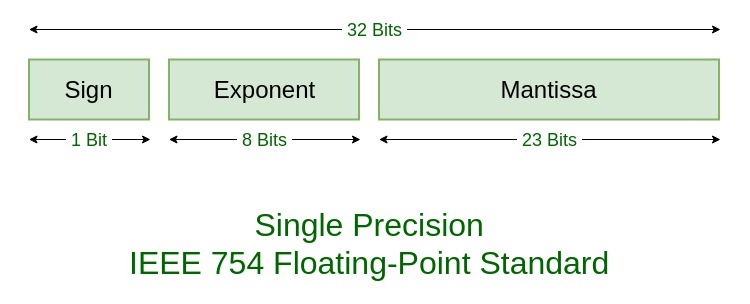 A floating-point number is a way to represent real numbers in binary. It consists of three parts:
- Sign: whether the number is positive or negative
- Exponent: determines the magnitude of the number
- Mantissa: determines the precision to which numbers can be represented
The numerical value of this representation is:
$$(-1)^\text{sign} \times \text{mantissa} \times 2^\text{exponent} $$
### The Eroxifloat An eroxifloat uses 3 scoreboards to store the sign, exponent and mantissa separately. Functions are provided to convert floating-point numbers in NBT storage to eroxifloats and back again. All math operations are performed on this scoreboard representation, but there are also functions provided that perform all the conversions so that you can simply do math on numbers in NBT storage.
The eroxifloat uses 30 bits to represent the mantissa, making it slightly more precise than a float, but less precise than a double. It is worth to note that the division and square root operations only have 15-bit precision. All other operation preserve 30-bit precision.
The sign can take on the values -1 and 1, rather than 0 and 1 as is the case in regular floating point representations.
# How to use Before you can use the pack, you need to run the function `flop:api/create_scoreboards` to set up the required scoreboard objectives and values. This function is not included in the `minecraft:load` tag by default, you need to run it yourself.
Currently, the following six operations are available:
- Addition ($a + b$)
- Subtraction ($a - b$)
- Multiplication ($a \times b$)
- Division ($\frac{a}{b}$)
- Square ($x^2$)
- Square root ($\sqrt{x}$)
The easiest way to use this library is to make use of the functions in the `flop:api/storage/` folder. These perform operations directly on floating-point numbers in NBT storage. For addition, for example:
``` data modify storage flop:api operand.a set value 5d
data modify storage flop:api operand.b set value 0. 13d
function flop:api/storage/add
data modify
Operations that take only one input, such as `sqrt` and `square`, are used as follows:
``` data modify storage flop:api input set value 42. 0d
function flop:api/storage/sqrt
data modify
### Advanced usage If you want to calculate complicated formulas, using the operations on storage can cause overhead due to unnecessary conversion between NBT and eroxifloat representations. You can instead perform operations on eroxifloats directly. To create an eroxifloat from a number in NBT storage, use the following function `flop:api/storage/read_as_eroxifloat`. This will convert the number stored in `storage flop:api input` into the three scoreboard values `input.sign flop`, `input.exponent flop` and `input.mantissa flop`: ``` data modify storage flop:api input set value 5d
function flop:api/storage/read_as_eroxifloat
scoreboard players operation
You can then perform the same kinds of calculations as before, but without the overhead of converting to NBT.
```
scoreboard players operation operand.a.sign flop =
function flop:api/eroxifloat/add
scoreboard players operation
```
scoreboard players operation input.sign flop =
function flop:api/eroxifloat/sqrt
scoreboard players operation
And for converting back to NBT, there are two options: writing as a float or as a double. Since the eroxifloat is slightly more precise than a normal float, the latter is reccomended. However, in some cases you may need your number to be a float instead.
```
scoreboard players operation output.sign flop =
📊 Mod Details
- Game
- Minecraft Data Packs
- Author
- Eroxen
- Version
- 1
- Downloads
- 140
- Endorsements
- 3
- Category
- datapack
- Created
- 9/27/2023
- Updated
- 9/26/2023
- Game Versions
- 1.15, 1.15.1, 1.15.2, 1.16, 1.16.1
- Tags
- library
🔧 How to Install Minecraft Data Packs Mods
Download from Modrinth. Use Prism Launcher or drop into your mods folder.
📖 Full step-by-step install guide for Minecraft Data Packs →
Visit the official mod page for specific installation instructions for this mod.
🎮 Need cheat codes or console commands? Check ur gaming wiki for Minecraft Data Packs commands, item IDs, and more.
❓ Frequently Asked Questions
Which Minecraft Data Packs versions does Flop support?
The author lists 1.15, 1.15.1, 1.15.2, 1.16, 1.16.1, 1.16.2. Other versions may work but are untested by the author.
What is the latest version of Flop?
Version 1, published 2023-09-26 with 140 downloads recorded at the source.
Keep browsing — more Minecraft Data Packs mods await