Duplication
🟡 Updated this year🖼️ Gallery (6 images)
🔍 Analysis
- 🏆 #794 of 2046 datapack mods in this game by downloads
📋 About This Mod
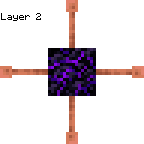
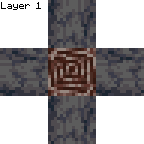
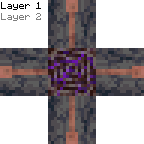
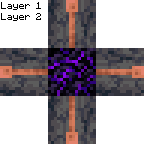
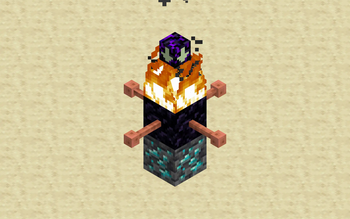
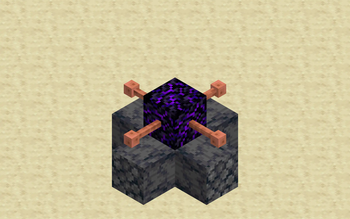
# Usage This datapack allows you to duplicate items. To duplicate items, first build a structure with 1 ancient debris, 4 basalt, 1 crying obsidian and 4 lightning rods: !(https://cdn.modrinth.com/data/cached_images/8f5b0a464089374b1840c91c672088cf36266664.png) Next, light the top of the crying obsidian with a flint and steel enchanted with summoning. The flint and steel will break instantly. This will create a duplicator. To use the duplicator, place the block you want to duplicate 2 blocks underneath it, then place basalt under the duplicator. It will duplicate the block. # Installation ## Datapack ### On Create World 1. Click the *More* tab 2. Click *Data Packs* 3. Click *Open Pack Folder* 4. Paste in the downloaded datapack 5. Move the datapack to *Selected* 6. Click *Done* ### Add to existing world 1. Select the world 2. Click *Edit* 3. Click *Open World Folder* 4. Open the `datapacks` folder 5. Paste in the downloaded datapack ## Required Resource Pack ### Singleplayer 1. Open the resource pack list 2. Click *Open Pack Folder* 3. Paste in the downloaded resource pack 4. Move the resource pack to *Selected* ### Server 1. Add the downloaded resource pack as a server resource pack 2. Make server resource packs required # Compatibility This datapack is not currently intentionally compatible with other datapacks or mods. However, it should be compatible with most mods or datapacks that don't change how flint and steel works.
# Usage This datapack allows you to duplicate items. To duplicate items, first build a structure with 1 ancient debris, 4 basalt, 1 crying obsidian and 4 lightning rods:
!(https://cdn.modrinth.com/data/cached_images/8f5b0a464089374b1840c91c672088cf36266664.png)
Next, light the top of the crying obsidian with a flint and steel enchanted with summoning. The flint and steel will break instantly. This will create a duplicator. To use the duplicator, place the block you want to duplicate 2 blocks underneath it, then place basalt under the duplicator. It will duplicate the block. # Installation ## Datapack ### On Create World 1. Click the More tab 2. Click Data Packs 3. Click Open Pack Folder 4. Paste in the downloaded datapack 5. Move the datapack to Selected 6. Click Done ### Add to existing world 1. Select the world 2. Click Edit 3. Click Open World Folder 4. Open the `datapacks` folder 5. Paste in the downloaded datapack ## Required Resource Pack ### Singleplayer 1. Open the resource pack list 2. Click Open Pack Folder 3. Paste in the downloaded resource pack 4. Move the resource pack to Selected ### Server 1. Add the downloaded resource pack as a server resource pack 2. Make server resource packs required # Compatibility This datapack is not currently intentionally compatible with other datapacks or mods.
However, it should be compatible with most mods or datapacks that don't change how flint and steel works.
📊 Mod Details
- Game
- Minecraft Data Packs
- Author
- cobl703
- Version
- 1.4.0
- Downloads
- 434
- Endorsements
- 1
- Category
- datapack
- Created
- 5/31/2025
- Updated
- 12/14/2025
- Game Versions
- 1.21.11
- Tags
- economy, game-mechanics, transportation
🔧 How to Install Minecraft Data Packs Mods
Download from Modrinth. Use Prism Launcher or drop into your mods folder.
📖 Full step-by-step install guide for Minecraft Data Packs →
Visit the official mod page for specific installation instructions for this mod.
🎮 Need cheat codes or console commands? Check ur gaming wiki for Minecraft Data Packs commands, item IDs, and more.
❓ Frequently Asked Questions
Which Minecraft Data Packs versions does Duplication support?
The author lists 1.21.11. Other versions may work but are untested by the author.
What is the latest version of Duplication?
Version 1.4.0, published 2025-12-14 with 434 downloads recorded at the source.
Keep browsing — more Minecraft Data Packs mods await