(Deprecated) Drop Fees
⚪ Last updated 2022Preview
🔍 Analysis
- 👍 5.3% endorsement rate — high engagement, a strong quality signal
- 🏆 #60 of 333 Gameplay mods in this game by downloads
📋 About This Mod
Works with game version: 1. 1. 323
Installation:
Download and unzip the main file. Place the unzipped folder containing a mod.json, Paks folder, etc. into the Mods folder of your MW5 installation (discard the Nexus created folder that has numbers at the end of the mod name). You can go in-game to Mods at the main menu and click the Manual-install folder if you're having trouble finding it. Final install path should look like Mechwarrior5\MW5Mercs\Mods\DropFees
Details:
-
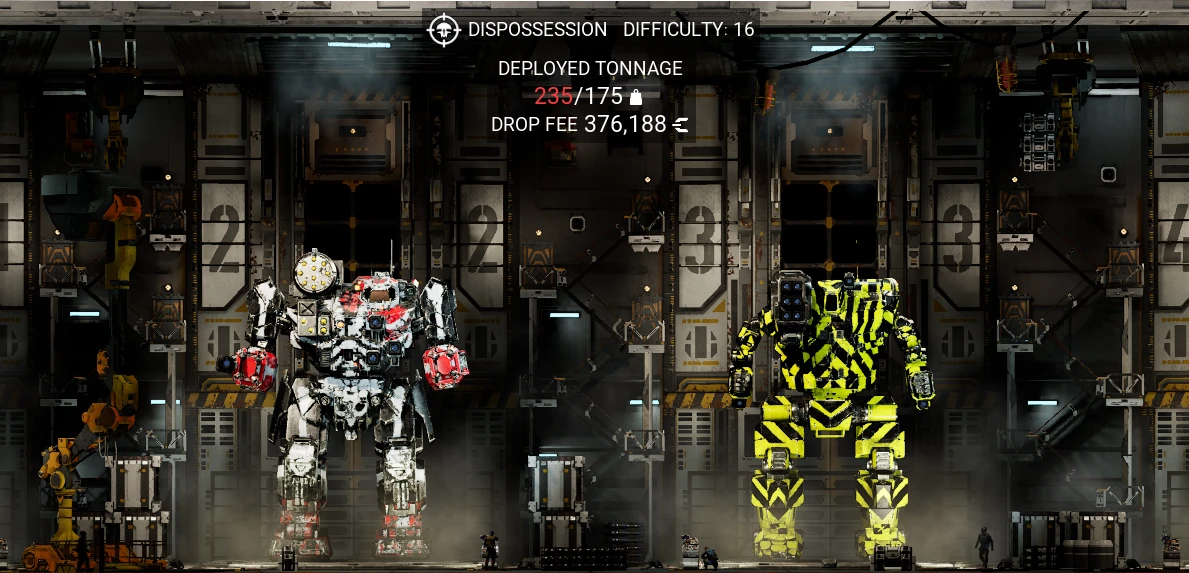
[]Removes tonnage limit for a fee
[
]Option to only add fees for excess tonnage[]Base fee rate affected by the current employer's faction standing (worse standings mean higher rates)
[]Going over the tonnage limit will incur an exponential extra cost per ton
[]Works with generated and campaign missions
Download Mod Options to configure options in-game
Options stored in :
%LocalAppData%\MW5Mercs\Saved\Config\WindowsNoEditor\Game.ini
For users not using ModOptions or having other issues
ExcessDropFeeOnly=False
ExcessOnlyBaseFee=42500 ;0-250000, Adds flat fee when using excess only and going over limit
DropFeeRate=750 ;0-10000
FactionAdjustment=50 ;0-1000
ExponentialRate=1. 125 ;1. 0-2. 0
For those that want to fiddle with values for their own balancing, here's the general equation:
Adjusted Fee Rate (AFR) = (DropFeeRate - FactionAdjustment EmployerPoints)
Drop Fee = (AFR CurrentTonsUpToLimit) + (AFR ExcessTons)^ExponentialRate
Ex: (750 fee rate - 50 faction adjustment 3 standing) = 600 cbills per ton
(600 200 ton limit) + (600 20 excess tons )^ 1. 125 ~= 158,822 drop fee
Default values are set to encourage only going 5-50 tons over limit without taking too much away from mission reward.
Notes:
On first install you need to travel to a different system to regenerate scenarios and remove tonnage limits.
Drop Fees replaces the Overtonnage Penalty system in Battletech with a custom C-Bill only fee, applying to all generated and story missions. It includes an option to only charge fees for exceeding tonnage. This mod is for players who prefer a simpler, credit-based penalty over the default system.
✨ Key Features
📊 Pros & Cons
✅ Pros
- Community-trusted with 461 endorsements and over 8,700 downloads.
- Simplifies the overtonnage penalty to a straightforward C-Bill cost.
- Includes a toggle for only charging when you exceed tonnage, giving you control.
⚠️ Cons
- Marked as deprecated, so it may not be updated for future game patches.
- Last updated in June 2022, so compatibility with the latest version is uncertain.
For Battletech players who find the default Overtonnage Penalty too punishing or complex and want a simpler credit-based fee. Also for those who want to customize when fees apply. Skip if you're fine with the vanilla system or want more gameplay changes beyond this tweak.
💡 Beginner Tips
- Since this mod is deprecated, check the game version you're running and test it in a quick mission to ensure it works.
- If you use a mod manager, install it through that to keep track of load order and avoid conflicts.
- The option to only charge for over tonnage is useful if you want to ignore fees when you're under the limit.
📊 Mod Details
- Game
- Mechwarrior5mercenaries Mods
- Author
- Bobbert
- Version
- 1.2.2
- Downloads
- 8,709
- Endorsements
- 461
- Category
- Gameplay
- Created
- 8/3/2021
- Updated
- 6/13/2022
🔧 How to Install MechWarrior 5: Mercenarie Mods
Download from Nexus Mods.
📖 Full step-by-step install guide for MechWarrior 5: Mercenarie →
Visit the official mod page for specific installation instructions for this mod.
🎮 Need cheat codes or console commands? Check ur gaming wiki for MechWarrior 5: Mercenarie commands, item IDs, and more.
Keep browsing — more MechWarrior 5: Mercenarie mods await