Classic Mechwarrior HUD Layouts - CUSTOM COLORS BETA
⚪ Last updated 2020Preview
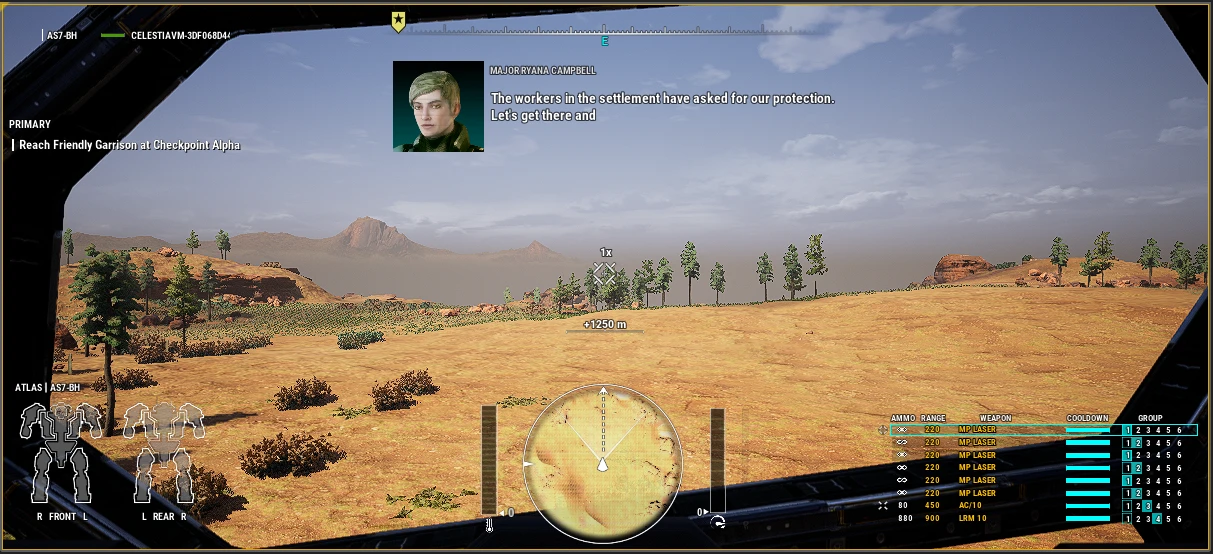
🔍 Analysis
- 👍 4.5% endorsement rate — high engagement, a strong quality signal
- 🏆 #25 of 107 User Interface mods in this game by downloads
📋 About This Mod
Hud re-arrangement to look closer to Mechwarrior Online and previous titles.
STABLE RELEASE NOTES BELOW ALPHA UPDATE:
THERE IS A BETA VERSION!
SOME THINGS MAY BE BROKEN BUT MOST SHOULD NOT BE
CONFIG FOLDER GOES IN THE SAME FOLDERS AS BINARIES AND CONTENT IN MechWarrior5 INSTALL FOLDER
CustomHud.config filepath=
MW5Mercs>Mw5Mercs>Config>CustomHud.config
THE DEFAULT CONFIG IS NOT PRESET TO A SPECIFIC COLOR PROFILE, MOST THINGS ARE PINK!
TO CHANGE COLORS - Open config file and change RGBA values at will. Restarting missions will apply changes, no need to close the game entirely.
JUST NOTE CONFIG FILE NOTES ABOUT COLORS WHEN CHANGING THEM
PLEASE LEAVE FEEDBACK IN THE FORUM POST ON THIS MOD.
STABLE RELEASES:
V1. 8 Green Edition AND NOW AMBER EDITION!
MORE IMPROVEMENTS
Square Mini Map (thank you Kingmoo)
Background boxes for Mini Map and Weapon Loadout
Color improvements for hit feedback and icons
Crosshair colors reflecting target (enemy red, friendly blue)
Targeting Colors reflecting target (enemy red, friendly green)
Green Override
LRM lock turns red when locked
Other misc color improvements.
Version 1. 6 GREEN EDITION
Do you want your HUD to look straight out of 2002? THIS IS FOR YOU! Don't Delay, download today!
Features include: Classic aesthetic, GREEN!
VERSION 1. 5 MWO Layout Only currently
Used Navid_A1's paper doll fix so left arm is left in bottom left box
Animated heat critical notification
Enlarged heat critical notification box
Changed notification to display at 75% heat (down from 80%)
Made torso twist indicator larger
Added compass numbers
VERSION 1. 0
*Paperdoll has not been flipped. If anyone has info on doing that, hit me up.
PLACE FILE:
Game directory, MW5Mercs/MW5Mercs/Content/Paks
PLEASE NOTE:
The name of this file is MW5Mercs-WindowsNoEditor42.pak
If you have another mod using this same name it will not function.
I suggest keeping a text document with your mods and ensure that no two filenames overlap.
This UI mod rearranges the HUD in MechWarrior 5 to resemble MechWarrior Online and earlier MechWarrior titles. With 217 endorsements and nearly 5,000 downloads, it's a niche but appreciated cosmetic overhaul for fans of the classic aesthetic.
✨ Key Features
📊 Pros & Cons
✅ Pros
- Community-approved with 217 endorsements and nearly 5,000 downloads.
- Brings a nostalgic HUD layout for veterans of MechWarrior Online and older games.
- Custom color options let you tweak the look to your preference.
⚠️ Cons
- Last updated in February 2020 — may not be compatible with the latest game patches.
- Beta status means potential bugs or incomplete features.
For MechWarrior 5 players who miss the classic HUD layouts from MechWarrior Online or earlier titles and want a more familiar interface. Skip if you're happy with the default HUD or prefer modern UI overhauls.
💡 Beginner Tips
- Since it's a UI mod, make sure to back up your original HUD files before replacing them.
- Check the mod's comments section for any reported issues with the current game version.
- If you use other UI mods, test for conflicts by enabling only this one first.
📊 Mod Details
- Game
- Mechwarrior5mercenaries Mods
- Author
- Bloodshed Romance
- Version
- Beta2
- Downloads
- 4,811
- Endorsements
- 217
- Category
- User Interface
- Created
- 1/18/2020
- Updated
- 2/16/2020
🔧 How to Install MechWarrior 5: Mercenarie Mods
Download from Nexus Mods.
📖 Full step-by-step install guide for MechWarrior 5: Mercenarie →
Visit the official mod page for specific installation instructions for this mod.
🎮 Need cheat codes or console commands? Check ur gaming wiki for MechWarrior 5: Mercenarie commands, item IDs, and more.
Keep browsing — more MechWarrior 5: Mercenarie mods await