BattleGrid - Alphanumerical grid
⚪ Last updated 2022Preview
🔍 Analysis
- 👍 3.0% endorsement rate — high engagement, a strong quality signal
- 🏆 #29 of 107 User Interface mods in this game by downloads
📋 About This Mod
UPDATE: I've decided to stop all my mod projects on MW5, so don't expect any kind of further updates for this mod.
If you're looking for a way to report issues, you don't need to.
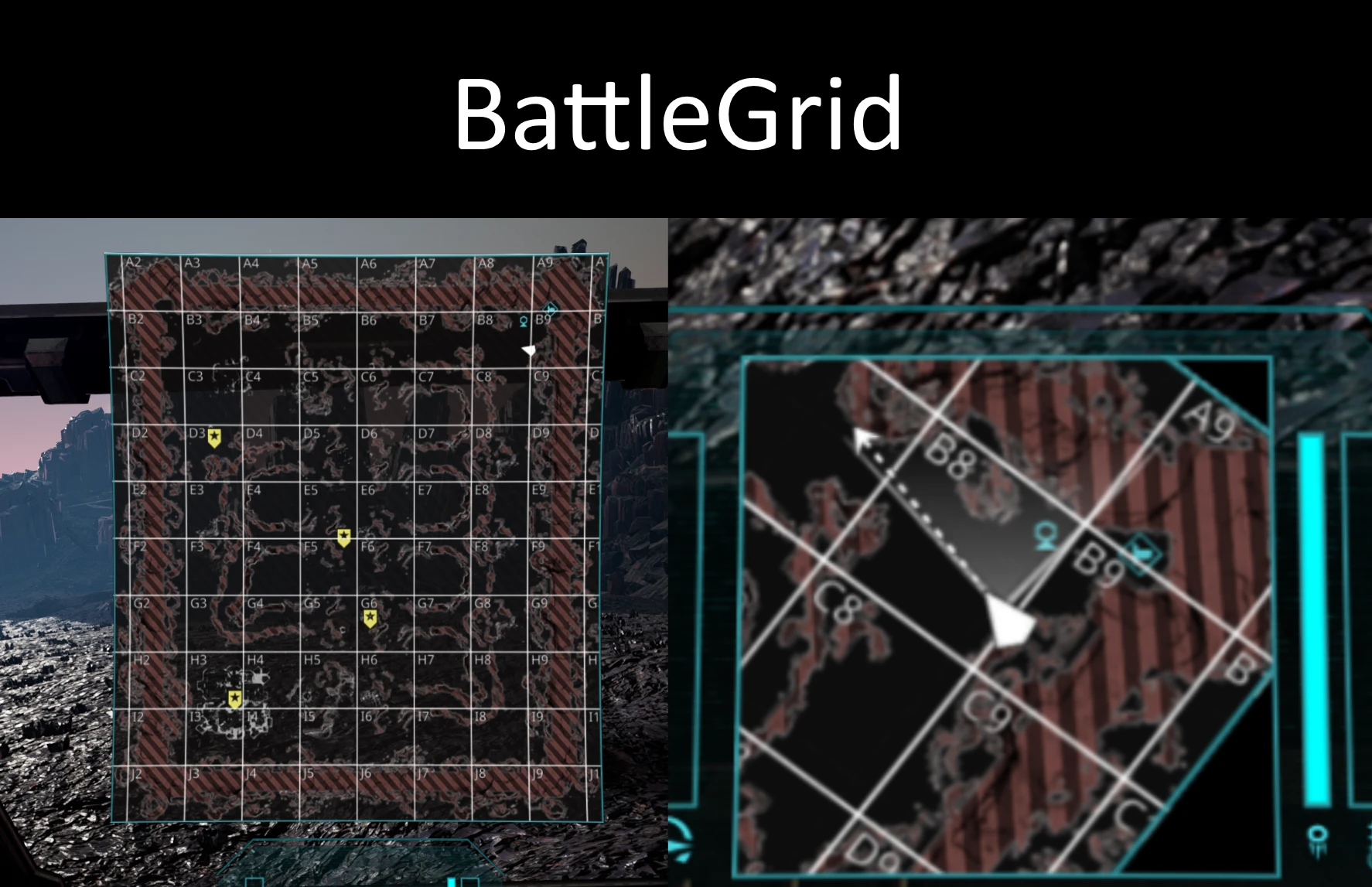
A grid that splits the battlezone, on both the main grid and the minimap, in an actual grid.
The numbers are placed in the top left corner of each square and don't rotate (it's not a bug, it's a feature) so you have a reference to narrow down the position of an object in the square by a "keypad" (e.g. "target in D6, keypad 7" - it means the target is on the north right corner of the square - see the attached image)
This mod should be compatible with Merctech, YAML and even any other UI-related mod, as seems like I'm the only one who was crazy enough to mess with this stuff. It's 100% compatible with my LL Torso Orientation Meter mod
Update 1. 1 adds the color picker in the settings menu, so you can change the color of the grid. Because of this, the mod requires the MW5 Mod Compatibility Pack.
The available settings are:
- "BattleGrid custom color": allows you to pick a color of your choice for the grid.
- "Use custom color for the grid": applies the picked color to the grid. If unticked, the stock MW5 aqua-ish HUD color is applied, regardless of the chosen custom color.
BattleGrid adds an alphanumerical grid overlay to the battlezone and minimap, helping players coordinate positions. It's a lightweight UI mod with 109 endorsements, last updated in April 2022. For players who want clearer battlefield awareness without changing gameplay.
✨ Key Features
📊 Pros & Cons
✅ Pros
- Simple, focused mod that does exactly what it says
- Community-tested with 109 endorsements and 3,584 downloads
- Great for coordinating with teammates in multiplayer
⚠️ Cons
- Last updated in April 2022 — may not work with the latest game version
- No detailed instructions or screenshots provided by the author
- Only adds a grid overlay; no other UI improvements
For players who want better spatial awareness in battles, especially those who play with a team and need to call out positions. Skip if you're looking for a full UI overhaul or gameplay changes.
💡 Beginner Tips
- Check if your game version is compatible with the mod's last update (April 2022) before installing.
- If you use a mod manager, install through it to keep track of updates and conflicts.
- Test the grid in a solo match first to see if it suits your playstyle.
📊 Mod Details
- Game
- Mechwarrior5mercenaries Mods
- Author
- Star_Wraith
- Version
- 1.1.3
- Downloads
- 3,584
- Endorsements
- 109
- Category
- User Interface
- Created
- 3/24/2022
- Updated
- 4/12/2022
🔧 How to Install MechWarrior 5: Mercenarie Mods
Download from Nexus Mods.
📖 Full step-by-step install guide for MechWarrior 5: Mercenarie →
Visit the official mod page for specific installation instructions for this mod.
🎮 Need cheat codes or console commands? Check ur gaming wiki for MechWarrior 5: Mercenarie commands, item IDs, and more.
Keep browsing — more MechWarrior 5: Mercenarie mods await