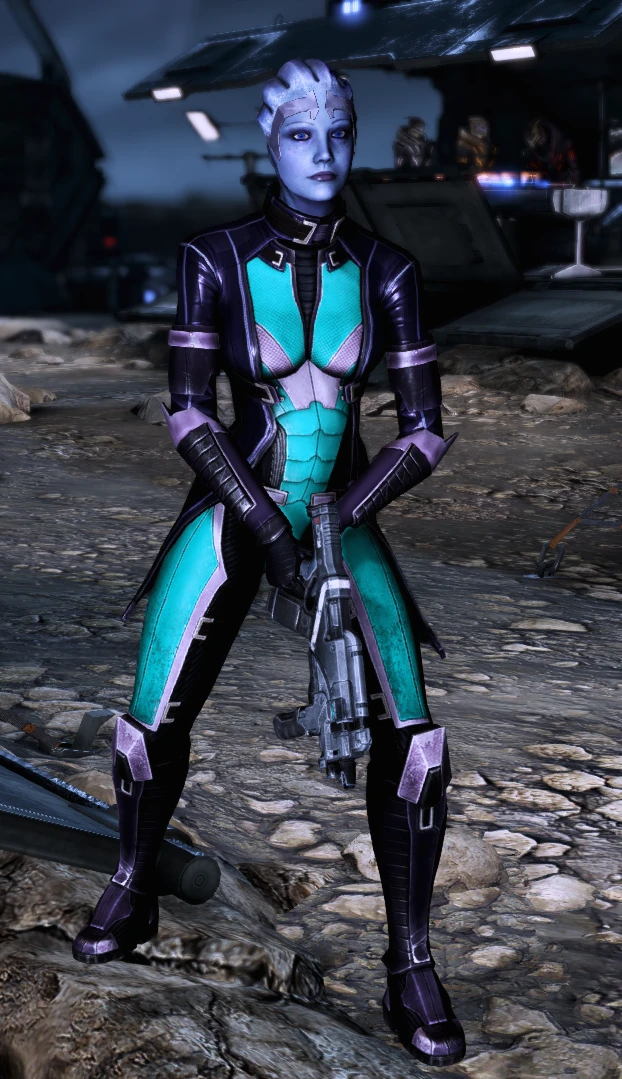
UPDATE Teal Liara Armor
⚪ Last updated 2021Preview
🔍 Analysis
- 👍 5.6% endorsement rate — high engagement, a strong quality signal
- 🏆 #480 of 666 Apparel mods in this game by downloads
📋 About This Mod
Changed the pepto bismol pink armor into a teal shade.
Possible future improvements include:
-More pictures! My current playthrough is on the second to last mission, so not many opportunities for glamor shots. Please feel free to submit your own as well!
-Attempting to make the armor less shiny. UPDATE: This is now a WIP! I'm looking at how the lights reflect off the leather coat and am debating if I am satisfied with it or not.
-UPDATE: Squad selection screen now displays teal armor as well to match.
How to install:
MEM v503 is required! Please download MEM here.
-
[]Download TealLiara.mem from the Main Files section
[
]Open the .zip archive and place the main folder somewhere[]Launch Mass Effect Modder.
[]Select "Mods Installer" under the Mass Effect 3 banner then "Add to list"
[]Navigate to the unzipped folder and select the .mem file
[]Select "Install all mods" or click the mod name and select "Install selected mods"
!!!! PLEASE READ THIS !!!!!
If you are downloading content mods (aka mods that use ME3Tweaks Mod Manager) and texture mods (such as this one, and other files that use the file extension .mem for Mass Effect Modder), YOU MUST DOWNLOAD CONTENT MODS FIRST THEN TEXTURE MODS. Once you have installed texture mods, and wish to go download content mods in the future, ME3TMM & MEM will have issues.
I HIGHLY recommend creating a vanilla (unmodded) game backup in ME3TMM by using the Backup & Restore feature. From there, add your content mods, then texture mods. Rinse and repeat when you come across a new content mod that you want to install.
A simple cosmetic mod that recolors Liara's default armor from pink to teal. With 38 endorsements and 682 downloads, it's a niche pick for Mass Effect players who prefer a cooler color scheme. Last updated in June 2021, so it may not be compatible with the latest game patches.
✨ Key Features
📊 Pros & Cons
✅ Pros
- Quick and easy visual tweak for Liara fans who hate the pink
- Small but active niche (38 endorsements, 682 downloads)
- No extra dependencies or complex setup
⚠️ Cons
- Only changes the color—no texture improvements or new variants
- Last updated in 2021—may not work with the latest game version
- Limited appeal if you don't play as Liara or use her default armor
For Mass Effect players who want a subtle color change for Liara's armor without altering the game's balance. If you're a completionist collecting cosmetic mods, this is a quick grab. Skip if you're looking for more substantial armor overhauls or gameplay tweaks.
💡 Beginner Tips
- Make sure to back up your original game files before replacing anything, just in case you want to revert.
- If you're using a mod manager, let it handle the file placement to avoid conflicts with other mods.
- Check the mod's comments section for any user-reported compatibility issues with your game version.
📊 Mod Details
- Game
- Mass Effect Mods
- Author
- esh1996
- Version
- 2.0
- Downloads
- 682
- Endorsements
- 38
- Category
- Apparel
- Created
- 6/20/2021
- Updated
- 6/28/2021
🔧 How to Install Mass Effect Mods
Download from Nexus.
📖 Full step-by-step install guide for Mass Effect →
Visit the official mod page for specific installation instructions for this mod.
🎮 Need cheat codes or console commands? Check ur gaming wiki for Mass Effect commands, item IDs, and more.
Keep browsing — more Mass Effect mods await