ME3 Dof Vignette and Bluewash Remover And ME1 2 And 3 Vignette Removing Guide
⚪ Last updated 2021Preview
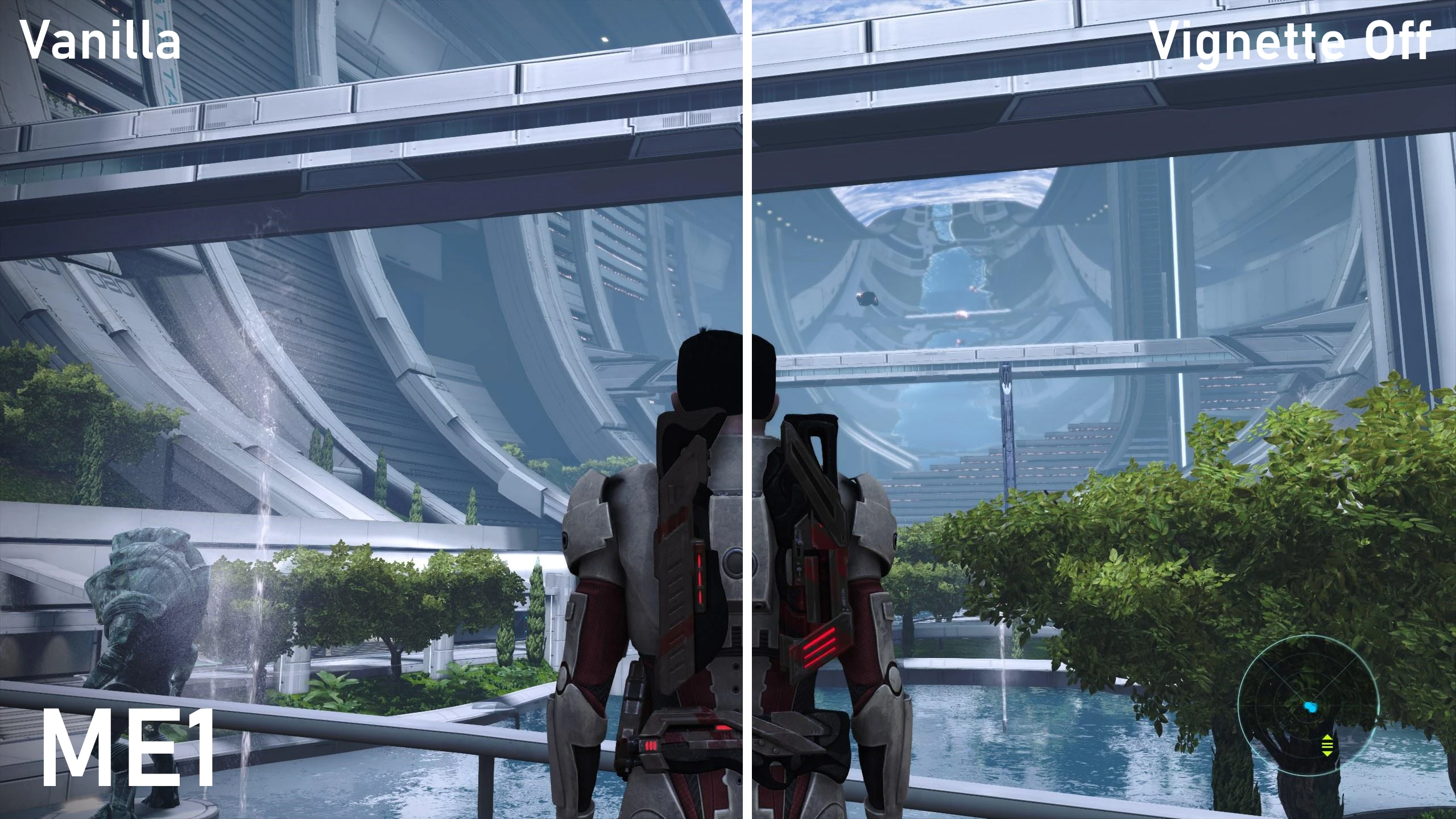
🔍 Analysis
- 👍 2.0% endorsement rate — high engagement, a strong quality signal
- 🏆 #40 of 284 User Interface mods in this game by downloads
📋 About This Mod
There is now a less intensive mod solution to this issue: Vignette Remover by Mgamerz
Use that probably rather than this(i will be), but this will stay up for the purpose of google friendly searching and research.
Description
I hate Vignette (The dark corners of your screen in games) and other post-processing effects developers seem to think make things look more "cinimatic". So this is my personally modified GamerSettings.ini (found in Game>ME3>Biogame>Config) file that removes those.
After some minor research and a test to confirm, I found out that the way these things were turned off in orignal ME3 was by disabling Depth Of Feild in the settings file. Since I knew that ME3 and ME3:LE are on the same engine, I figured it must still work. And it does.
So I added DepthOfField=False to the section, which disables some post-processing.
To be clear:
It is my recommendation that you edit your own file, as some other settings may do things I don't understand and impact performance. My rig is strong, so default settings for it may not be good for your rig.
How to modify your own settings file (Recommended)
-
[]Go to Mass Effect Legendary Edition>Game>ME3>BioGame>Config
[
]Select GamerSettings.ini[]Right-click and select Open With...
[]Click More Options, and select notepad
[]Go to the section
[]add the line DepthOfField=False
[]Save the file (make sure it's saved as GamerSettings.ini)
[]Open ME3 and enjoy
Installation (Using my settings file to replace yours)
To install this file, simply drop it into Mass Effect Legendary Edition>Game>ME3>BioGame>Config and click yes to overwrite.
Be Aware, this is where some of your configuration choices are stored, so it will set some of your settings to mine. However, the only setting changes I have made are removing Film Grain and Motion Blur.
Removing Vignette In ME1, ME2, & ME3
Download and install one of the console enablers.
I use: In-game console by d00telemental
(This has since been removed, but the mod removed page details how to enable console nowdays, so you should click there still.)
Then run the console command "Show Vignette".
Yes, it's that easy.
This mod edits the GamerSettings file in Mass Effect 3 to disable Depth of Field, removing vignette and other post-processing effects. It also includes a guide for removing vignette in all three Mass Effect games. With 77 endorsements and 3,769 downloads, it's a niche but useful tool for players who want a cleaner visual presentation.
✨ Key Features
📊 Pros & Cons
✅ Pros
- Simple and effective: one-line edit to disable unwanted post-processing.
- Covers all three games with the vignette removal guide.
- Decent community trust: 77 endorsements and 3,769 downloads.
⚠️ Cons
- Only affects ME3 directly; ME1 and ME2 require manual steps from the guide.
- Last updated in 2021, so may not be tested with the latest game patches or Legendary Edition.
- No screenshots or detailed before/after comparisons provided.
For Mass Effect players who find the vignette and depth of field effects distracting or want a cleaner image. Skip if you're fine with the default post-processing or play the Legendary Edition, as this mod targets the original trilogy.
💡 Beginner Tips
- Back up your GamerSettings.ini before editing, so you can revert if needed.
- For ME1 and ME2, follow the guide carefully—the file paths differ from ME3.
- If you're on the Legendary Edition, this mod won't work; look for a separate mod.
📊 Mod Details
- Game
- Mass Effect Mods
- Author
- ShepShep
- Version
- 1.0
- Downloads
- 3,769
- Endorsements
- 77
- Category
- User Interface
- Created
- 6/7/2021
- Updated
- 6/7/2021
🔧 How to Install Mass Effect Mods
Download from Nexus.
📖 Full step-by-step install guide for Mass Effect →
Visit the official mod page for specific installation instructions for this mod.
🎮 Need cheat codes or console commands? Check ur gaming wiki for Mass Effect commands, item IDs, and more.
Keep browsing — more Mass Effect mods await